---
url: /docs/web/installation/ai-development
title: AI-assisted development
description: Configure AI coding assistants like Cursor, Claude Code, Codex, or Antigravity to build your SaaS faster.
---
TurboStarter includes pre-configured rules, skills, subagents, and commands for AI coding assistants. These help AI understand your codebase, follow project conventions, and produce consistent, high-quality code.
Everything works out-of-the-box with all major AI tools like [Cursor](https://cursor.com), [Claude Code](https://claude.ai/code), [Codex](https://openai.com/codex), [Antigravity](https://antigravity.dev), and many more. Just open the project in your AI tool and start coding with the help of LLMs.
## Structure
The codebase organizes AI-specific configuration in the following structure:
The `.agents/` directory contains shared skills, commands, and agents that ship with TurboStarter. The tool-specific folders (e.g., `.cursor/`, `.claude/`, `.github/`) are [symlinked](https://en.wikipedia.org/wiki/Symbolic_link) to the `.agents/` directory, allowing you to add your own skills, commands, and agents to all tools at once while also customizing them individually.
## Rules
Rules provide persistent instructions that LLMs can read when they need to know more about specific parts of your project. They define code conventions, project structure, and workflow guidelines.
### AGENTS.md
The `AGENTS.md` file at the project root is the primary rules file. It uses a standardized format recognized by [most](https://agents.md) AI coding tools.
```md title="AGENTS.md"
## Agent rules
**DO:**
- Read existing files before editing; understand imports and structure first
- Keep diffs minimal and scoped to the request
...
**DON'T:**
- Commit, push, or modify git state unless explicitly asked
- Run destructive commands (`reset --hard`, force-push) without permission
...
## Code conventions
- TypeScript: functional, declarative; no classes
- File layout: exported component → subcomponents → helpers → types
```
Rules should be concise and actionable. Include only information the AI **cannot infer from code alone**, such as:
* Bash commands and common workflows
* Code style rules that differ from defaults
* Architectural decisions specific to your project
* Common gotchas or non-obvious behaviors
Keep rules short. Overly long files cause AI to ignore important instructions. If you notice the AI not following a rule, the file might be too verbose.
### CLAUDE.md
The `CLAUDE.md` file provides compatibility with Claude-specific tools. In TurboStarter, it simply references the main rules file:
```md title="CLAUDE.md"
@AGENTS.md
```
This ensures consistent behavior across all AI tools without duplicating content.
You can also nest AGENTS.md files in subdirectories to create more granular rules for specific parts of your project.
For example, you can create an `AGENTS.md` file in the `apps/web/` directory to add rules for the web application, or an `AGENTS.md` file in the `packages/api/` directory to add specific rules for the API.
The right approach depends on your project's complexity and where you need more targeted AI assistance.
Most providers allow you to add tool-specific rules. For example, Cursor rules go in the `.cursor/` directory, while Claude rules go in the `.claude/` directory.
If you primarily use one AI tool in your workflow, consider creating tool-specific rules rather than relying solely on the shared `AGENTS.md` file.
## Skills
Skills are modular capabilities that extend AI functionality with domain-specific knowledge. They package instructions, workflows, and reference materials that AI loads on-demand when relevant.
### How skills work
Skills are organized as directories containing a `SKILL.md` file and optionally a `references/` directory with additional documentation:
Each skill includes YAML frontmatter that describes when to use it:
```md title="SKILL.md"
---
name: better-auth-best-practices
description: Skill for integrating Better Auth - the comprehensive TypeScript authentication framework.
---
# Better Auth Integration Guide
**Always consult [better-auth.com/docs](https://better-auth.com/docs) for code examples and latest API.**
...
```
AI tools read the `description` field to determine when to apply the skill automatically. When triggered, the full skill content loads into context.
### Included skills
TurboStarter ships with several pre-configured skills covering common development scenarios:
| Skill | Description |
| ----------------------------- | ---------------------------------------------- |
| `better-auth-best-practices` | Auth integration patterns and API reference |
| `building-native-ui` | Mobile UI patterns with Expo and React Native |
| `native-data-fetching` | Network requests, caching, and offline support |
| `vercel-react-best-practices` | React and Next.js performance optimization |
| `vercel-composition-patterns` | Component architecture and API design |
| `web-design-guidelines` | UI review and accessibility compliance |
| `find-skills` | Discover and install additional skills |
### Installing skills
To install additional skills, we recommend using [Skills CLI](https://skills.sh), which allows you to easily install skills from the [open skills ecosystem](https://skills.sh). To install a skill, run:
```bash
npx skills add
```
Browse available skills at [skills.sh](https://skills.sh).
### Creating custom skills
If you have project-specific workflows, you can create your own skills:
Create a directory in `.agents/skills/`:
```bash
mkdir -p .agents/skills/my-custom-skill
```
Add a `SKILL.md` file with frontmatter:
```md title=".agents/skills/my-custom-skill/SKILL.md"
---
name: my-custom-skill
description: Handles X workflow. Use when working with Y or when user asks about Z.
---
# My Custom Skill
## Instructions
1. First, check the existing patterns in `packages/api/`
2. Follow the established naming conventions
3. ...
```
The skill will be automatically available in your AI tool. Test by asking about the topic described in the `description` field.
## Subagents
Subagents are specialized AI assistants that handle specific types of tasks in isolation. They operate in their own context window, preventing long research or review tasks from cluttering your main conversation.
### Included subagents
TurboStarter includes a code reviewer subagent:
```md title=".agents/agents/code-reviewer.md"
---
name: code-reviewer
description: Reviews code for quality, conventions, and potential issues.
model: inherit
readonly: true
---
You are a senior code reviewer for the TurboStarter project...
```
The subagent runs in read-only mode and checks for:
* TypeScript best practices (no `any`, explicit types)
* Component conventions (named exports, props interface)
* Architecture patterns (shared logic in packages)
* Security issues (no hardcoded secrets, proper auth)
### Using subagents
Invoke subagents explicitly in your prompts:
```txt
Use the code-reviewer to review the changes in src/modules/auth/
```
Or let the AI delegate automatically based on the task.
### Creating custom subagents
Add subagent definitions to `.agents/agents/`:
```md title=".agents/agents/security-auditor.md"
---
name: security-auditor
description: Security specialist. Use when implementing auth, payments, or handling sensitive data.
model: inherit
readonly: true
---
You are a security expert auditing code for vulnerabilities.
When invoked:
1. Identify security-sensitive code paths
2. Check for common vulnerabilities (injection, XSS, auth bypass)
3. Verify secrets are not hardcoded
4. Review input validation and sanitization
Report findings by severity: Critical, High, Medium, Low.
```
## Commands
Commands are reusable workflows triggered with a `/` prefix in chat. They standardize common tasks and encode institutional knowledge.
### Included commands
TurboStarter includes a feature setup command:
```md title=".agents/commands/setup-new-feature.md"
# Setup New Feature
Set up a new feature in the TurboStarter.dev website following project conventions.
## Before starting
1. **Clarify scope**: What part of the site needs this feature?
2. **Check existing code**: Look in `packages/*` for reusable logic
3. **Identify shared vs app-specific**: Shared logic goes in `packages/*`
## Project structure
...
```
### Using commands
Type `/` in chat to see available commands:
```txt
/setup-new-feature
```
Follow the guided workflow to scaffold features consistently.
### Creating custom commands
Add command definitions to `.agents/commands/`:
```md title=".agents/commands/fix-issue.md"
# Fix GitHub Issue
Fix a GitHub issue following project conventions.
## Steps
1. Use `gh issue view ` to get issue details
2. Search the codebase for relevant files
3. Implement the fix following existing patterns
4. Write tests to verify the fix
5. Run `pnpm typecheck` and `pnpm lint`
6. Create a descriptive commit message
7. Push and create a PR
```
## Model Context Protocol (MCP)
MCP enables AI tools to connect to external services like databases, APIs, and third-party tools. This allows AI to access real data and perform actions beyond code generation.
### Common MCP integrations
| Service | Use case |
| ---------------------------------------------------------------------------------------------- | -------------------------------------- |
| [GitHub](https://github.com/github/github-mcp-server) | Create issues, open PRs, read comments |
| [Database](https://github.com/crystaldba/postgres-mcp) | Query schemas, inspect data |
| [Figma](https://help.figma.com/hc/en-us/articles/32132100833559-Guide-to-the-Figma-MCP-server) | Import designs for implementation |
| [Linear](https://linear.app/docs/mcp)/[Jira](https://github.com/sooperset/mcp-atlassian) | Read tickets, update status |
| [Browser](https://browsermcp.io/) | Test UI, take screenshots |
For a full list of available MCP servers, see the [Cursor documentation](https://cursor.com/docs/context/mcp/directory) or the [MCP directory](https://www.pulsemcp.com/servers/).
### Setting up MCP
MCP configuration varies by tool. Generally, you create a configuration file that specifies server connections:
```json title="mcp.json"
{
"mcpServers": {
"github": {
"command": "npx",
"args": ["-y", "@modelcontextprotocol/server-github"],
"env": {
"GITHUB_TOKEN": "${env:GITHUB_TOKEN}"
}
}
}
}
```
Consult your AI tool's documentation for specific setup instructions.
## Documentation
Like the rest of TurboStarter, the documentation is optimized for AI-assisted workflows. You can chat with it and get answers about specific features using the **most up-to-date** information.
### `llms.txt`
You can access the entire TurboStarter documentation in Markdown format at [/llms.txt](/llms.txt). This allows you to ask any LLM (assuming it has a large enough context window) questions about TurboStarter using the most up-to-date documentation.
#### Example usage
For example, to prompt an LLM with questions about TurboStarter:
1. Copy the documentation contents from [/llms.txt](/llms.txt)
2. Use the following prompt format:
```txt
Documentation:
{paste documentation here}
---
Based on the above documentation, answer the following:
{your question}
```
This works with any AI tool that accepts large context, regardless of whether it has native integration with your editor.
### Markdown format
Each documentation page is also available in raw Markdown format. You can copy the contents using the *Copy Markdown* button in the page header.
You can also access it directly by visiting the `/llms.mdx` route with the page slug. For example, to access this page, visit [/llms.mdx/web/installation/ai-development](/llms.mdx/web/installation/ai-development).
### Open in ...
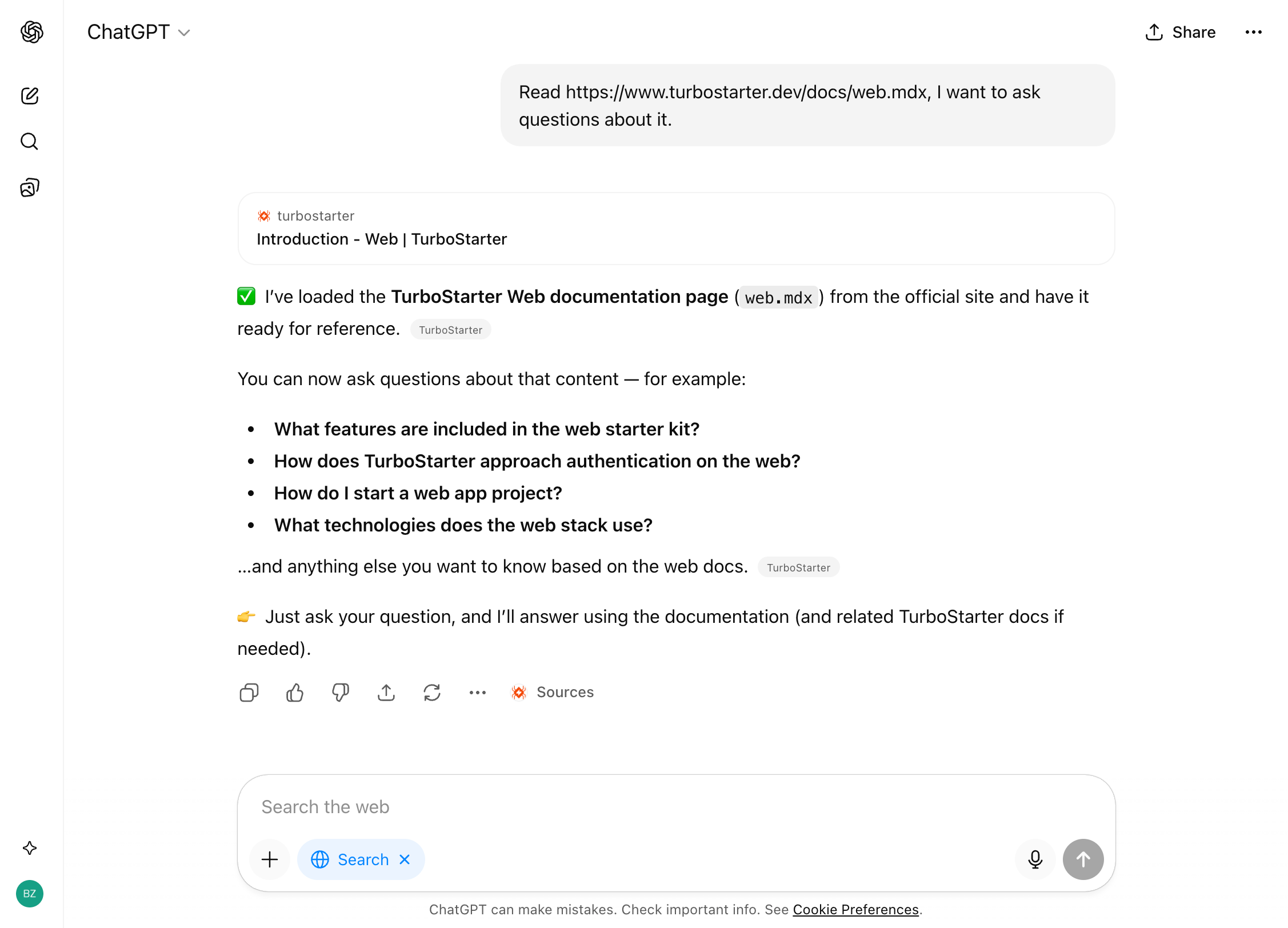
To make chatting with TurboStarter documentation even more convenient, each page includes an *Open in...* button in the header that opens the documentation directly in your preferred chatbot.
For example, opening the documentation page in [ChatGPT](https://chatgpt.com) will create a new chat with the documentation automatically attached as a context:
## Best practices
Following best practices helps you get the most out of AI-assisted development. Review the tips below and share your experiences on our [Discord](https://discord.gg/KjpK2uk3JP) server.
### Plan before coding
The most impactful change you can make is planning before implementation. Planning forces clear thinking about what you're building and gives the AI concrete goals to work toward.
For complex tasks, use this workflow:
1. **Explore**: Have the AI read files and understand the existing architecture
2. **Plan**: Ask for a detailed implementation plan with file paths and code references
3. **Implement**: Execute the plan, verifying against each step
4. **Commit**: Review changes and commit with descriptive messages
Not every task needs a detailed plan. For quick changes or familiar patterns, jumping straight to implementation is fine.
### Provide verification criteria
AI performs dramatically better when it can verify its own work. Include tests, screenshots, or expected outputs:
```txt
// Instead of:
"implement email validation"
// Use:
"write a validateEmail function. test cases: user@example.com → true,
invalid → false, user@.com → false. run tests after implementing."
```
Without clear success criteria, the AI might produce something that looks right but doesn't actually work. Verification can be a test suite, a linter, or a command that checks output.
### Write specific prompts
The more precise your instructions, the fewer corrections you'll need. Reference specific files, mention constraints, and point to example patterns:
| Strategy | Before | After |
| ---------------------- | ----------------------- | ------------------------------------------------------------------------------------------------------------------------------------------------- |
| **Scope the task** | "add tests for auth" | "write a test for `auth.ts` covering the logout edge case, using patterns in `__tests__/` and avoiding mocks" |
| **Reference patterns** | "add a calendar widget" | "look at how existing widgets are implemented. `HotDogWidget.tsx` is a good example. follow the pattern to implement a calendar widget" |
| **Describe symptoms** | "fix the login bug" | "users report login fails after session timeout. check the auth flow in `src/auth/`, especially token refresh. write a failing test, then fix it" |
### Use absolute rules
When writing rules, be direct. Absolute rules beat suggestions. "Always verify ownership with `userId` before database writes" works. "Consider checking ownership" gets ignored.
Structure rules with clear "MUST do" and "MUST NOT do" sections:
```md
## MUST DO
- Verify ownership before ALL database writes
- Run `pnpm typecheck` after every implementation
- Use `@workspace/ui` components - never install shadcn directly
## MUST NOT DO
- Never use `any` type - fix the types instead
- Never store secrets in code - use environment variables
- Never create new UI components if one exists in @workspace/ui
```
### Use rules as a router
Tell AI where and how to find things. This prevents hallucinated file paths and inconsistent patterns:
```md
## Where to find things
- Database schemas: `packages/db/src/schema/`
- Server action patterns: `apps/web/app/api/`
- UI components: `packages/ui/src/`
- Existing features to reference: `apps/web/app/`
```
### Course-correct early
Stop AI mid-action if it goes off track. Most tools support an interrupt key (usually `Esc`). Redirect early rather than waiting for a complete but wrong implementation.
If you've corrected the AI more than twice on the same issue in one session, the context is cluttered with failed approaches. Start fresh with a more specific prompt that incorporates what you learned.
### Manage context aggressively
Long sessions accumulate irrelevant context that degrades AI performance. Clear context between unrelated tasks or start fresh sessions for new features.
**Start a new conversation when:**
* You're moving to a different task or feature
* The AI seems confused or keeps making the same mistakes
* You've finished one logical unit of work
**Continue the conversation when:**
* You're iterating on the same feature
* The AI needs context from earlier in the discussion
* You're debugging something it just built
### Use subagents for research
When exploring unfamiliar code, delegate to subagents. They run in separate context windows and report back summaries, keeping your main conversation clean for implementation.
This is especially useful for:
* Codebase exploration that might read many files
* Code review (fresh context prevents bias toward code just written)
* Security audits and performance analysis
### Review AI-generated code carefully
AI-generated code can look right while being subtly wrong. Read the diffs and review carefully. The faster the AI works, the more important your review process becomes.
For significant changes, consider:
* Running a dedicated review pass after implementation
* Asking the AI to generate architecture diagrams
* Using a separate AI session to review the changes (fresh context)
### Add business domain context
Generic rules produce generic code. Add your application's domain to help AI understand context:
```md
## Business Domain
This application is a project management tool for software teams.
### Key Entities
- **Projects**: User-created workspaces containing tasks
- **Tasks**: Work items with status, assignee, and due date
### Business Rules
- Projects belong to organizations (use organizationId for queries)
- Tasks require project membership to view (check via RBAC)
- Deleted projects cascade-delete all tasks
```
## Troubleshooting
Common issues when using AI coding assistants and how to resolve them:
1. Check that `AGENTS.md` exists at the project root
2. Verify the file contains valid Markdown
3. Some tools require reopening the project to reload rules
4. Check if the file is too long—important rules may be getting lost in the noise
5. Try adding emphasis (e.g., "IMPORTANT" or "MUST") to critical instructions
Long sessions cause AI to "forget" rules and earlier instructions. This happens because:
* Context windows fill up with irrelevant information
* Important instructions get pushed out during summarization
* Failed approaches pollute the conversation
**Solutions:**
1. Start fresh sessions for complex or unrelated tasks
2. Re-state important rules when you notice drift
3. After two failed corrections, clear context and write a better initial prompt
1. Verify the skill's `description` field clearly describes when to use it
2. Try invoking the skill explicitly by name (e.g., `/skill-name`)
3. Check that the `SKILL.md` file has valid YAML frontmatter
4. Skills may require explicit invocation for workflows with side effects
1. Ensure subagent files are in the correct directory (`.agents/agents/`)
2. Check the frontmatter for syntax errors
3. Some tools require specific configuration to enable subagents
4. Verify the `name` and `description` fields are properly defined
AI can produce plausible-looking implementations that don't handle edge cases or reference non-existent APIs.
**Prevention:**
1. Always provide verification criteria (tests, expected outputs)
2. Use typed languages and configure linters
3. Point AI to reference implementations rather than documenting APIs
4. Run verification commands after every implementation
**Recovery:**
1. Don't try to fix incorrect code through follow-up prompts repeatedly
2. Revert changes and start fresh with a more specific prompt
3. Use a dedicated review pass to catch issues before committing
When you have multiple `AGENTS.md` files (root and package-level), they can conflict. Generally, the more specific file (closer to the code being edited) takes priority.
**Solutions:**
1. Check which `AGENTS.md` is being read by asking the AI
2. Consolidate conflicting rules into one location
3. Use package-level rules only for domain-specific guidance
Unbounded exploration fills context with irrelevant information.
**Solutions:**
1. Scope investigations narrowly: "search for JWT validation in `src/auth/`" instead of "find auth code"
2. Use subagents for exploration so it doesn't consume your main context
3. Specify file types or directories to limit search scope
Large codebases or long sessions can consume significant resources.
**Solutions:**
1. Use compact/summarize features regularly to reduce context size
2. Close and restart between major tasks
3. Add large build directories (e.g., `node_modules`, `dist`) to `.gitignore`
4. Disable unnecessary extensions that might impact performance
## Learn more
Dive deeper into AI-assisted development with these resources. They cover open standards, tool directories, and specifications that power modern AI coding workflows.