Deploy TurboStarter to Cloudflare Workers - complete guide
Learn how to deploy your TurboStarter Next.js SaaS to Cloudflare Workers with OpenNext, Hyperdrive, R2, Wrangler, and production-ready environment setup.
If you want to deploy TurboStarter to Cloudflare Workers, you do not need to rewrite your Next.js SaaS from scratch. TurboStarter ships a Cloudflare generator that wires OpenNext for Cloudflare, Wrangler, Hyperdrive, and R2 into a production-shaped deployment path.
Short answer: run pnpm turbo gen cloudflare, create Hyperdrive and an R2 cache bucket, configure build-time and runtime environment variables, preview with pnpm --filter web cf:preview, then deploy with pnpm --filter web cf:deploy. Your app runs on Cloudflare Workers close to users worldwide while Postgres stays on your existing provider through Hyperdrive.
This guide walks through the full TurboStarter Cloudflare deployment flow, explains which Cloudflare services matter for a SaaS app, and links to the official docs when you want to go deeper.
Why deploy a Next.js SaaS to Cloudflare Workers?
Cloudflare Workers run your application on Cloudflare's global edge network instead of a single regional Node.js server. For a TurboStarter SaaS, that can mean lower latency for auth flows, dashboards, marketing pages, and API routes — especially if your users are spread across regions.
Compared with a traditional VPS or container host, Cloudflare is attractive when you want:
- Global edge execution via Cloudflare Workers
- Managed database connection pooling via Hyperdrive
- Low-cost object storage via R2 without S3 egress fees
- Incremental cache storage for OpenNext through an R2 binding
- Simple CLI workflows with Wrangler
- Optional add-ons like Turnstile, Queues, and Workers KV as your product grows
TurboStarter still supports Vercel for the easiest Next.js hosting experience and Docker when you want full Node.js runtime control. Cloudflare is the best fit when you want edge deployment without managing servers yourself.
| Hosting option | Best for | Tradeoff |
|---|---|---|
| Vercel | Fastest default Next.js deployment | Less control over edge/database architecture |
| Cloudflare Workers | Global edge + R2 + Hyperdrive | Worker size limits and Workers runtime constraints |
| Docker | Full Node.js control, self-hosting | You manage infrastructure and scaling |
| Railway / Render | Managed containers with Postgres nearby | Not edge-native |
How TurboStarter deploys to Cloudflare
TurboStarter does not use Next.js on Pages as the primary path. It uses OpenNext for Cloudflare to transform the Next.js build output into a Worker-compatible package that runs in the Workers runtime with nodejs_compat enabled.
The default production stack looks like this:
| Layer | Service | Role in TurboStarter |
|---|---|---|
| App runtime | Cloudflare Workers | Runs the transformed Next.js app at the edge |
| Build adapter | OpenNext for Cloudflare | Converts next build output into Worker code |
| CLI | Wrangler | Previews, configures secrets, and deploys the Worker |
| Database access | Hyperdrive | Pools Postgres connections inside Cloudflare's network |
| Incremental cache | R2 | Stores OpenNext incremental cache via NEXT_INC_CACHE_R2_BUCKET |
| App database | Your Postgres provider | Remains your source of truth; Hyperdrive connects Workers to it |
That architecture matters because TurboStarter is a full SaaS app — auth, billing, organizations, admin, feature flags, emails, and storage — not a static marketing site. You need reliable Postgres access, runtime secrets, and a deployment flow that matches production behavior before you go live.
Prerequisites
Before deploying TurboStarter to Cloudflare, make sure you have:
- a Cloudflare account
- a production Postgres database with migrations already applied
- production environment variables ready
- Wrangler authenticated locally with
pnpm --filter web exec wrangler login
Cloudflare Workers also have script size limits. Wrangler prints the compressed upload size during deployment, so check that output if the upload is rejected.
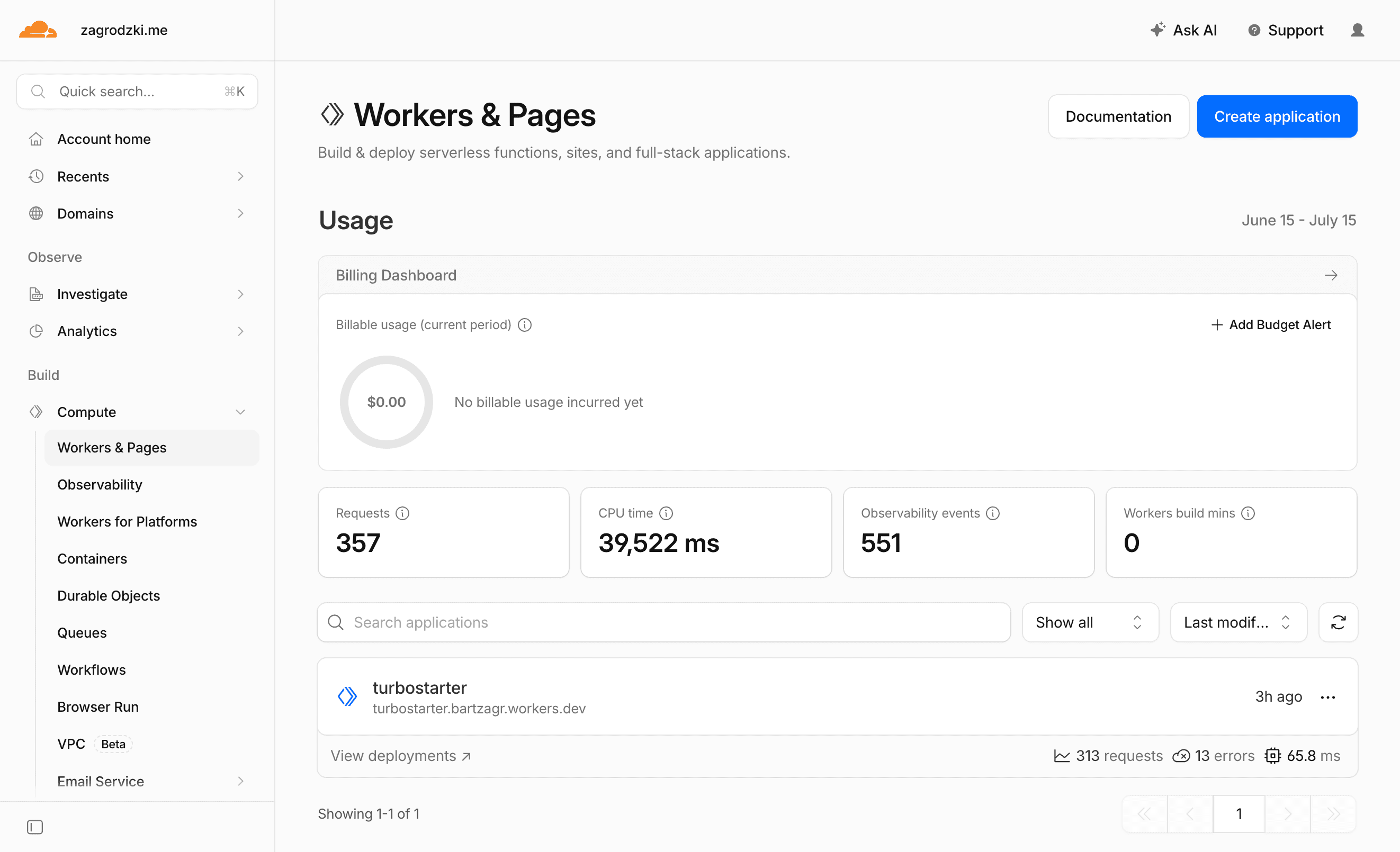
Step 1: Generate the Cloudflare setup
The fastest path is TurboStarter's Cloudflare generator. Run it from the repository root:
pnpm turbo gen cloudflareThe generator asks for:
- Worker name — the Cloudflare Worker name, usually your product slug
- R2 bucket name — the bucket OpenNext uses for incremental cache
- Hyperdrive config id — paste this after you create Hyperdrive in the next step
- Local database URL — used by Wrangler preview
- App URL — used by local Cloudflare preview
- Wrangler compatibility date — keep the default unless you have a reason to pin it
It creates and updates the files needed by the web app:
apps/web/wrangler.jsoncapps/web/open-next.config.tsapps/web/scripts/cf-build.mjsapps/web/.dev.vars.exampleapps/web/next.config.tsapps/web/package.jsonapps/web/middleware.tspackages/db/src/server.tsturbo.json
It also adds scripts like cf:build, cf:preview, cf:deploy, cf:upload, and cf:typegen to the web package.
Prefer doing it manually?
You can add the same files yourself. Use the generated setup as the source of truth: wrangler.jsonc points to .open-next/worker.js, enables nodejs_compat, binds ASSETS, IMAGES, NEXT_INC_CACHE_R2_BUCKET, and HYPERDRIVE, while open-next.config.ts enables the R2 incremental cache override.
For the full reference, see the Cloudflare deployment docs.
Step 2: Create Hyperdrive for Postgres
Cloudflare Workers run globally, while most Postgres databases live in one region. Without connection pooling, serverless-style deployments can exhaust database connections quickly — especially in a SaaS app with auth sessions, billing webhooks, and dashboard queries.
Hyperdrive solves that by keeping pooled connections inside Cloudflare's network and exposing a Worker binding called HYPERDRIVE.
Create a Hyperdrive configuration with your production database URL:
pnpm --filter web exec wrangler hyperdrive create <name> --connection-string="$DATABASE_URL"Copy the returned id into apps/web/wrangler.jsonc:
{
  "hyperdrive": [
    {
      "binding": "HYPERDRIVE",
      "id": "<your-hyperdrive-id>",
      "localConnectionString": "postgresql://turbostarter:turbostarter@localhost:5432/core"
    }
  ]
}
Keep localConnectionString pointed at your local database. Wrangler uses it when you run cf:preview.
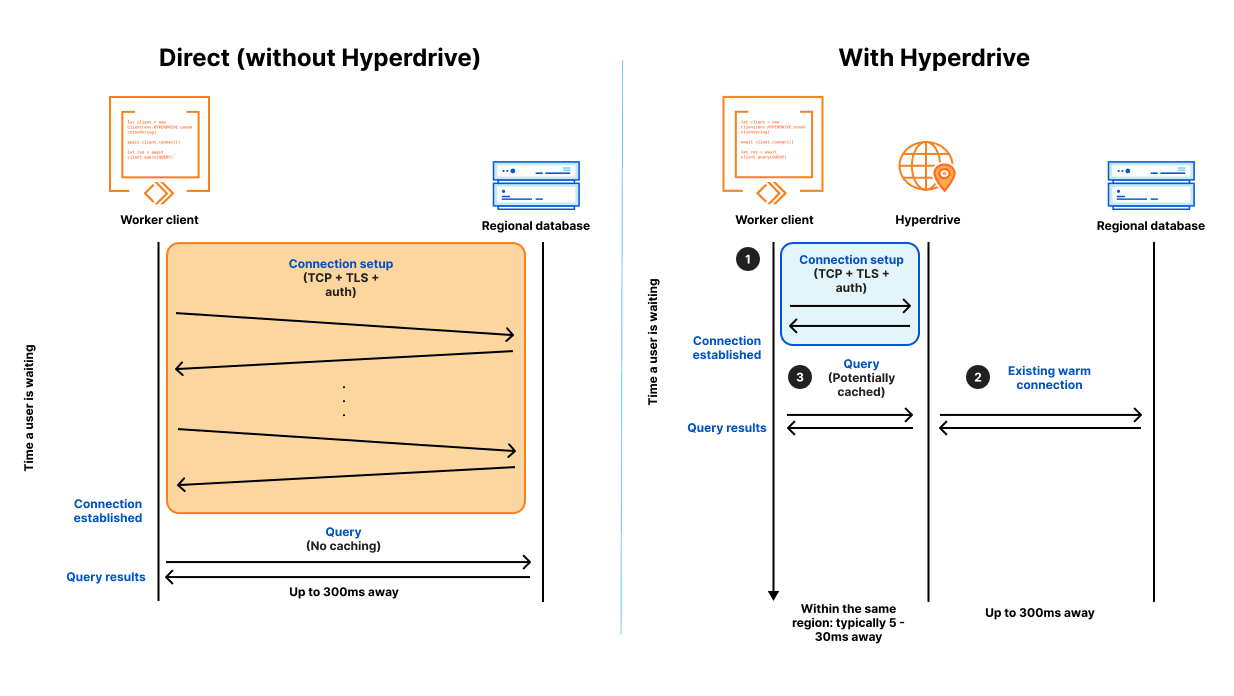
Hyperdrive is one of the most important pieces of a TurboStarter Cloudflare deployment because TurboStarter uses Drizzle ORM against PostgreSQL for auth, billing, organizations, and app data. Treat database connectivity as a first-class launch requirement, not an afterthought.
Step 3: Create the R2 cache bucket
The generated open-next.config.ts configures OpenNext to use R2 for incremental cache. Create the bucket with the same name you entered in the generator:
pnpm --filter web exec wrangler r2 bucket create <bucket-name>Then verify the binding in apps/web/wrangler.jsonc:
{
  "r2_buckets": [
    {
      "binding": "NEXT_INC_CACHE_R2_BUCKET",
      "bucket_name": "<bucket-name>"
    }
  ]
}
If you are not using ISR or cached server data yet, you can still keep this bucket configured. It gives your app the right production shape before you need it.
Cache bucket vs user uploads
This R2 bucket is for OpenNext's incremental cache, not for user files. If your TurboStarter app stores uploads, exports, avatars, or generated assets, create a separate Cloudflare R2 bucket and wire it through the storage package. Keeping cache and user files separate makes permissions, lifecycle rules, and cleanup much easier.
Step 4: Configure environment variables
Cloudflare needs two kinds of variables for a TurboStarter SaaS deployment:
- Build-time variables — available when
cf:buildruns, especiallyNEXT_PUBLIC_*values and anything used by static generation - Runtime variables and secrets — available to the deployed Worker during requests
For local preview, copy the generated example file:
cp apps/web/.dev.vars.example apps/web/.dev.varsKeep your normal local values in .env.local and apps/web/.env.local as described in environment variables. Use .dev.vars only for values Wrangler needs during Worker preview, such as DATABASE_URL and URL.
For production, add the same variables you use for other deployments:
URL="https://example.com"
BETTER_AUTH_URL="https://example.com"
NEXT_PUBLIC_URL="https://example.com"
DATABASE_URL="postgresql://..."
BETTER_AUTH_SECRET="..."
You can set them in the Cloudflare dashboard or with Wrangler:
pnpm --filter web exec wrangler secret put DATABASE_URL
pnpm --filter web exec wrangler secret put BETTER_AUTH_SECRET
The generated wrangler.jsonc includes keep_vars: true, so deployments will not remove variables you manage in the Cloudflare dashboard.
Use separate staging and production values
If you deploy multiple environments, keep the same variable names and change only the values. The multiple environments recipe shows the recommended structure.
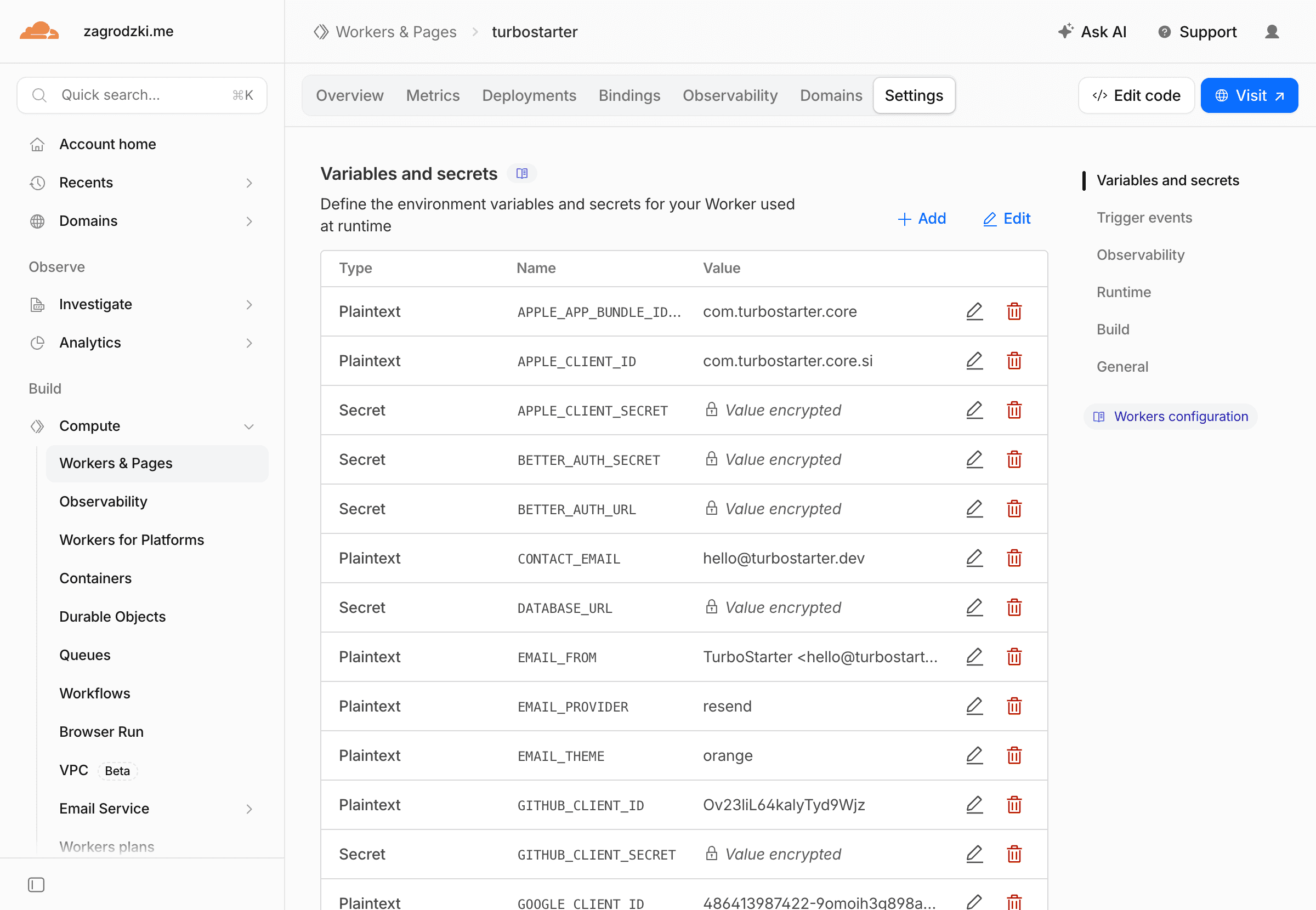
For a TurboStarter SaaS, pay special attention to:
URL,NEXT_PUBLIC_URL, andBETTER_AUTH_URL— must match your production domainDATABASE_URL— production Postgres connection string used by HyperdriveBETTER_AUTH_SECRET— required for session security- Billing provider secrets — Stripe, Lemon Squeezy, Polar, or Dodo depending on your setup
- Email provider credentials — if magic links or transactional email are enabled
- Storage credentials — if you use S3-compatible storage or R2 for user files
Review the full production deployment checklist before going live.
Step 5: Generate Cloudflare binding types
After wrangler.jsonc has a real Hyperdrive id and R2 bucket name, generate Worker binding types:
pnpm --filter web cf:typegenThis creates apps/web/cloudflare-env.d.ts. The generator also adds that file to the web app's TypeScript config so bindings like HYPERDRIVE and NEXT_INC_CACHE_R2_BUCKET are typed correctly.
Step 6: Preview locally in the Workers runtime
pnpm dev is still the fastest command for daily development. For Cloudflare deployment validation, preview the app in the same Workers runtime it will use in production:
pnpm --filter web cf:previewTest the paths that depend on external services:
- sign in and sign out
- organization creation
- database reads and writes
- billing checkout and webhooks
- email sending
- file uploads, if your app uses storage
Preview before every first deploy
cf:preview is the production-shape check that catches Worker, Hyperdrive, and environment issues before your users do. Run it after changing wrangler.jsonc, secrets, Hyperdrive, or database-related code.
Step 7: Deploy to Cloudflare
When preview looks good, deploy the Worker from your local machine:
pnpm --filter web cf:deployThis runs the custom Cloudflare build script, transforms the Next.js output with OpenNext, uploads the Worker, and deploys it to Cloudflare.
If you want to upload a version without immediately routing traffic to it, use:
pnpm --filter web cf:uploadAfter deployment, open the Worker URL and update your production URL, NEXT_PUBLIC_URL, BETTER_AUTH_URL, OAuth callbacks, and billing webhooks to use the final domain.
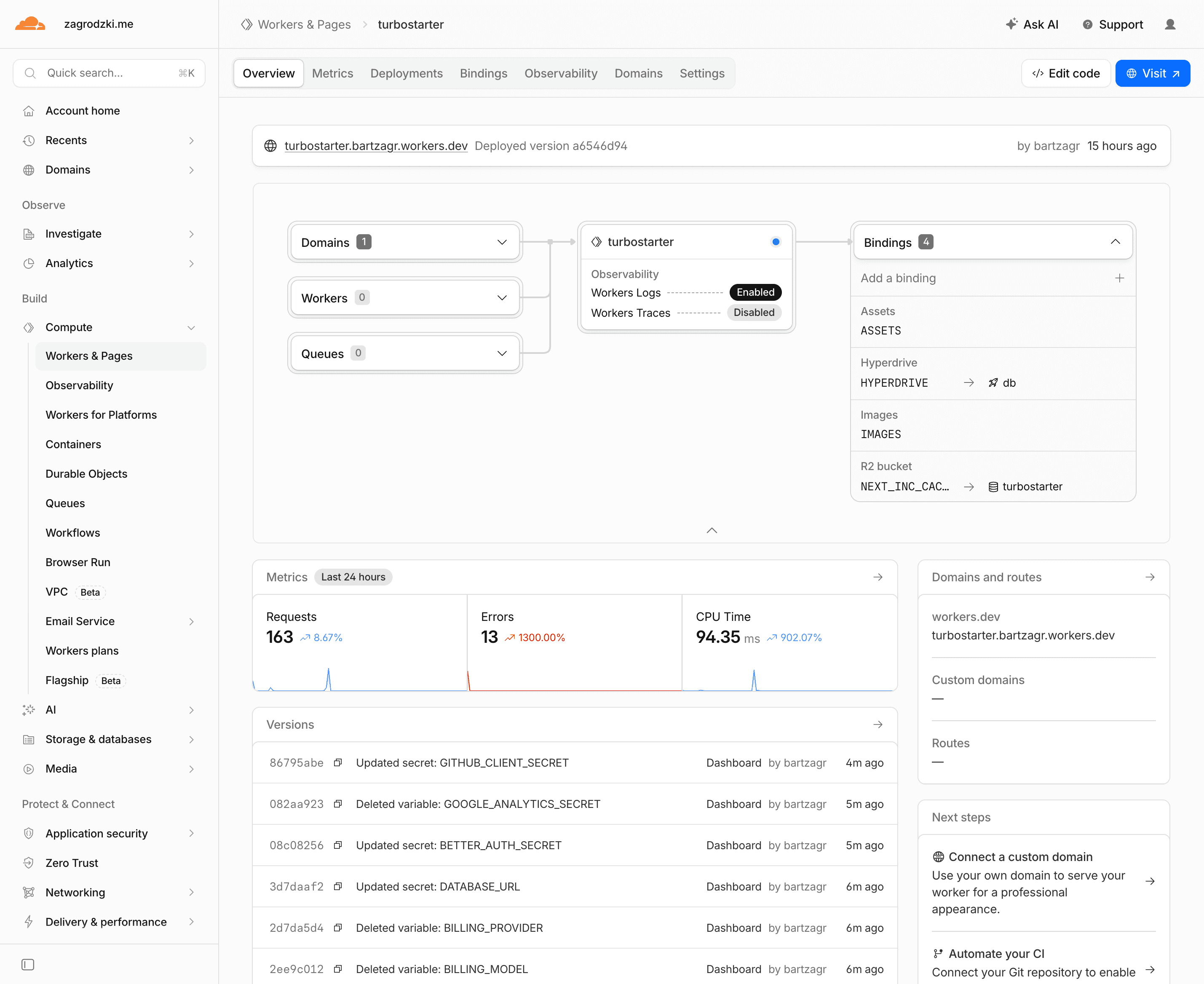
Step 8: Add a custom domain
In the Cloudflare dashboard, open your Worker and add a custom domain or route for your production host.
After the domain is active:
- update
URL,NEXT_PUBLIC_URL, andBETTER_AUTH_URL - update OAuth redirect URLs in each provider
- update billing webhook URLs to
/api/billing/webhook - redeploy with
pnpm --filter web cf:deploy
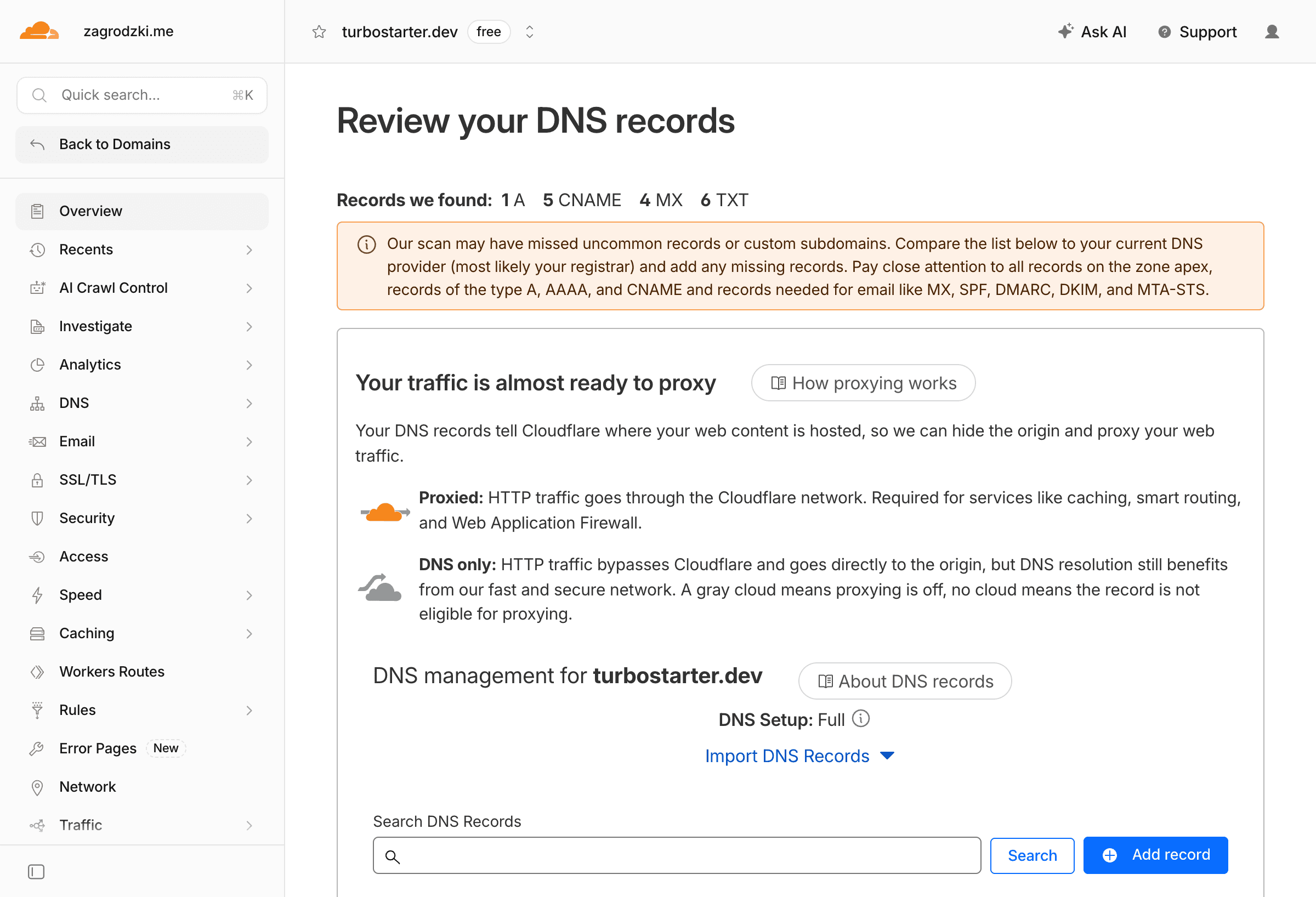
If your domain is already on Cloudflare, you also get access to DNS, TLS, caching, and security controls in one place — useful for a production SaaS launch.
Cloudflare services worth knowing for TurboStarter
You do not need every Cloudflare product on day one. The default TurboStarter Cloudflare setup uses Workers, Hyperdrive, R2, and Wrangler. As your SaaS grows, these services become useful add-ons:
| Service | What it does | Good TurboStarter use case |
|---|---|---|
| Workers | Runs your app at the edge | Host the Next.js SaaS itself |
| Hyperdrive | Pools Postgres connections for Workers | Connect Workers to your main TurboStarter database |
| R2 | S3-compatible object storage | Incremental cache, uploads, exports, generated files |
| Images | Optimize and serve images from the edge | Avatars, marketing assets, user-generated media |
| Workers KV | Low-latency global key-value storage | Feature flags, public config, cached lookup tables |
| Queues | Async background processing | Email fan-out, imports, retries, webhook processing |
| Durable Objects | Strongly consistent stateful compute | Live collaboration, presence, chat, rate limits |
| D1 | Serverless SQLite at the edge | Small edge-native features, not your main SaaS database |
| Turnstile | Bot protection without traditional CAPTCHAs | Sign-up, contact, invite, and waitlist forms |
| Zaraz | Third-party tool loading through Cloudflare | Analytics and marketing tags with less client bloat |
Start small
Keep Postgres as the main TurboStarter database unless you intentionally redesign that layer. Services like KV, D1, Durable Objects, and Queues are best added for specific workloads, not as replacements for the default app database on day one.
When to add R2 for user uploads
TurboStarter's storage layer supports S3-compatible providers, including Cloudflare R2. That is separate from the OpenNext cache bucket. Use R2 for user-facing files when you want:
- no S3 egress fees on large download volumes
- storage close to your Cloudflare-hosted app
- simple bucket-based permissions for uploads and exports
See the storage overview for wiring R2 into your app.
When to add Turnstile
If your SaaS has public sign-up, invite acceptance, contact forms, or waitlists, Turnstile is a strong fit. It reduces bot traffic without the UX pain of traditional CAPTCHAs — especially helpful right after launch when marketing traffic spikes.
When to add Queues
TurboStarter already supports background work patterns, but Queues become useful when you need durable async processing at the edge: sending emails in bulk, importing data, retrying failed webhooks, or decoupling slow tasks from user-facing requests.
Useful TurboStarter Cloudflare commands
# Build the OpenNext Worker output
pnpm --filter web cf:build

# Preview locally in the Workers runtime
pnpm --filter web cf:preview

# Deploy to Cloudflare
pnpm --filter web cf:deploy

# Upload a new Worker version without deploying traffic immediately
pnpm --filter web cf:upload

# Regenerate Cloudflare binding types
pnpm --filter web cf:typegen
Troubleshooting common Cloudflare deployment issues
Build fails because an environment variable is missing
TurboStarter validates environment variables during build. Make sure build-time values exist locally before cf:build, and runtime values exist in Cloudflare before the deployed Worker starts.
For NEXT_PUBLIC_* values, remember that Next.js inlines them during the build.
Hyperdrive binding is missing
Check that apps/web/wrangler.jsonc includes a hyperdrive entry with binding: "HYPERDRIVE" and a real id. Then rerun:
pnpm --filter web cf:typegen
pnpm --filter web cf:preview
Upload fails because the Worker is too large
Wrangler prints the compressed Worker size during upload. If it exceeds your Cloudflare plan limit, remove unused server dependencies, avoid importing large packages into server routes, or upgrade the Workers plan. See Worker limits.
A package expects unsupported Node.js behavior
The generated wrangler.jsonc enables nodejs_compat, which is required for many Next.js and database use cases on Workers. Some Node.js APIs are still only partially supported, so replace Node-only libraries with HTTP/fetch-based providers when needed.
A route uses the Edge runtime
OpenNext for Cloudflare is designed around the Next.js Node.js runtime on Workers. If you added export const runtime = "edge" to a route, remove it and preview again.
Auth or billing works locally but fails in production
This is usually a URL mismatch. Confirm URL, NEXT_PUBLIC_URL, and BETTER_AUTH_URL all point to your live domain, then update OAuth redirect URLs and billing webhook endpoints before retesting.
For more deployment debugging, see deployment troubleshooting.
Cloudflare vs Vercel for TurboStarter
Both are valid production hosts. The right choice depends on what you optimize for.
| Factor | Cloudflare Workers | Vercel |
|---|---|---|
| Setup speed | Moderate — generator + Hyperdrive + R2 | Fastest — strong Next.js defaults |
| Edge model | Worker-based global execution | Managed Next.js platform |
| Database strategy | Hyperdrive to external Postgres | External Postgres or managed integrations |
| Object storage | Native R2 integration | Bring your own S3/R2 provider |
| Best when | You want edge + R2 + Hyperdrive in one platform | You want the simplest Next.js deploy path |
If you are unsure, start with Vercel for speed. Move to Cloudflare when edge execution, R2, or Cloudflare's broader platform become strategic for your SaaS.
Next steps after deployment
Before sending production traffic to your Cloudflare deployment:
- Run through the production deployment checklist
- Verify environment variables
- Test auth, billing, emails, and storage on the live domain
- Set up monitoring and error tracking
- Review multiple environments if you maintain staging and production
Official references:
- OpenNext for Cloudflare
- Cloudflare Next.js guide
- Hyperdrive getting started
- Wrangler documentation
- Cloudflare bindings
- TurboStarter Cloudflare docs
FAQ
Can you deploy TurboStarter to Cloudflare Workers?
Yes. TurboStarter includes a Cloudflare generator that sets up OpenNext, Wrangler, Hyperdrive, and R2 bindings so you can build, preview, and deploy the web app to Cloudflare Workers.
What is the easiest way to deploy TurboStarter to Cloudflare?
Run pnpm turbo gen cloudflare, create Hyperdrive and an R2 cache bucket, configure environment variables, preview with pnpm --filter web cf:preview, then deploy with pnpm --filter web cf:deploy.
Does TurboStarter use Cloudflare Pages or Workers?
TurboStarter uses OpenNext for Cloudflare to deploy the Next.js app as a Cloudflare Worker, not as a Pages-only static deployment. That supports SSR, auth, billing, and other server features your SaaS needs.
Why do I need Hyperdrive for a TurboStarter Cloudflare deployment?
Hyperdrive pools Postgres connections inside Cloudflare's network. That helps serverless-style Worker deployments talk reliably to a regional Postgres database without exhausting connection limits.
What is the R2 bucket used for in TurboStarter on Cloudflare?
The generated setup uses R2 for OpenNext incremental cache through the NEXT_INC_CACHE_R2_BUCKET binding. User uploads should use a separate R2 bucket configured through TurboStarter's storage layer.
Is Cloudflare better than Vercel for TurboStarter?
It depends on your goals. Vercel is usually the fastest default for Next.js. Cloudflare is stronger when you want edge execution, R2, Hyperdrive, and more of your production stack on Cloudflare's platform.
Can I self-host TurboStarter instead of using Cloudflare?
Yes. TurboStarter also supports Docker, Railway, Render, and other deployment targets if you want more infrastructure control.
What should I test before going live on Cloudflare?
Test sign-in, sign-out, organization flows, database reads and writes, billing checkout, webhooks, emails, and file uploads on the preview or staging domain before routing production traffic.
Cross-platform SaaS with one backend - web, mobile, and browser extension from a monorepo
How to build a cross-platform SaaS with one backend for Next.js web, Expo mobile, and a browser extension. Architecture, shared auth, and when a monorepo wins.
Drizzle vs Prisma in 2026 - which TypeScript ORM should you pick?
Drizzle vs Prisma for Next.js SaaS: schema, queries, migrations, serverless, and when each wins. Plus why TurboStarter ships Drizzle in production.