Expo React Native Guide for Web Developers (2026 Edition)
Expo React Native guide for web developers: map React and Next.js skills to mobile, ship to TestFlight with EAS, and share code with your web app.

If you build for the web and want a real iOS and Android app, this Expo React Native guide for web developers is the short path. You already know React, TypeScript, fetch, and file-based routing. Expo lets you keep almost all of that, swaps the DOM for native views, and handles the parts web developers usually fear: Xcode, signing certificates, and store uploads.
This guide is current as of October 2026 (Expo SDK 57). It covers what changed since the "managed vs bare" era, how your web mental model maps to mobile, the exact commands from an empty folder to TestFlight, what EAS costs, and how to share auth and API code between a Next.js app and an Expo app in one monorepo.
Short answer
Expo is the open-source framework for building React Native apps, and it is
the setup the React Native team itself recommends for new projects. Web
developers should start there because you write React and TypeScript, get
file-based routing (Expo Router), and never touch native build files unless
you want to. The path to the App Store is: npx create-expo-app@latest, run
it on your phone or a simulator, build in the cloud with eas build, upload
with eas submit, test in TestFlight, then submit for App Review. Expo itself
is free; you pay Apple $99 per year, Google $25 once, and optionally Expo for
more cloud builds and updates.
What Expo is (and how it relates to React Native in 2026)
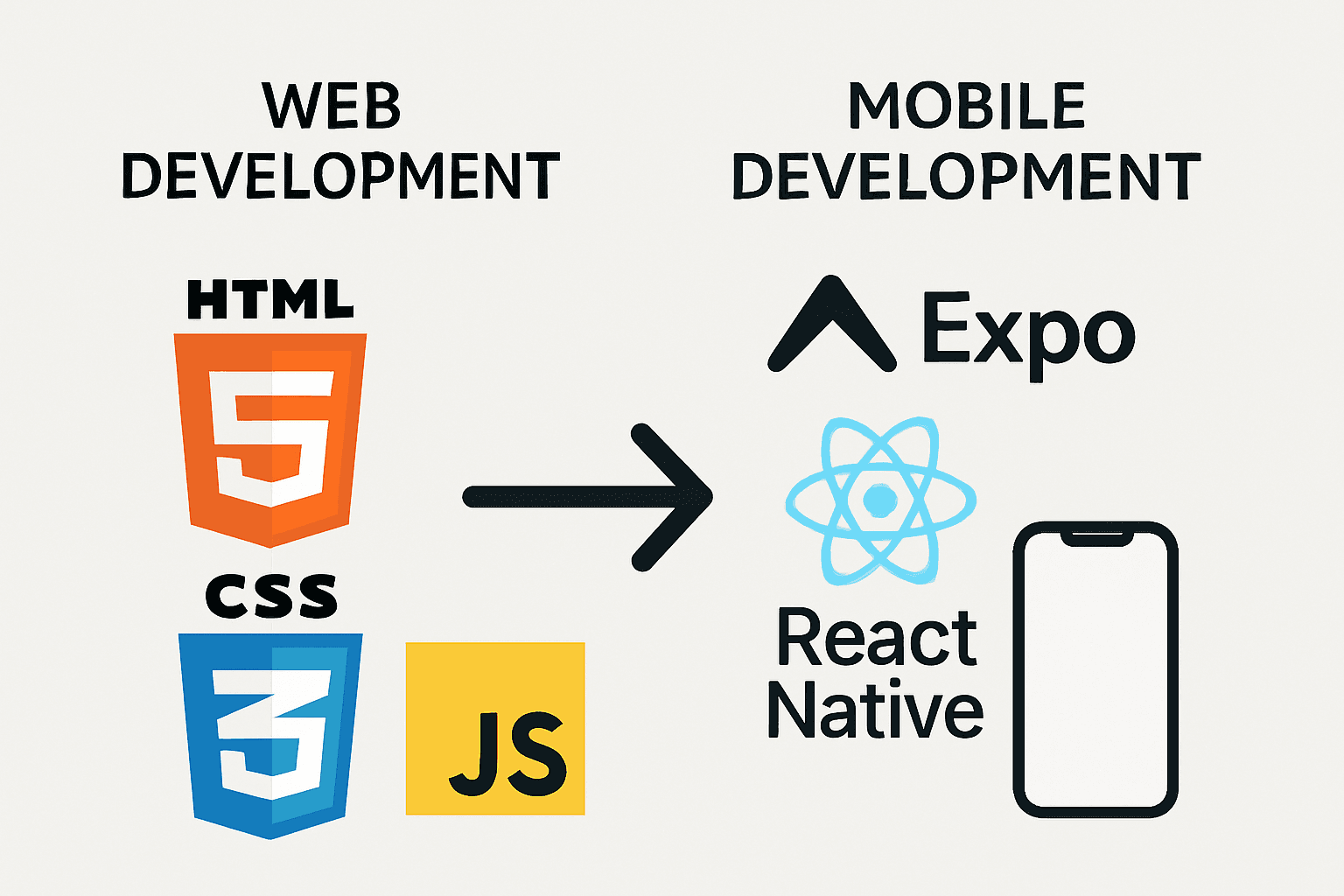
Expo is a production-grade React Native framework plus an optional set of cloud services (EAS) for building, submitting, and updating iOS and Android apps. React Native is the runtime that renders React components as native UI. Expo sits on top of it the way Next.js sits on top of React: routing, a standard library of native modules, config, and tooling.
That framing is official now. The React Native docs say most developers benefit from using a framework like Expo, and the getting started command on reactnative.dev is npx create-expo-app@latest.
The old debate ("managed workflow vs ejecting to bare") is mostly gone. Expo apps are React Native apps, every Expo SDK package works in any React Native project, and Expo regenerates the native android and ios folders for you from config (Continuous Native Generation). You only drop down to native code when you need a custom native module.
The versions that matter right now
| Piece | Status in October 2026 | Source |
|---|---|---|
| Expo SDK (stable) | SDK 57, released June 2026 | Expo changelog |
| React Native | 0.86 (bundled with SDK 57) | SDK version table |
| React | 19.2.3 | SDK version table |
| Minimum Node.js | 22.13 for SDK 57 | SDK version table |
| New Architecture | Always on since SDK 55; cannot be disabled | Expo New Architecture guide |
| JavaScript engine | Hermes v1 is the default since SDK 56 | SDK 56 notes |
| Expo Router | Versioned with the SDK (57.x on SDK 57); no longer built on React Navigation since SDK 56 | SDK 55 notes, SDK 56 notes |
| Expo UI (SwiftUI, Compose) | Stable since SDK 56 and included in the default template | SDK 56 notes |
| Next SDK | SDK 58 in beta with React Native 0.88 release candidate, built for iOS 27 | SDK 58 beta |
Two practical notes. First, since SDK 55 every Expo package shares the SDK's major version (expo-camera@^57.0.0 on SDK 57), so mismatches are easy to spot. Second, if you need to build with Xcode 27 and the iOS 27 SDK before moving to SDK 58, Expo documents an opt-in scene life cycle flag for SDK 57 in the SDK 57 notes.
Why web developers should start with Expo
You could learn Swift and Kotlin. If your product is a SaaS with a web app already, that means two extra codebases, two UI toolkits, and two release pipelines. Expo gives you one TypeScript codebase for both stores, with native UI on each.
What carries over from the web almost unchanged:
- React itself: components, hooks, context, Suspense, React Query, Zustand, Zod, React Hook Form.
- TypeScript and npm: same package manager, same monorepo tools, same linting.
- Networking:
fetchworks the same way, and so does any HTTP client built on it. - File-based routing: Expo Router uses an
appdirectory with layouts, much like the Next.js App Router. - Fast refresh: save a file, see the change on your phone.
What you have to learn is smaller than it looks: a handful of layout primitives, how styling differs from CSS, platform permissions, and the store release process. The rest of this guide is about those differences.
The web developer mental model, mapped to Expo
This table is the cheat sheet most web developers wish they had on day one.
| On the web | In Expo / React Native |
|---|---|
<div>, <section> | <View> |
<p>, <span>, <h1> | <Text> (every string must live inside <Text>) |
<img> | <Image> from React Native or expo-image |
<input>, <textarea> | <TextInput> with onChangeText |
<button>, onClick | <Pressable> with onPress |
<ul> with .map() | <FlatList> or @shopify/flash-list (virtualized) |
overflow: auto | <ScrollView> for short content, a list component for long content |
| CSS files, class selectors, cascade | StyleSheet.create objects, or Tailwind classes via Uniwind or NativeWind; no cascade |
display: flex (row by default) | Flexbox everywhere, flexDirection: "column" by default |
px, rem | Unitless density-independent points |
| Media queries | useWindowDimensions() or Tailwind breakpoints in Uniwind/NativeWind |
fetch | fetch (same API) |
localStorage | @react-native-async-storage/async-storage for plain data, expo-secure-store for tokens, expo-sqlite for structured data |
| Browser cookie jar | No automatic cookies; store the session securely and attach headers yourself |
Next.js app/page.tsx, layout.tsx | Expo Router src/app/index.tsx, _layout.tsx |
next/link, useRouter() | Link and router from expo-router |
| Next.js Route Handlers | Expo Router API routes (+api.ts files), which need a server |
NEXT_PUBLIC_* env vars | EXPO_PUBLIC_* env vars |
window, document, DOM APIs | Not available; DOM components ("use dom") are the escape hatch |
| Chrome DevTools | React Native DevTools |
| Deploy to Vercel in a minute | Build a binary with EAS Build, then store review |
| Redeploy to fix a bug | EAS Update over-the-air for JavaScript-only changes |
The last two rows are the biggest mindset shift. On the web you own deployment. On mobile, Apple and Google sit between you and your users, so you plan releases instead of pushing straight to production.
Same component, two platforms
Here is a small profile card as you would write it in a Next.js app, and the Expo version with Tailwind-style classes (this works with Uniwind or NativeWind installed):
import Link from "next/link";

export function ProfileCard({ name, plan }: { name: string; plan: string }) {
  return (
    <div className="flex flex-col gap-2 rounded-xl border p-4">
      <h2 className="text-lg font-semibold">{name}</h2>
      <p className="text-sm text-gray-500">Plan: {plan}</p>
      <Link
        href="/settings"
        className="rounded-lg bg-black px-4 py-2 text-white"
      >
        Settings
      </Link>
    </div>
  );
}
import { Link } from "expo-router";
import { Pressable, Text, View } from "react-native";
export function ProfileCard({ name, plan }: { name: string; plan: string }) {
return (
<View className="gap-2 rounded-xl border border-gray-200 p-4">
<Text className="text-lg font-semibold">{name}</Text>
<Text className="text-sm text-gray-500">Plan: {plan}</Text>
<Link href="/settings" asChild>
<Pressable className="rounded-lg bg-black px-4 py-2">
<Text className="text-white">Settings</Text>
</Pressable>
</Link>
</View>
);
}Notice what changed: div became View, every piece of text sits in Text, the link wraps a Pressable, and the white text color moved onto the inner Text because styles do not cascade from parents to children (text styles only inherit between nested Text elements).
Five things that trip up web developers
These are the mistakes we see most often when web developers ship their first Expo app.
- Raw strings outside
<Text>.<View>Hello</View>crashes. This also bites with{count && <Badge />}whencountis0, because React Native tries to render0as a bare string. Use a ternary orcount > 0. - Expecting the cascade. There is no global stylesheet that styles every
p. Set fonts and colors on eachText, or build a small set of themed primitives (Heading,Body,Button) and reuse them. - Rendering long lists with
.map()inside aScrollView. That renders every row up front. UseFlatListor FlashList, which only render what is on screen. - Ignoring safe areas and the keyboard. Phones have notches, home indicators, and on-screen keyboards that cover inputs. Use
react-native-safe-area-contextfor insets and a keyboard-aware layout (for examplereact-native-keyboard-controller, which is in the Expo SDK's supported third-party list) for forms. - Treating permissions as optional. Camera, location, notifications, and tracking all need runtime permission prompts and usage strings in your app config. Missing usage descriptions are a common reason for App Review rejections.
Expo Go vs development builds
When you run npx expo start, you can open the app in Expo Go, a prebuilt app from the stores that already contains the Expo SDK's native code. It is great for your first afternoon: scan a QR code and your code runs on a real phone.
It is not where production apps live. Expo's own upgrade notes say Expo Go is "not recommended as a development environment for production apps" (SDK 57 notes). Three reasons matter in practice:
- Custom native code does not load in Expo Go. Any library with native code outside the Expo SDK (RevenueCat, Google Sign-In, Firebase, LiveKit) needs your own build.
- Store availability lags. Expo Go for SDK 55 and SDK 56 was not available on the App Store at launch; Expo pointed iOS users to TestFlight or the
eas gocommand instead (SDK 56 notes). - Login is now required on iOS devices. Since September 2026, running a project in Expo Go on a physical iPhone requires signing in to the same Expo account in both Expo CLI and Expo Go (changelog). Simulators and development builds are unaffected.
A development build is your own debug version of the app with expo-dev-client installed. It behaves like Expo Go (fast refresh, dev menu) but contains exactly the native modules your app uses. Create one as soon as you add a native dependency or start working on auth, payments, or push notifications.
Styling: StyleSheet, NativeWind, or Uniwind
React Native's built-in StyleSheet.create is plain JavaScript objects with camelCase properties (backgroundColor, not background-color). It works everywhere and needs no setup.
Most web developers coming from Tailwind prefer utility classes. There are two main options:
| Option | What it is | When to pick it |
|---|---|---|
StyleSheet | Built-in style objects | Small apps, design systems written in TypeScript, zero extra dependencies |
| NativeWind | Tailwind for React Native, the longest-running option | Large existing ecosystem and tutorials; Expo's official examples include a NativeWind setup |
| Uniwind | Tailwind CSS v4 library for React Native; its docs describe it as 2x faster than NativeWind and working on iOS, Android, and web | You want Tailwind v4 config shared with a Tailwind v4 web app and CSS-variable theming |
TurboStarter's mobile app uses Uniwind with React Native Reusables components, because the same Tailwind v4 theme tokens (OKLCH CSS variables) drive both the Next.js app and the Expo app. The setup is documented in the mobile styling docs and the Expo + Uniwind UI template. NativeWind is still a reasonable choice if your team already knows it.
Two newer native UI options are worth knowing:
- Expo UI gives you real SwiftUI and Jetpack Compose components from JavaScript. Its native APIs are stable as of SDK 56, and it now ships universal components plus drop-in replacements for popular libraries like bottom sheets, pickers, and sliders (SDK 56 notes).
- Native tabs in Expo Router render the platform's own tab bar. On SDK 54 to 57 you import them from
expo-router/unstable-native-tabs; SDK 58 moves them toexpo-router/native-tabs(docs).
Navigation with Expo Router
If you know the Next.js App Router, Expo Router will feel familiar. Since SDK 55 the default template puts routes in src/app (SDK 55 notes):
src/app/
  _layout.tsx        # root layout (like layout.tsx)
  index.tsx          # "/" screen
  settings.tsx       # "/settings"
  (tabs)/_layout.tsx # route group with a tab bar
  posts/[id].tsx     # dynamic route
  hello+api.ts       # API route (server only)
A root layout with a native stack is three lines:
// src/app/_layout.tsx
import { Stack } from "expo-router";

export default function RootLayout() {
  return <Stack />;
}
Every file in src/app also becomes a deep link, so a URL like myapp://posts/42 opens the right screen. That matters for magic links, OAuth callbacks, and push notifications.
Expo Router also has web-adjacent features. Treat them as tools, not as a reason to replace Next.js:
- API routes:
+api.tsfiles exportGET,POST, and friends, using standardRequestandResponseobjects. They need a server, which you can deploy to EAS Hosting or most other hosts (API routes docs). - React Server Components: available experimentally as a beta and subject to breaking changes (RSC docs).
- DOM components: add
"use dom"to a component to render web code (including HTML elements and web-only libraries) inside your native app through a webview. On SDK 56 and later this uses@expo/dom-webviewby default (DOM components docs). Useful for incremental migration of a chart or rich-text editor from your web app.
One SDK 56 change to know about if you follow older tutorials: Expo Router forked the parts of React Navigation it builds on, so code that imports directly from @react-navigation/* alongside expo-router may need updating. Expo ships a codemod for it (SDK 56 notes).
Native device features without native code
The Expo SDK covers the device APIs most SaaS apps need: camera, location, notifications, secure storage, haptics, local authentication (Face ID, fingerprint), file system, image picker, and more (SDK reference). Always install them with npx expo install, which picks the version that matches your SDK:
npx expo install expo-location expo-secure-store expo-notificationsThe pattern is the same for every capability: ask for permission, handle denial, then call the API.
import * as Location from "expo-location";
import { useState } from "react";
import { Button, Text, View } from "react-native";

export function WhereAmI() {
  const [coords, setCoords] = useState<string | null>(null);
  const [error, setError] = useState<string | null>(null);

  const locate = async () => {
    const { status } = await Location.requestForegroundPermissionsAsync();
    if (status !== "granted") {
      setError("Location permission was denied");
      return;
    }
    const position = await Location.getCurrentPositionAsync({});
    setCoords(`${position.coords.latitude}, ${position.coords.longitude}`);
  };

  return (
    <View className="gap-2 p-4">
      <Button title="Find my location" onPress={locate} />
      {coords ? <Text>{coords}</Text> : null}
      {error ? <Text className="text-red-600">{error}</Text> : null}
    </View>
  );
}
For anything sensitive (session tokens, refresh tokens), use expo-secure-store, which stores values in the iOS Keychain and Android Keystore. Never put tokens in AsyncStorage. And never ship secrets in EXPO_PUBLIC_* variables: they are bundled into the app and anyone can extract them.
Push notifications deserve a warning: remote push does not work in Expo Go on recent SDKs, so plan on a development build and real APNs and FCM credentials. TurboStarter's push notifications docs walk through the full setup.
From zero to TestFlight
This is the shortest verified path from an empty folder to a build your testers can install from TestFlight. Commands come from the EAS Build and EAS Submit docs.
Check the prerequisites
- Node.js 22.13 or newer (the minimum for SDK 57)
- A free Expo account
- An Apple Developer Program membership ($99 per year) for TestFlight and the App Store, or a Google Play Developer account ($25 one-time) for Android
- A phone, the iOS Simulator (macOS only), or an Android emulator
You do not need a Mac to ship iOS builds: EAS builds and submits from macOS, Linux, or Windows.
Create the app and run it
npx create-expo-app@latest my-app
cd my-app
npx expo start
The default template includes Expo Router and TypeScript. It also generates an AGENTS.md with Expo-specific context for AI coding tools (skip it with --no-agents-md). Press i for the iOS Simulator, a for an Android emulator, or scan the QR code.
Sign in to Expo CLI
npx expo loginRequired to open the project in Expo Go on a physical iPhone, and needed anyway for EAS.
Install EAS CLI and configure builds
npm install --global eas-cli
eas login
eas build:configure
eas build:configure creates eas.json with build profiles. Then add a bundle identifier to your app config:
{
  "expo": {
    "ios": { "bundleIdentifier": "com.yourcompany.yourapp" },
    "android": { "package": "com.yourcompany.yourapp" }
  }
}
Create a development build (recommended)
npx expo install expo-dev-client
eas build --profile development --platform ios
Install it on your device from the build page, then keep using npx expo start as before. This is your daily driver once you add native libraries.
Build for the App Store
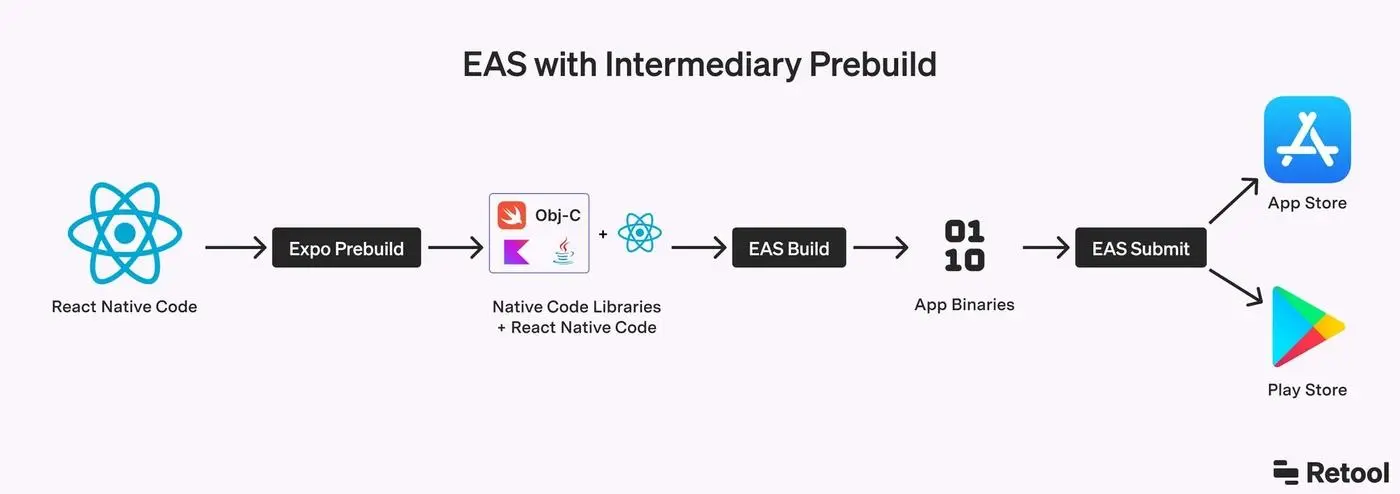
eas build --platform ios --profile productionOn the first run, EAS can generate and store your distribution certificate and provisioning profile for you. Accept that unless you already manage credentials.
Upload to App Store Connect and TestFlight
eas submit --platform iosThe build shows up in TestFlight after Apple processes it, usually 10 to 15 minutes according to Expo's docs. Add internal testers in App Store Connect. To build and submit in one go next time, use eas build --platform ios --auto-submit.
Ship JavaScript fixes over the air
eas update:configure
eas update --channel production --message "Fix checkout copy"
Run eas update:configure once, then rebuild so the binary knows its update channel. EAS Update delivers JavaScript and asset changes without a new store review. Anything that changes native code (a new native library, a permission, an SDK upgrade) still needs a new build and review.
When you are ready for the actual App Store submission (screenshots, privacy labels, review notes), use a checklist. TurboStarter's publishing checklist and iOS publishing guide cover the steps that cause most rejections, and the EAS OTA updates template shows how channels and update notifications fit together.
How much EAS costs
Expo and the Expo SDK are free and open source under the MIT license. EAS is the paid cloud layer, and every plan includes Build, Submit, Update, and CI/CD Workflows. Figures below are from expo.dev/pricing at the time of writing:
| Plan | Price | Builds | OTA updates (MAUs included) |
|---|---|---|---|
| Free | $0 | Up to 15 Android and 15 iOS builds, low-priority queue | 1,000 |
| Starter | $19/month plus usage | $45 of build credit, high-priority queue | 3,000 |
| Production | $199/month plus usage | $225 of build credit, 2 concurrencies | 50,000 |
| Enterprise | Custom | From $1,000 of build credit, 5 concurrencies | 1,000,000 |
Past the included credit, builds are billed per build: $1 for an Android medium worker build and $2 for an iOS medium worker build (large workers cost double). Update overage starts at $0.005 per monthly active user on Starter and Production. A user only counts as an MAU if they download at least one update that month.
For most indie apps the Free plan covers development and the first launch. The two things that push teams to Starter are the low-priority queue (Expo warns of 90+ minute waits at peak times) and passing 1,000 users who download updates. You can also build locally with eas build --local or Xcode and skip cloud builds entirely.
Do not forget store costs: Apple's developer membership is $99 per year and Google Play is a one-time $25 fee (EAS Build docs).
Sharing code between a Next.js app and an Expo app
Most SaaS founders do not want "a mobile app". They want their existing product on phones, with the same accounts, the same data, and the same subscription rules. The cleanest way to get that is a monorepo where the Next.js app and the Expo app depend on shared packages.
What to share and what to keep separate
| Share across web and mobile | Keep platform-specific |
|---|---|
| API routes and a typed API client | Screens and navigation |
| Database schema and server logic | Most UI components (DOM vs native views) |
| Zod schemas, types, constants | Storage (cookies on web, SecureStore on mobile) |
| Auth server config and permission rules | Payments UI (Stripe checkout vs in-app purchases) |
| i18n strings, theme tokens, feature flags | Push notifications, deep links, app store config |
A typical layout with Turborepo and pnpm workspaces:
apps/
  web/        # Next.js: marketing site, dashboard, API route handler
  mobile/     # Expo: native app, calls the same API
packages/
  api/        # API routes + typed client
  auth/       # Better Auth server config and clients
  db/         # Drizzle schema and queries
  shared/     # Zod schemas, constants, utilities
  ui/         # design tokens (+ separate web and native components)
Expo handles monorepos well now. It detects workspaces and configures Metro automatically (SDK 52 and later), supports pnpm's isolated installs (SDK 54 and later), and deduplicates autolinked native modules in monorepos by default (SDK 55 and later), according to the Expo monorepo guide. The rule that still bites: keep a single React Native version in the repo and a single React version per app.
Shared auth with the Better Auth Expo plugin
Auth is where web-plus-mobile setups usually break, because mobile apps have no browser cookie jar. Better Auth solves this with a dedicated Expo plugin. Your Next.js app keeps hosting the auth server; you add the plugin there and trust your app's URL scheme:
// packages/auth/server.ts
import { betterAuth } from "better-auth";
import { expo } from "@better-auth/expo";

export const auth = betterAuth({
  plugins: [expo()],
  emailAndPassword: { enabled: true },
  trustedOrigins: ["myapp://"],
});
In the Expo app, the client plugin stores the session in SecureStore and handles OAuth redirects through the system browser:
// apps/mobile/lib/auth.ts
import { createAuthClient } from "better-auth/react";
import { expoClient } from "@better-auth/expo/client";
import * as SecureStore from "expo-secure-store";

export const authClient = createAuthClient({
  baseURL: process.env.EXPO_PUBLIC_API_URL,
  plugins: [
    expoClient({
      scheme: "myapp",
      storagePrefix: "myapp",
      storage: SecureStore,
    }),
  ],
});
For your own API calls, read the stored cookie with authClient.getCookie() and send it as a Cookie header with credentials: "omit". That one detail is the most common reason a "logged in" mobile user gets a 401 from an API that works fine on the web. During development you also need to trust Expo's exp:// scheme, and only in development; the Better Auth docs show the exact patterns.
If you want to go deeper on the trade-offs of one backend for several clients, we wrote a separate guide on cross-platform SaaS with one backend.
How TurboStarter Core Kit wires it
This is the setup we ship in TurboStarter Core Kit, so here is exactly what you get rather than a sales pitch:
- One API for every client. The API lives in
packages/api(Hono), mounted as a Next.js route handler. The Expo app calls it through a typed client with React Query, sending the session cookie and a mobile platform header (mobile docs). - One auth system. Better Auth handles email and password, magic links, OTP, anonymous sessions, OAuth, native Sign in with Apple on iOS, and native Google sign-in on Android, sharing users and sessions with the web app (mobile auth docs). The Expo + Better Auth template shows the pattern in isolation.
- Store-compliant billing. The web app uses Stripe, Lemon Squeezy, Polar, or Dodo Payments, while the mobile app uses in-app purchases through RevenueCat or Superwall. Both feed the same server-side entitlements, so a user's plan is consistent across devices.
- Shared design tokens. Uniwind on mobile and Tailwind on web read the same theme variables, with separate component packages for web and native.
- Release plumbing. EAS build profiles, multiple environments, OTA updates, and store publishing guides are included.
When it is not worth it: if you only need a mobile app with no web product, create-expo-app plus a hosted backend is simpler. If you are building web-only for now, start with the web app and add mobile later; the monorepo is designed for that. For a broader look at what a mobile SaaS starter should include, see the React Native SaaS starter kit and Expo mobile app template pages.
Expo vs bare React Native vs fully native
You will see three options discussed. Here is how to decide:
| Choose | When |
|---|---|
| Expo (default) | New apps, web teams, SaaS companion apps, anything where shipping speed and OTA updates matter. You can still write custom native modules in Swift and Kotlin. |
| React Native without Expo | Unusual constraints the framework does not serve, or an existing native app adding React Native screens. The React Native docs call this the exception. |
| Swift / Kotlin | Products where the UI is the moat and you need day-one access to every new OS API, with dedicated iOS and Android engineers on the team. |
The gap between "Expo" and "native" has narrowed. With Expo UI rendering real SwiftUI and Jetpack Compose views, and Expo Modules for custom native code, the cases where you must leave React Native are rarer than they were two years ago.
FAQ
Yes. Expo is the framework the React Native team recommends for new projects, and it covers the full lifecycle: development builds, cloud builds, store submission, OTA updates, and monitoring through EAS. The production caveat is about tooling, not the framework: use development builds instead of Expo Go, and stay within about a year of the latest SDK (Expo supports each SDK release for roughly one year).
Use Expo. "Bare" used to mean you lost access to Expo tools, but today every Expo SDK package works in any React Native app, and Expo generates your native folders from config. Plain React Native without a framework makes sense only if you have unusual native constraints or are adding React Native to an existing native app.
Most of them. Components, hooks, TypeScript, React Query, Zod, and fetch
work as you know them. Expo Router uses file-based routing with layouts,
like the Next.js App Router. What you learn new is the native primitives
(View, Text, Pressable), styling without the cascade, permissions, and
the store release process.
The Free plan includes up to 15 Android and 15 iOS builds and OTA updates for 1,000 monthly active users. Starter is $19 per month with $45 of build credit and 3,000 update MAUs; Production is $199 per month with $225 of credit and 50,000 MAUs, plus usage-based pricing on both (see expo.dev/pricing). Store fees are separate: $99 per year for Apple and $25 once for Google Play.
Yes, and it is the only option now. SDK 55 and later run entirely on React
Native's New Architecture and you cannot turn it off. SDK 54 was the last
version where you could opt out. All expo-* packages support it, and npx expo-doctor flags third-party libraries that do not.
Yes. Put both apps in a monorepo (Turborepo with pnpm workspaces works well) and share API code, Zod schemas, types, auth config, translations, and design tokens through internal packages. Keep screens, navigation, and most UI components platform-specific. For auth, Better Auth's Expo plugin lets the mobile app use the same users and sessions as your web app.
No. EAS Build runs iOS builds on Expo's macOS machines, and EAS Submit uploads to App Store Connect from macOS, Linux, or Windows. A Mac is only required if you want the iOS Simulator or local Xcode builds.
The bottom line
Expo is the right starting point for web developers moving into mobile in 2026. The framework is free, the React Native team recommends it, the New Architecture is the default everywhere, and the path from npx create-expo-app@latest to TestFlight is a handful of commands. Spend your learning time on native layout, permissions, and the release process, not on build tooling.
If you already run a Next.js SaaS, the bigger win is sharing your API, auth, and entitlements with the mobile app instead of building a second backend. Start with the TurboStarter mobile docs to see how that looks in a production codebase, or follow this Expo React Native guide step by step on a fresh project and add sharing once the first build is in TestFlight.
Migrate from Clerk to Better Auth
How to migrate Clerk to Better Auth: bcrypt passwords, user export, cutover vs dual-run, middleware, and what breaks (sessions, orgs).
Next.js API Router: Route Handlers guide
Next.js API Router explained: App Router route.ts handlers, vs Pages API and Server Actions, plus when to mount tRPC.