For the complete documentation index, see llms.txt. Prefer markdown by appending.mdto documentation URLs or sendingAccept: text/markdown.
E2E tests
Test your Chrome MV3 extension with Playwright. Covers popup flows, sign-in via the web app, content scripts, and CI.
Extension E2E tests verify that your Chrome MV3 extension works correctly: popup rendering, sign-in through the web app, authenticated state, and content script injection. Tests use Playwright with a custom fixture that loads your unpacked extension build.
Why test the extension in a real browser?
Extension behavior depends on service workers, chrome-extension:// origins, and cross-context messaging. Playwright launches Chromium with your extension pre-loaded via --load-extension, giving you a real MV3 environment without manual Chrome profile setup.
Prerequisites
- Start services:
pnpm services:setup- Environment files:
cp .env.example .env
cp apps/web/.env.example apps/web/.env.local
cp apps/extension/.env.example apps/extension/.env- Install Playwright (first time only):
pnpm --filter extension exec playwright install chromiumThe global setup builds the extension automatically on first run. Locally, it skips the rebuild if manifest.json already exists in the build output.
Test structure
E2E tests live in apps/extension/e2e/:
apps/extension/e2e/
├── constants.ts              # Test user, auth paths, build output path
├── env.ts                    # Loads env before Playwright starts
├── fixtures/
│   └── extension.ts          # Custom fixture: loads MV3 build in Chromium
├── pages/
│   ├── popup.page.ts         # Extension popup interactions
│   └── login.page.ts         # Web app login (opened from popup)
├── setup/
│   ├── global-setup.ts       # Migrate DB, seed users, build extension
│   └── auth.setup.ts         # Persist authenticated session
├── specs/
│   ├── popup.smoke.spec.ts           # Popup renders correctly
│   ├── auth.sign-in.spec.ts          # Sign in via popup → web app
│   ├── popup.authenticated.spec.ts   # Authenticated popup state
│   └── content-script.spec.ts        # Content script UI injection
├── .playwright/              # Generated auth state (gitignored)
├── playwright-report/
└── test-results/
Extension fixture
The custom Playwright fixture in fixtures/extension.ts is the core of extension testing. It:
- Launches Chromium in headed mode with
--load-extensionpointing to your WXT build output - Resolves the extension ID from the service worker URL
- Opens the popup at
chrome-extension://<id>/popup.html - Applies
storageStatefor authenticated tests
export const test = base.extend<ExtensionFixtures>({
  context: async ({ storageState }, use) => {
    const context = await chromium.launchPersistentContext("", {
      channel: "chromium",
      headless: false,
      args: [
        `--disable-extensions-except=${extensionBuildPath}`,
        `--load-extension=${extensionBuildPath}`,
      ],
    });
    await use(context);
    await context.close();
  },
  popupPage: async ({ context, extensionId }, use) => {
    const popup = await context.newPage();
    await popup.goto(`chrome-extension://${extensionId}/popup.html`);
    await use(popup);
  },
});
Extension tests must run headed (not headless) because Chromium's headless mode does not support extensions. In CI, tests run inside xvfb-run to provide a virtual display.
Configuration
apps/extension/playwright.config.ts is configured to:
- Production web server: builds and starts the Next.js app for API and auth
- Global setup: migrates DB, seeds users, and builds the extension (WXT Chrome build)
- Setup + authenticated projects: auth state is persisted and reused across specs
- Single worker: extension tests run sequentially to avoid profile conflicts
export default defineConfig({
  fullyParallel: false,
  workers: 1,
  globalSetup: "./e2e/setup/global-setup.ts",
  projects: [
    { name: "setup", testMatch: /setup\/.*\.setup\.ts/ },
    { name: "chrome-extension", testMatch: /specs\/.*\.spec\.ts/ },
    {
      name: "chrome-extension-authenticated",
      dependencies: ["setup"],
      use: { storageState: authStatePath },
    },
  ],
});
Example specs
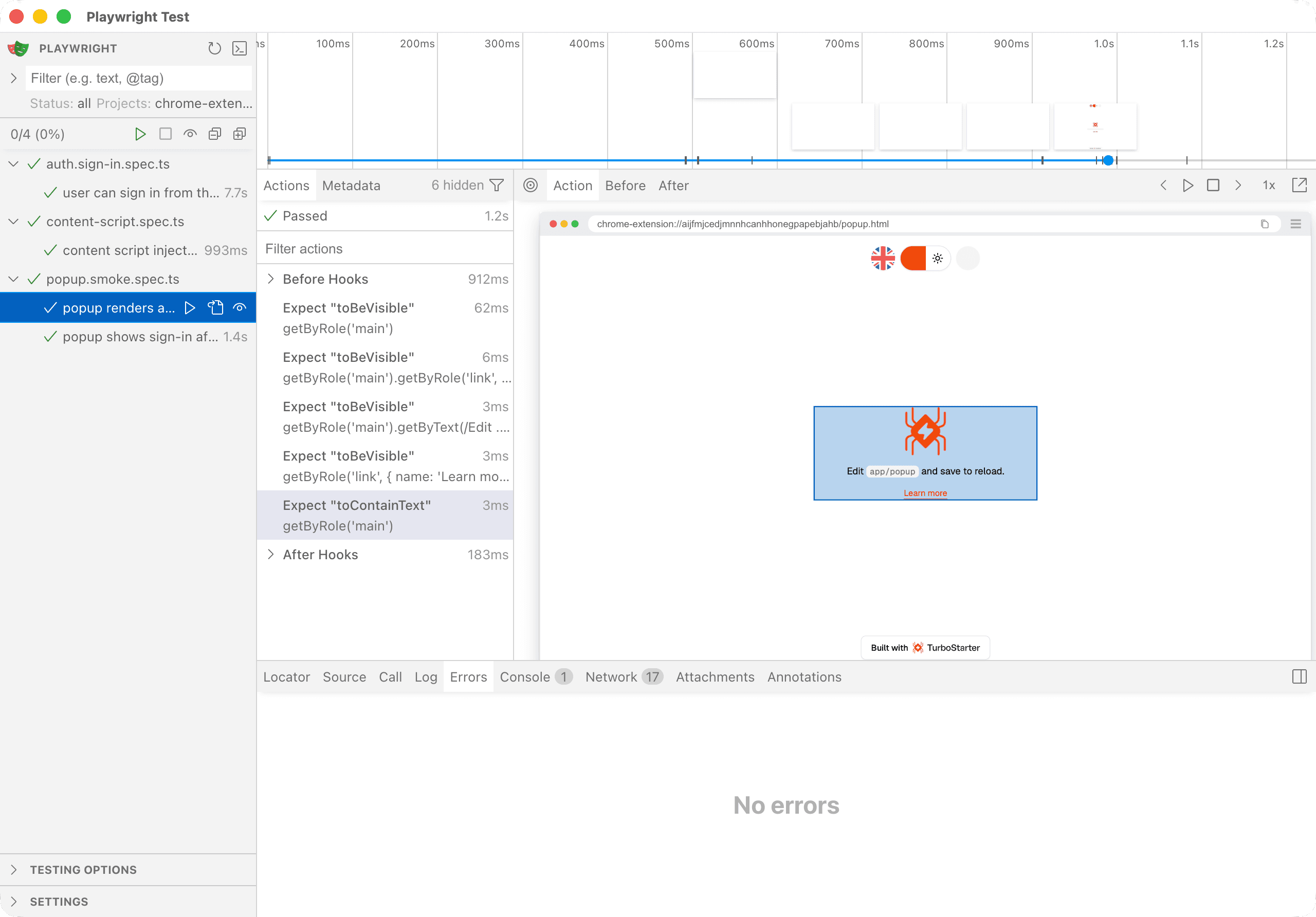
Popup smoke test
test("popup renders and background messaging responds", async ({
  popupPage,
  extensionId,
}) => {
  const popup = new PopupPage(popupPage, extensionId);
  await popup.waitForReady();
  await expect(
    popupPage.getByRole("link", { name: "Learn more" }),
  ).toBeVisible();
});
Sign in via the web app
When a user clicks "Sign in" in the popup, a new browser tab opens with the web app login. The test handles this cross-context flow:
test("user can sign in from the popup via the web app", async ({
  context,
  popupPage,
  extensionId,
}) => {
  const popup = new PopupPage(popupPage, extensionId);
  const loginPagePromise = context.waitForEvent("page");
  await popup.signInLink().click();

  const loginPage = await loginPagePromise;
  const login = new LoginPage(loginPage);
  await login.signIn(e2eUser.email, e2eUser.password);
  await loginPage.close();

  await popupPage.reload();
  await expect(popup.userMenu()).toBeVisible({ timeout: 15_000 });
});
Content script injection
Content scripts run in the context of web pages. This spec verifies the injected UI appears on a target page:
test("content script injects UI on a web page", async ({ context }) => {
  const page = await context.newPage();
  await page.goto("https://example.com");
  await expect(
    page.getByRole("button", { name: "Content script UI" }),
  ).toBeVisible();
});
Running tests
All extension tests
pnpm --filter extension test:e2eThis builds the web app, starts the production server, builds the extension, and runs all specs.
Single spec
pnpm --filter extension exec playwright test popup.smokeInteractive UI mode
pnpm --filter extension exec playwright test --uiView the HTML report
pnpm --filter extension exec playwright show-report e2e/playwright-reportLocal rebuild skip
Global setup skips the WXT build when manifest.json already exists in the build output and you are not in CI. Delete the build folder or set CI=true to force a rebuild.
CI
The CI / E2E / Extension workflow runs on pull requests labeled e2e or e2e-extension. It:
- Starts Docker services (Postgres, Mailpit)
- Copies example env files
- Installs Playwright with Chromium
- Runs tests inside
xvfb-run(virtual display for headed Chromium) - Uploads HTML reports and failure artifacts
Writing new tests
Unauthenticated spec
Import the extension fixture instead of the default Playwright test:
import { test } from "../fixtures/extension";
import { PopupPage } from "../pages/popup.page";

test("my new popup feature", async ({ popupPage, extensionId }) => {
  const popup = new PopupPage(popupPage, extensionId);
  await popup.waitForReady();
  // ...
});
Authenticated spec
Name the file *.authenticated.spec.ts to run with persisted auth state:
import { expect } from "@playwright/test";
import { test } from "../fixtures/extension";

test("authenticated popup shows user info", async ({
  popupPage,
  extensionId,
}) => {
  const popup = new PopupPage(popupPage, extensionId);
  await popup.waitForReady();
  await expect(popup.userMenu()).toBeVisible();
});
Content script spec
Use context.newPage() to open a regular web page where your content script injects UI:
test("content script appears on target page", async ({ context }) => {
  const page = await context.newPage();
  await page.goto("https://your-target-site.com");
  // Assert injected UI
  await page.close();
});
Best practices
- Test cross-context flows: popup → web app tab → back to popup is the most common extension pattern; use
context.waitForEvent("page")to handle new tabs - Run headed locally: extension tests require a visible Chromium instance; use
--headedif debugging outside the fixture - Keep workers at 1: multiple extension instances can conflict on the same profile
- Add
data-testidhooks: stable selectors for sign-in links, user menus, and content script UI
Next steps
- Extension development setup: local extension development
- Unit tests: fast Vitest tests for extension packages
- Authentication: how auth works in the extension
How is this guide?
Last updated on