Connect your Turbostarter (Next.js, React Native, Vite) app to Supabase in 5 minutes
Learn how to connect your TurboStarter monorepo (Next.js, React Native, Vite) to Supabase and use it as your unified database, storage, and edge backend.
When you spin up a new TurboStarter project – a starter kit for web apps, mobile apps, and browser extensions powered by Turborepo – one of the first questions is: where does my data live and how do I ship fast without fighting my backend?
Supabase answers that with a managed PostgreSQL platform – database, storage, and edge runtime – while TurboStarter gives you a production‑ready monorepo with Next.js, React Native, and Vite/WXT already wired together.
In this article, you’ll follow the same setup flow as our official Supabase recipe – just with a more opinionated, SEO‑friendly walkthrough. By the end, you’ll have one Supabase Postgres database and optional Supabase Storage + Edge Functions wired into your TurboStarter stack, ready to power web, mobile, and extension apps from a single source of truth.
TurboStarter complements Supabase perfectly:
- Monorepo by default – web, mobile, and extensions in one place.
- Shared database package –
@workspace/dbwith Drizzle ORM so schema and migrations are defined once and reused everywhere. - Production‑grade tooling – Turborepo, TypeScript, best‑practice configs, and CI‑ready structure.
You get the speed of a starter kit with the power of a real platform, without locking yourself into proprietary APIs. Let’s plug Supabase into TurboStarter in about five minutes.
What you’ll set up
In this guide you will:
- Create a Supabase project backed by managed Postgres.
- Point TurboStarter’s database at Supabase via
DATABASE_URL. - Run TurboStarter migrations so your full schema lives in Supabase.
- Use Supabase Storage as S3‑compatible storage for things like avatars, logos, and uploads.
- Optionally run your API on Supabase Edge Functions using Hono close to your data.
- Explore extra Supabase features (Auth, Realtime, Vector, Cron) that fit naturally into TurboStarter’s architecture.
Everything here follows the same structure as the Supabase recipe in your docs, so you can skim this post, follow along, and then dive into the reference documentation when you need more detail.
Supabase features at a glance
Before wiring anything up, it helps to understand what you’re getting from Supabase and how it pairs with TurboStarter’s monorepo.
Managed Postgres database
At the core of Supabase is a fully managed PostgreSQL database with automatic provisioning, backups, monitoring, and scaling. You keep the full power of Postgres – joins, constraints, indexes, transactions, extensions – while managing everything through a modern UI (database overview). TurboStarter plugs into this via @workspace/db and Drizzle, so your schema and migrations stay in Git while Supabase handles the heavy lifting of running Postgres in production.
Auth and Row Level Security
Supabase ships a complete authentication and authorization system on top of your database: email/password, magic links, OAuth providers (GitHub, Google, etc.), and SSO flows (auth overview). It integrates tightly with Postgres Row Level Security (RLS), letting you express rules like “users only see their own rows” directly in SQL. You can treat Supabase Auth as a dedicated identity provider, or combine it with TurboStarter’s existing auth patterns and user tables.
Auto‑generated APIs
Out of the box, Supabase can expose your tables via auto‑generated REST and GraphQL APIs (API guides). As you evolve your schema, these APIs update automatically, which is great for rapid prototyping or internal tools. In a TurboStarter project you can either lean on these generated APIs, or keep using your own @workspace/api routes and use Supabase strictly as your database and storage layer.
Storage for files and media
Supabase Storage gives you S3‑compatible object storage that is aware of your Postgres auth rules (storage docs). You can group files into buckets (avatars, documents, videos), secure them with RLS, and serve them through a CDN. Because TurboStarter already expects an S3‑style interface, plugging in Supabase Storage is mostly a matter of setting S3_ENDPOINT, bucket name, and access keys in .env.local.
Realtime powered by Postgres
Supabase Realtime listens to Postgres replication and streams inserts, updates, and deletes over websockets (realtime docs). Instead of polling, your apps can subscribe to table changes or custom channels and update UI instantly – ideal for dashboards, activity feeds, or collaborative experiences. With TurboStarter, you can enable Realtime on top of the same tables you manage via @workspace/db, without introducing a second realtime system.
Edge Functions and Cron
Supabase Edge Functions let you run serverless Deno functions close to your database and users (functions quickstart). They’re perfect for webhooks, custom business logic, or tasks that don’t belong in your frontend. Combined with Cron and pg_cron, you can schedule recurring jobs – for example nightly cleanups, report generation, or billing checks – all deployed alongside your database and accessible from your TurboStarter apps.
Vector and AI‑ready Postgres
With the pgvector extension and Supabase’s Vector tooling, you can store embeddings directly in Postgres and run similarity search queries. That means you can build AI‑powered features – recommendations, semantic search, RAG pipelines – without standing up a separate vector database. TurboStarter’s schema and migrations can define vector columns like any other field, so AI features live in the same repository and workflows as the rest of your data model.
Supabase Studio and CLI
Finally, Supabase includes Supabase Studio, a browser‑based dashboard for browsing tables, editing data, running SQL, inspecting logs, and managing auth, storage, and functions (architecture docs). The Supabase CLI complements this with local development, migrations, and function deployment commands. Together they give your TurboStarter team a single pane of glass for everything running in your Supabase project.
Prerequisites
Before you start, make sure you have:
| Requirement | Details |
|---|---|
| TurboStarter project | Cloned locally with dependencies installed (you can use our CLI to create a new project in seconds). |
| Supabase account | Create one at supabase.com and spin up a project. |
| Tooling | pnpm and Node.js installed (see development setup). |
If you’re already familiar with our core database docs:
…you’re in a perfect place to connect TurboStarter to Supabase.
Connect TurboStarter to Supabase in 5 minutes
Let’s go step‑by‑step through wiring a fresh TurboStarter monorepo to a new Supabase project. This is based closely on the official Supabase recipe, adapted for a blog format and SEO.
Create a new Supabase project
- Go to the Supabase dashboard.
- Create a new project (choose a strong database password and a region close to your users).
- Supabase will automatically provision a PostgreSQL database for you.
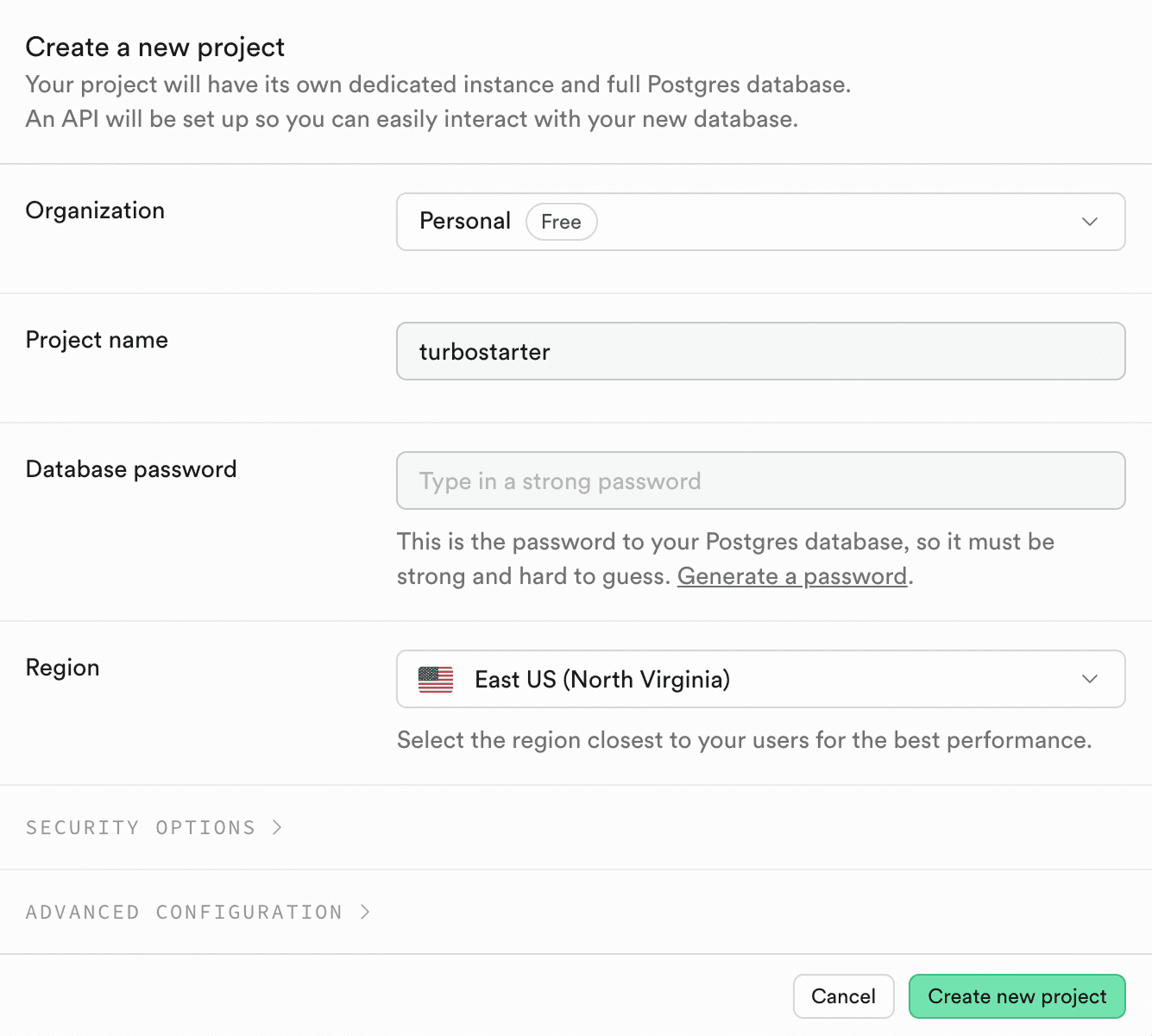
Optionally, you can customize the Security options by choosing the Only Connection String option – it opts out of autogenerating APIs for tables inside your database. It’s not required for TurboStarter, but you can still leverage Supabase’s generated APIs for your own use‑cases if you want.
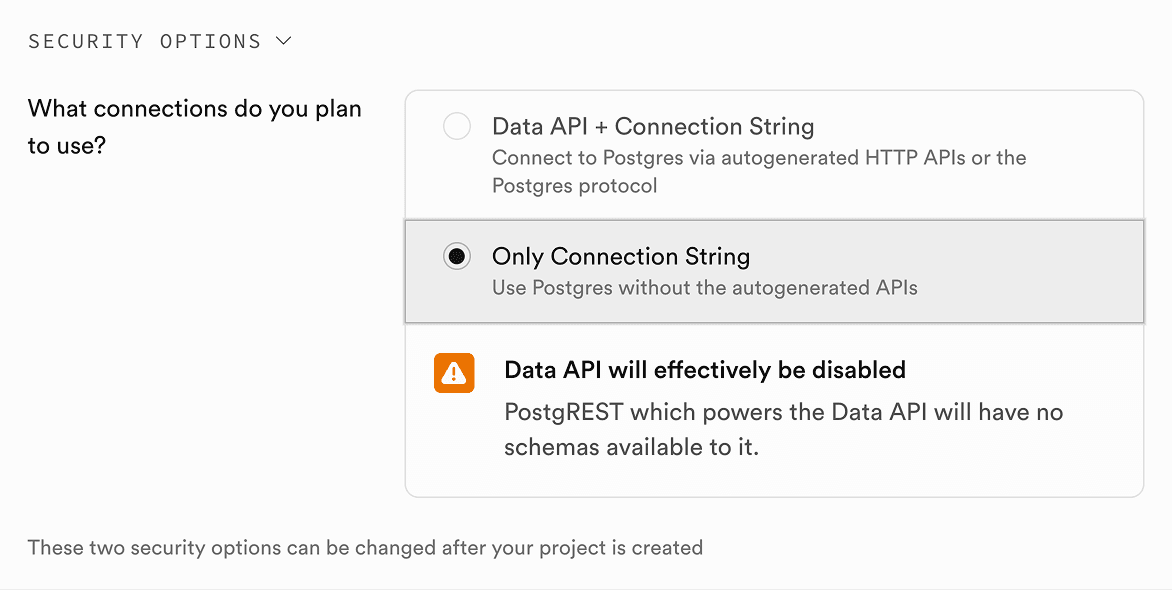
Once the project is ready, you’re ready to grab the connection string.
Get the database connection string
In the Supabase dashboard:
- Open your project.
- Click on the Connect button at the top.
- Locate the connection string for your chosen ORM (under the ORMs tab).
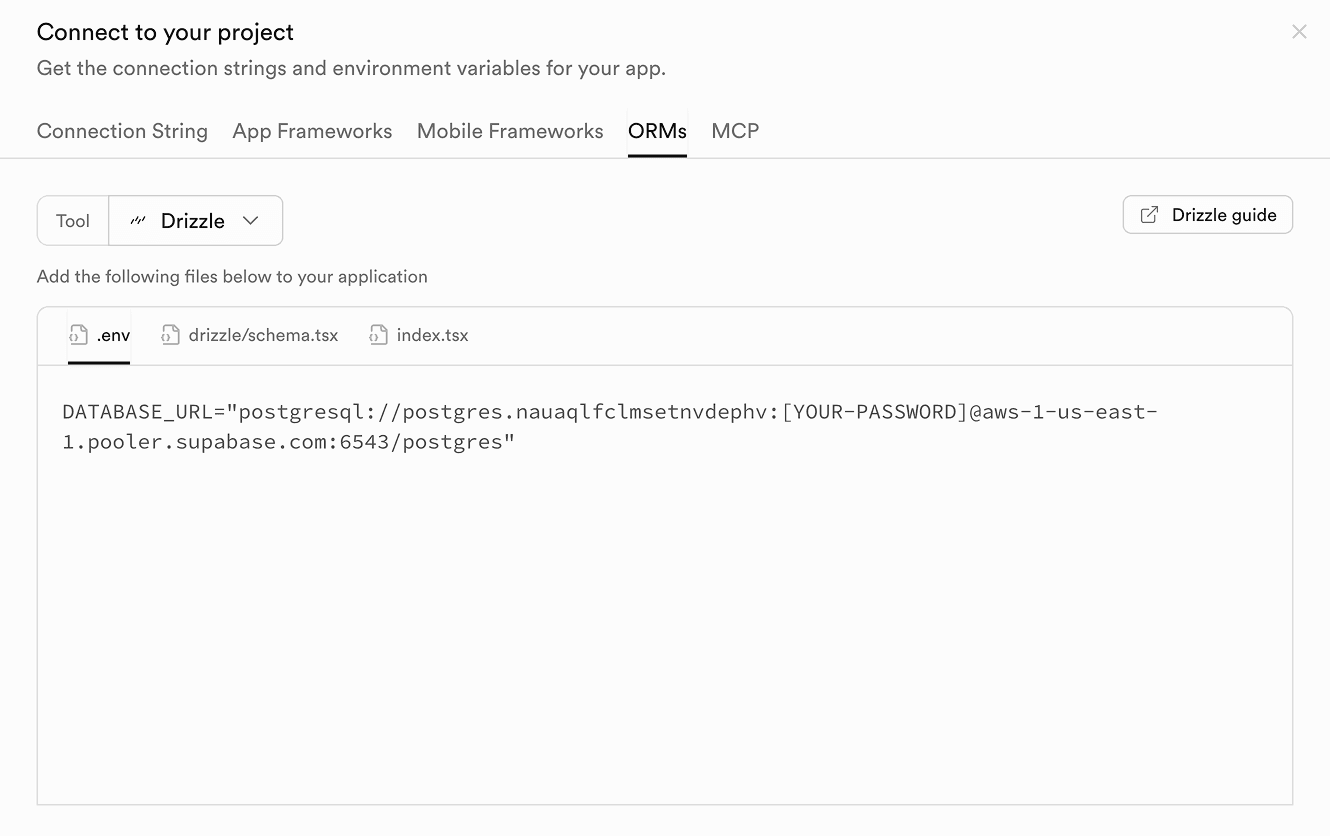
Copy this value – you’ll use it as your DATABASE_URL.
Replace password placeholder
In your Supabase connection string, you’ll see a placeholder like [YOUR-PASSWORD]. Make sure to replace this with the actual password you set when creating your Supabase project.
Configure TurboStarter to use Supabase Postgres
TurboStarter reads database connection settings from the root .env.local file and uses them inside the @workspace/db package. That means once you point DATABASE_URL at Supabase, all apps that rely on @workspace/db (web, mobile backends, extension backends) will automatically talk to Supabase Postgres.
Create (or update) the .env.local file in the monorepo root:
DATABASE_URL="postgres://postgres.[YOUR-PROJECT-REF]:[YOUR-PASSWORD]@aws-0-[aws-region].pooler.supabase.com:6543/postgres?pgbouncer=true&connection_limit=1"Replace:
YOUR-PROJECT-REFwith your Supabase project ref.YOUR-PASSWORDwith the database password you set when creating the project.aws-regionwith the region shown in the Supabase connection string.
This DATABASE_URL is validated in the @workspace/db package and used to create the Drizzle client for your database. You stay in full control of your schema and migrations while letting Supabase handle hosting, backups, and performance.
For more background on how DATABASE_URL is used under the hood, see the Database overview.
Apply the TurboStarter schema to Supabase
With DATABASE_URL now pointing to Supabase, you can apply the existing TurboStarter schema to your Supabase database.
From the monorepo root, run:
pnpm with-env pnpm --filter @workspace/db db:migrateThis will:
- Use your Supabase
DATABASE_URLfrom.env.local. - Run all pending SQL migrations from
packages/db/migrations. - Create the full TurboStarter schema (users, billing, demo tables, etc.) in Supabase.
If you’re actively iterating on the schema, you can generate new migrations and apply them as described in Migrations.
Seeding your database
After running your migrations, you may want to seed your database with initial data (such as demo users or organizations). You can do this by running:
pnpm with-env pnpm turbo db:seedThis will populate your Supabase Postgres database with example data you can use to explore TurboStarter’s features across web, mobile, and extensions.
Use Supabase Storage as S3‑compatible storage
TurboStarter’s storage layer is designed to work seamlessly with any S3‑compatible provider. Supabase Storage provides a simple, S3‑compatible API and is a great choice if you’re already using Supabase for your database.
Create a storage bucket
- In the Supabase dashboard, go to Storage → Buckets.
- Click Create bucket (name it whatever you want, for example
avatarsoruploads). - Adjust settings based on your needs (e.g. max file size, allowed file types).
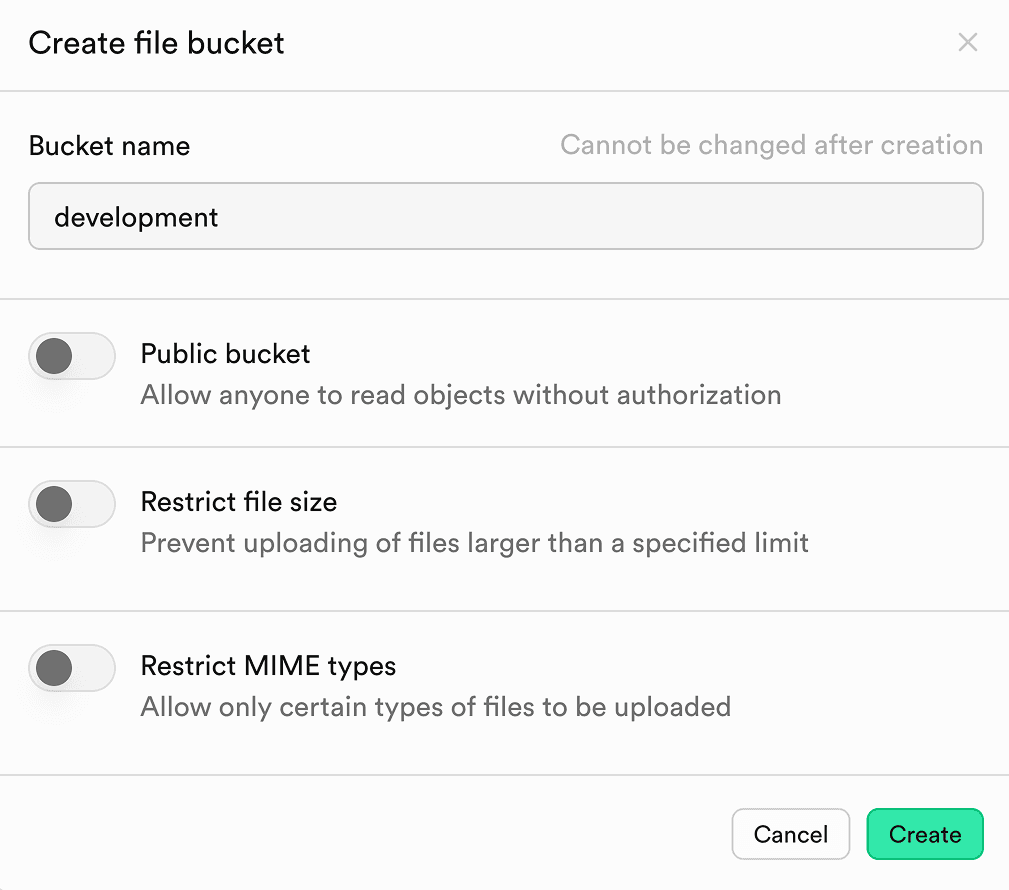
You can create multiple buckets (for documents, images, videos, etc.) if needed.
Generate S3 access keys in Supabase dashboard
- Go to Storage → S3 → Access keys.
- Click New access key.
- Give it a descriptive name and create the key.
- Copy the Access key ID and Secret access key to use in your application.
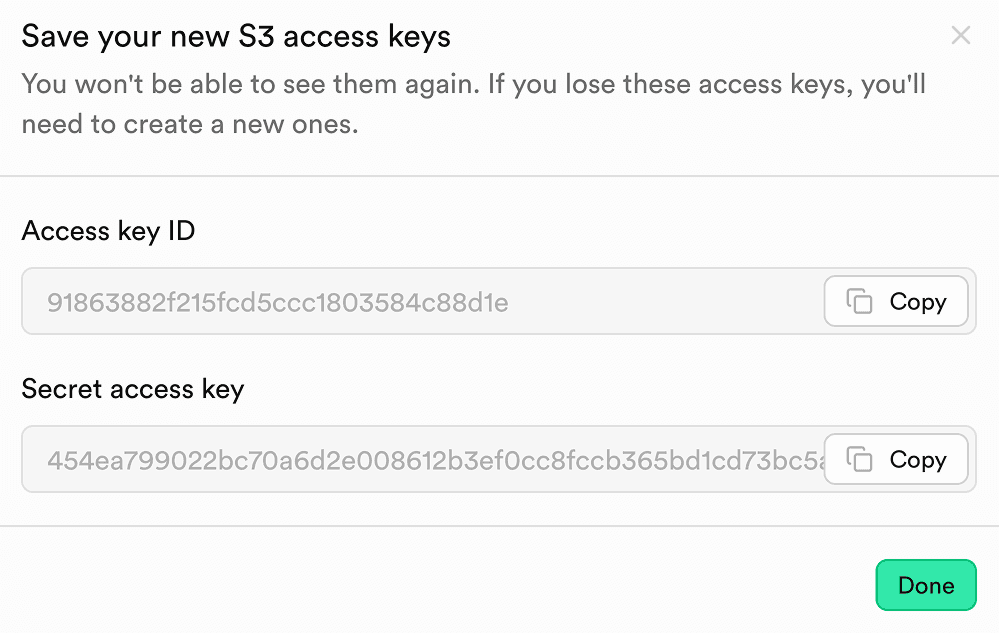
Configure S3 environment variables for Supabase Storage
In your web application’s .env.local, add (or update) the S3 configuration used by TurboStarter’s storage layer:
S3_REGION="us-east-1"
S3_BUCKET="avatars"
S3_ENDPOINT="https://[YOUR-PROJECT-REF].supabase.co/storage/v1/s3"
S3_ACCESS_KEY_ID="your-access-key-id"
S3_SECRET_ACCESS_KEY="your-secret-access-key"
These variables integrate directly with the storage configuration described in:
Once set, existing TurboStarter file upload flows (e.g. user avatars, organization logos) will use Supabase Storage via presigned URLs – no extra code changes required.
Run your API on Supabase Edge Functions
TurboStarter uses Hono as an API server. If you want, you can deploy it as a Supabase Edge Function so it runs close to your users and your Supabase Postgres database.
At a high level:
- Install the Supabase CLI and initialize a Supabase project locally with
supabase init. - Create a new Edge Function (for example
hono-backend) with:
supabase functions new hono-backend- Inside the generated function (for example
supabase/functions/hono-backend/index.ts), set up a basic Hono app and export it viaDeno.serve(app.fetch):
import { Hono } from "jsr:@hono/hono";

// change this to your function name
const functionName = "hono-backend";
const app = new Hono().basePath(`/${functionName}`);

app.get("/hello", (c) => c.text("Hello from hono-server!"));

Deno.serve(app.fetch);- Run the function locally with
supabase startandsupabase functions serve --no-verify-jwt, then call it from your TurboStarter app using the local or deployed function URL. - When you’re ready, deploy the function with
supabase functions deploy(orsupabase functions deploy hono-backend) and manage it using the Supabase dashboard, as described in the Supabase Edge Functions docs.
This is entirely optional, but it’s a great fit for lightweight APIs, webhooks, and other serverless logic you want to run alongside your Supabase project.
Explore additional Supabase features (without rewriting your app)
Once your TurboStarter project is backed by Supabase Postgres and Storage, you can gradually add more Supabase features as your app grows.
Some features that fit especially well with TurboStarter’s design:
- Realtime – built on Postgres replication, so you can stream changes from your existing TurboStarter tables (inserts, updates, deletes) into live UIs without changing how you manage schema or RLS. You still define tables and policies via
@workspace/db, and opt into Realtime on top. - Vector – powered by the pgvector extension and stored in regular Postgres tables, making it easy to integrate semantic search or AI features while keeping everything in the same migrations and Drizzle models you already use in TurboStarter. We’re using it extensively in our dedicated AI Kit.
- Cron – lets you schedule background jobs and periodic tasks with pg_cron, perfect for scheduled cleanups, report generation, or recurring workflows.
Because these features are layered on top of Postgres, you manage them through the same TurboStarter migrations and db package – no separate database, no duplicated schema.
Optional: talk directly to Supabase from your apps
Everything above works with TurboStarter’s existing database abstractions – you don’t have to add any Supabase SDKs to ship a production‑ready app backed by Supabase.
If you do want to integrate Supabase more deeply, you have options:
- Call Supabase REST endpoints from your Next.js, React Native, or extension frontends.
- Use the official JavaScript client in places where it makes sense (for example, for auth or realtime in a specific app).
Here’s a minimal example of the kind of query you might run once a client is configured (see the Supabase docs for full setup details):
// Example shape only – not part of TurboStarter's core setup
const { data, error } = await supabase.from("todos").select("*");
Or, for a simple REST call:
await fetch(`${process.env.NEXT_PUBLIC_SUPABASE_URL}/rest/v1/todos`, {
  headers: {
    apikey: process.env.NEXT_PUBLIC_SUPABASE_ANON_KEY!,
  },
});
These are optional enhancements on top of the core “Drizzle + Supabase Postgres” architecture described above.
Production best practices for Supabase + TurboStarter
To get a production‑grade setup, keep these points in mind:
- Environment variables:
- Keep secrets (service role keys, database passwords) outside of the client bundle.
- Use
.env.localin development and environment variables in your hosting provider for production.
- Row Level Security:
- Turn on RLS for user‑facing tables.
- Start from Supabase’s RLS examples and adapt them to your TurboStarter schema.
- Connection pooling:
- Supabase’s connection strings can include
pgbouncerandconnection_limitdefaults. - This is important when you run TurboStarter across multiple server instances or edge regions.
- Supabase’s connection strings can include
- Monitoring and logs:
- Use Supabase’s dashboard to monitor slow queries, function errors, and auth issues.
- Pair it with your TurboStarter logging/observability setup for a complete view of your system.
The combination of Supabase’s platform tools and TurboStarter’s structure lets you move from prototype to production without rewriting your backend – and if you ever start a new project, you can spin it up in seconds with TurboStarter and reuse the same patterns.
Deploy your Supabase‑powered TurboStarter stack
Once your stack is integrated, deployment is straightforward:
- Use our guide on self‑hosting your Next.js Turborepo app with Docker in 5 minutes.
- Pair it with Supabase’s managed Postgres and Storage for a fully managed backend.
- Optimize builds with Turbopack and our advanced Turbo CLI techniques.
You now have a modern, scalable, Supabase‑backed TurboStarter app that runs across web, mobile, and extensions with a single source of truth. Explore more patterns in the Supabase docs and our own TurboStarter documentation to keep leveling up your stack – or start your next idea with TurboStarter and reuse everything you learned here.
Next.js Security Checklist 2026: Auth, Server Actions, CVEs
Next.js security for 16.x: patched versions for the 2025-2026 CVEs, why proxy.ts is not auth, Server Actions, CSRF, CSP nonces and Better Auth.
Cross-platform SaaS with one backend - web, mobile, and browser extension from a monorepo
How to build a cross-platform SaaS with one backend for Next.js web, Expo mobile, and a browser extension. Architecture, shared auth, and when a monorepo wins.