For the complete documentation index, see llms.txt. Prefer markdown by appending.mdto documentation URLs or sendingAccept: text/markdown.
Configuration
Configure native store products, offerings, and paywalls for iOS and Android. User and organization billing with cross-platform plan sync.
Mobile billing configuration consists of a few key components that must be set up correctly to work across platforms.
If you're new to in-app purchases, the most important thing to understand is that native stores are the source of truth for your products (what can be purchased, how much it costs, and where it's available). Your billing provider (and your app) can only show and sell what you've configured correctly in App Store Connect (iOS) or the Google Play Console (Android).
As a rule of thumb, set things up in this order:
- Store: complete agreements, create products in the native stores, and make sure they're available for testing
- Offerings: organize products into purchasable choices for your users (monthly/yearly, tiers, etc.) and specify which entitlements each option grants
- Paywall: present offerings in-app and trigger purchases/restores
All of these components are tightly connected, and each must be configured correctly for the billing flow to work smoothly. The sections below guide you through configuring each one.
Billing reference
In the mobile app, billing can be resolved against either:
- the current user for B2C/self-serve billing
- the active organization for organization-aware B2B billing
The current mobile billing setup identifies the customer with the active billing reference at runtime. If the user has an active organization selected, billing can be associated with that organization. Otherwise, it falls back to the personal user account.
This means you can support both:
- personal subscriptions for individual users
- team-oriented billing where access belongs to the organization
This is especially useful when your mobile app shares billing state with the web app and uses the same user or organization account model across platforms.
Important distinction
Native mobile purchases still go through Apple or Google billing systems. The B2B part here is about which app-level account owns the billing state and access after purchase: the user or the organization.
Store
Store configuration is the foundation: every in-app purchase ultimately goes through the native store (App Store on iOS, Google Play on Android). Complete this first—otherwise your paywall won't be able to display the correct products and prices.
Follow the official guides to make sure you've created and configured your products in the native stores correctly.
iOS Product Setup
Setting up your in-app purchases in App Store Connect.
Google Play Product Setup
Setting up your in-app purchases in Google Play Billing.
Although these links come from RevenueCat's documentation, the steps apply to any provider - the key part is knowing what's relevant for correct store setup.
Offerings
Offerings are what your app presents to the user. They typically map store products into a set of purchasable options (for example: monthly vs. yearly), plus the “what do I unlock?” logic.
They're primarily configured remotely in your provider's dashboard. See the dedicated setup guides below to learn how to configure offerings for each provider.
RevenueCat
Integrate your mobile application with RevenueCat.
Superwall
Implement paywalls, subscriptions, and revenue sharing with Superwall.
The source of truth for the offerings is the native store products data, so make sure to first complete the store configuration above.
Entitlements
In mobile apps terminology, you often can see the term entitlements used together with offerings. Entitlements define what content or features users have access to after making a purchase and are tied to specific products.
For instance, a user who purchases a premium subscription could be granted access to exclusive features through entitlements.
Cross-platform support
To show purchased plan details in your app (such as on a subscription overview screen) and make them accessible on both mobile and web apps, you'll need to include that plan in your shared billing configuration. Follow the web configuration schema for consistency across platforms.
export const config = billingConfigSchema.parse({
  ...
  plans: [
    {
      id: BillingPlan.PREMIUM,
      name: "Premium",
      description: "Become a power user and gain benefits",
      badge: "Bestseller",
      variants: [
        {
          /* WEB */
          ...

          /* MOBILE */
          /* 👇 This is the product identifier from the store (e.g. App Store Connect, Google Play) */
          id: "core_premium_recurring_month_flat",
          cost: 1900,
          currency: "usd",
          model: BillingModel.RECURRING,
          interval: RecurringInterval.MONTH,
          trialDays: 7,
          hidden: true,
        },
      ],
    },
  ],
  ...
}) satisfies BillingConfig;
Make sure to set the hidden flag to true to prevent the variant from being displayed in the pricing table on the web app. This is because the web app will display variants from the shared billing configuration, while the mobile app displays variants from offerings configured for the specific paywall in the provider's dashboard.
This way, you stay compliant with in-app purchase requirements, keep a native mobile experience, and can still show plan details in both the web app and the mobile app.
If your app supports organizations, this shared configuration also helps keep B2B billing behavior consistent across platforms. The web app and mobile app can both resolve billing against the same organization reference, even though the mobile purchase itself still happens through the native store flow.
Paywall
The paywall is the UI users interact with to purchase an offering. It's configured remotely in the provider's dashboard, letting you change the paywall UI, behavior, and displayed offerings without needing to release a new version of your app.
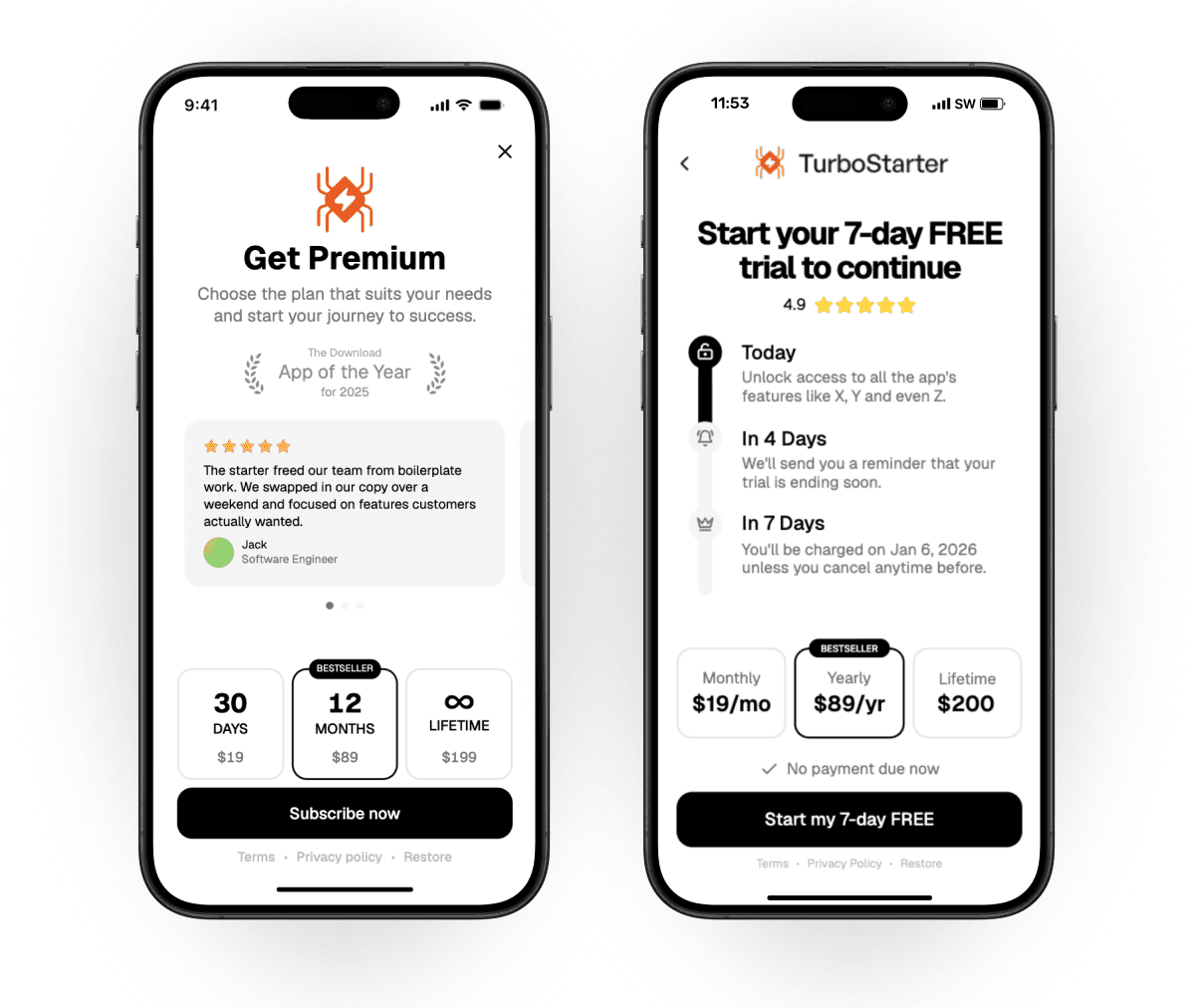
To make paywall setup easier, we have a dedicated guide for each provider:
RevenueCat
Integrate your mobile application with RevenueCat.
Superwall
Implement paywalls, subscriptions, and revenue sharing with Superwall.
Test your paywall in a sandbox environment first to confirm everything works as expected and that products from the native stores display correctly.
How is this guide?
Last updated on