Next.js API Router: Route Handlers guide
Next.js API Router explained: App Router route.ts handlers, vs Pages API and Server Actions, plus when to mount tRPC.
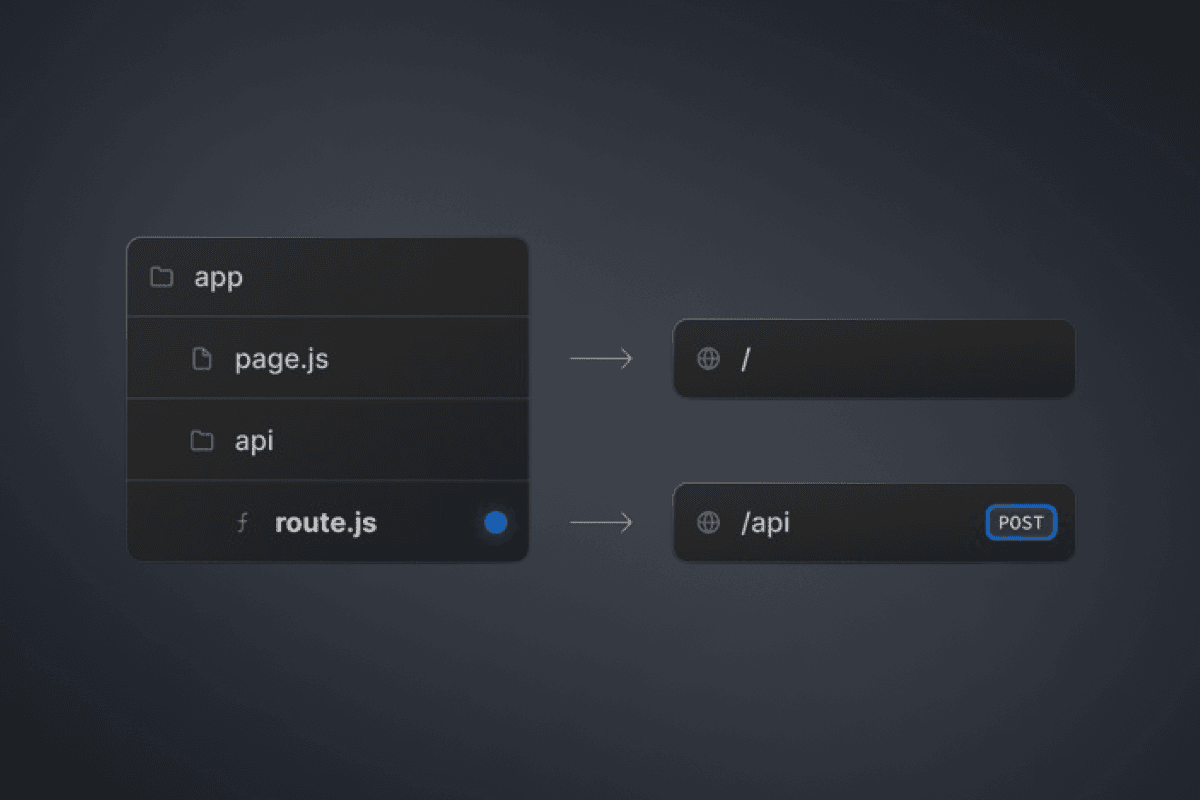
If you searched for Next.js API Router, you are usually hunting for how to build HTTP endpoints in the App Router: app/api/.../route.ts files that export GET, POST, and friends. There is no separate product called "API Router." People mean Route Handlers on top of the App Router, the replacement for classic pages/api routes.
Short answer
Use App Router Route Handlers (route.ts exporting named HTTP methods) for any real HTTP endpoint: public APIs, webhooks, auth callbacks, mobile clients, or CORS-facing fetch. Use Server Actions for UI-triggered mutations inside your own Next.js app. Skip inventing dozens of thin route.ts files for product CRUD; mount a typed API (for example tRPC or Hono) behind one handler, the pattern TurboStarter uses for SaaS web, mobile, and extension clients.
Key takeaways
- Next.js API Router in search results almost always means App Router Route Handlers, not a third router.
- Handlers use Web Request / Response APIs; Pages
pages/apiused Node-stylereq/res. - Since Next.js 15,
paramsis a Promise you mustawait, and GET handlers are dynamic by default. - Prefer Server Components for private reads, Server Actions for internal writes, Route Handlers for HTTP.
- Production SaaS usually adds a typed API layer once web + mobile share the same backend.
What is the Next.js API Router?
Quotable definition: The Next.js "API Router" is the App Router convention of colocating HTTP endpoints as route.ts (or route.js) files that export functions named after HTTP methods (GET, POST, PUT, PATCH, DELETE, HEAD, OPTIONS).
| Name people say | What it actually is | Where it lives |
|---|---|---|
| Pages API routes | Legacy Node-style handlers | pages/api/*.ts |
| App Router APIs | Route Handlers (Web Request/Response) | app/**/route.ts |
| "Next.js API Router" | Informal label for App Router Route Handlers | Same as Route Handlers |
| Server Actions | Server mutations callable from your UI (not a public URL) | "use server" functions |
Official guidance from Vercel covers this under Building APIs with Next.js and the Route Handlers file convention. Folders still define the URL. A file at app/api/users/route.ts serves /api/users. You do not need an api folder name, but /api remains the conventional prefix.
Route Handlers vs Pages API vs Server Actions
Pick the tool by who calls it, not by habit.
| Need | Prefer | Why |
|---|---|---|
| Webhook (Stripe, Lemon Squeezy, GitHub) | Route Handler | External HTTP POST with raw body/headers |
| Better Auth / OAuth callback | Route Handler | Framework mounts on a URL path |
| Mobile app or browser extension client | Route Handler + typed API | Shared HTTP contract across platforms |
| Form submit / dashboard mutation in-app | Server Action | No public URL to maintain |
| Read data only for a page you render | Server Component data access | No endpoint to expose |
| Legacy Pages Router codebase | Keep pages/api until migrated | Both routers can coexist during moves |
Decision rule: if anything outside your React tree needs a URL, status codes, and headers, use a Route Handler. If only your own form or button needs a mutation, use a Server Action and keep business logic in a shared data-access function (Next.js security guidance).
Prerequisites
- Next.js App Router project (13.2+ for Route Handlers; treat 15+ as current for async
params) - TypeScript recommended
- A place for shared logic outside the handler (service / DAL), so you do not duplicate code between Actions and routes
- Clarity on clients: web-only vs web + mobile + webhooks
Optional:
- Zod for body validation
- A typed RPC layer (tRPC) once you outgrow ad-hoc
fetch('/api/...') - Auth that already ships a Next.js handler, such as Better Auth
toNextJsHandler
Build your first Next.js API Router endpoint
Create app/api/health/route.ts. The folder path is the URL path.
// app/api/health/route.ts
export async function GET() {
  return Response.json({ ok: true, ts: Date.now() });
}
Hit GET /api/health. You should get JSON. Scaffolding tip: npx create-next-app@latest --api includes an example handler (official API guide).
Unlike Pages API (one default export), App Router handlers export one function per method.
// app/api/notes/route.ts
import { NextRequest } from "next/server";

export async function GET() {
  return Response.json({ notes: [] });
}

export async function POST(request: NextRequest) {
  const body = (await request.json()) as { title?: string };

  if (!body.title?.trim()) {
    return Response.json({ error: "title required" }, { status: 400 });
  }

  return Response.json(
    { id: crypto.randomUUID(), title: body.title.trim() },
    { status: 201 },
  );
}
Parse the body yourself. There is no auto-filled req.body like Pages Router.
For /api/notes/:id, use a folder segment:
// app/api/notes/[id]/route.ts
import { NextRequest } from "next/server";

export async function GET(
  _request: NextRequest,
  { params }: { params: Promise<{ id: string }> },
) {
  const { id } = await params;
  return Response.json({ id });
}
Since Next.js 15, params is a Promise. Forgetting await is the most common App Router API migration bug. See the route file convention.
import { NextRequest } from "next/server";
import { cookies, headers } from "next/headers";

export async function GET(request: NextRequest) {
  const q = request.nextUrl.searchParams.get("q");
  const cookieStore = await cookies();
  const headerStore = await headers();

  return Response.json({
    q,
    session: cookieStore.get("session")?.value ?? null,
    userAgent: headerStore.get("user-agent"),
  });
}
Use NextRequest / NextResponse when you want Next helpers (nextUrl, cookie helpers). Plain Request / Response remain valid Web standards.
import { z } from "zod";

const createNoteSchema = z.object({
  title: z.string().min(1).max(120),
});

export async function POST(request: Request) {
  const parsed = createNoteSchema.safeParse(await request.json());

  if (!parsed.success) {
    return Response.json({ error: parsed.error.flatten() }, { status: 400 });
  }

  // insert with parsed.data
  return Response.json({ ok: true }, { status: 201 });
}
Same rule as Server Actions: never trust the client. Pair this with the patterns in our Next.js security guide.
Caching and runtime (do not cargo-cult old blog posts)
Route Handler caching changed across major versions. As of current Next.js docs:
- Handlers are not cached by default.
- You can opt a
GETinto static behavior with segment config such asexport const dynamic = 'force-static'. - Next.js 15 changed the previous "GET often static" default toward dynamic by default (changelog notes on the route docs).
If an older tutorial warns that your authenticated GET might be baked at build time, verify against your Next version. For user-specific data, read cookies/headers (or otherwise force dynamic behavior) and never return another user's payload from a cached handler.
Default runtime is Node.js. Set export const runtime = 'edge' only when you need edge constraints and your dependencies allow it.
Static output: 'export' cannot run dynamic API handlers. Host APIs on a Node-capable deploy if you need request-time endpoints (SPA / static export notes).
Production patterns that beat a pile of route.ts files
1. Thin handlers that mount libraries
Auth and billing webhooks rarely need custom routing trees. Mount the library:
// Pattern: Better Auth on App Router
import { toNextJsHandler } from "better-auth/next-js";
import { auth } from "@/lib/auth";

export const { GET, POST } = toNextJsHandler(auth.handler);
TurboStarter wires auth the same way under /api/auth/[...all] and billing webhooks under a dedicated Route Handler that re-exports the provider webhook. Product mutations live in the typed API, not in dozens of one-off files.
2. One typed API behind /api/trpc (or Hono)
When your web app, mobile app, and extension share procedures, a typed layer pays off. Mount the adapter once:
// Simplified: tRPC fetch adapter in a Route Handler
import { fetchRequestHandler } from "@trpc/server/adapters/fetch";
import { appRouter, createTRPCContext } from "@/server/api";

const handler = (req: Request) =>
  fetchRequestHandler({
    endpoint: "/api/trpc",
    req,
    router: appRouter,
    createContext: () => createTRPCContext({ headers: req.headers }),
  });

export { handler as GET, handler as POST };
That is the App Router "API Router" in a SaaS monorepo: Next owns HTTP edge, your package owns procedures, auth context, and Zod inputs. See TurboStarter API overview and the best SaaS stack 2026 writeup for how this fits with Better Auth and Drizzle.
3. Shared middleware wrappers
For a small number of raw handlers, wrap auth once:
import type { NextRequest } from "next/server";

type Handler = (req: NextRequest) => Promise<Response>;

export function withAuth(handler: Handler): Handler {
  return async (req) => {
    const token = req.cookies.get("session")?.value;
    if (!token) {
      return Response.json({ error: "Unauthorized" }, { status: 401 });
    }
    return handler(req);
  };
}
Prefer framework middleware (tRPC procedures, Hono middleware) once the surface area grows. Reimplementing Express in every route.ts does not scale.
4. Proxy / BFF only when it earns its keep
Route Handlers can forward to an upstream API with secrets kept server-side (BFF pattern in the official API post). Use that for consolidating microservices or hiding keys. Do not proxy your own database through HTTP when a Server Component can call the data layer directly.
Common mistakes
- Calling
pages/apimental models: expectingreq.bodyor a single default export. Parse JSON yourself; export named methods. - Forgetting
await params: breaks dynamic routes on Next.js 15+. - Building
/api/*for every form: inventing CSRF and client fetch glue that Server Actions already cover for in-app mutations. - Skipping auth on handlers: UI checks are not authorization. Enforce session and tenant membership in the handler or procedure (multi-tenant SaaS guide).
- Static export assumptions:
output: 'export'does not give you a live API server. - Mixing caches and user data: serving personalized GET responses from a forced-static handler.
- Business logic inside route.ts: duplicate it into Server Actions later. Extract a DAL early.
When to use a starter instead
DIY Route Handlers are fine for a health check and two webhooks. They are a poor place to invent org-scoped auth, billing webhooks, admin impersonation, and typed clients for Expo + extension. If that is your real backlog, a SaaS starter kit that already mounts auth and a typed API on the App Router saves weeks. TurboStarter's web docs cover the API layer, auth, and API deployment.
Frequently asked questions
No. Searchers use "Next.js API Router" for App Router Route Handlers (route.ts). The product names are App Router and Route Handlers. Pages Router APIs still exist as pages/api for legacy apps.
They still work in Pages Router projects and can coexist during migration. New App Router work should use Route Handlers. Vercel's Building APIs with Next.js positions Route Handlers as the default App Router approach.
Learn both. Use Server Actions for mutations from your own UI. Use Route Handlers when you need a stable HTTP URL (webhooks, mobile, public API). Share business logic underneath both.
Response / Request are enough for most handlers. Prefer NextRequest / NextResponse when you want helpers like nextUrl.searchParams or cookie utilities. Both are supported.
Next.js 15 made params (and similar request APIs) async so the framework can prepare data without blocking. Always const { id } = await params in dynamic Route Handlers. A codemod exists for upgrades.
Yes, with export const runtime = 'edge', subject to Edge API limits and dependency compatibility. Default is Node.js. Choose Edge for latency-sensitive, lightweight handlers; keep heavy ORMs and Node APIs on Node unless you have verified support.
Not by default. Many products only need authenticated typed procedures for first-party clients plus a few webhook handlers. Add a public REST surface when partners or customers need it, with auth, rate limits, and versioning from day one.
Final verdict: Next.js API Router
- Treat Next.js API Router as App Router Route Handlers.
- Use
route.ts+ named HTTP methods for real endpoints; use Server Actions for in-app mutations. await params, validate bodies, and enforce auth on the server.- Grow into a typed API mounted once (tRPC/Hono) when web and mobile share procedures.
- Keep webhooks and auth adapters as thin Route Handlers.
If you want that layout without assembling it from blog posts, start from TurboStarter or skim the web API docs and stack overview to see how Route Handlers, auth, and typed procedures fit a production monorepo.
Expo React Native Guide for Web Developers (2026 Edition)
Expo React Native guide for web developers: map React and Next.js skills to mobile, ship to TestFlight with EAS, and share code with your web app.
30x faster linting and formatting - ESLint and Prettier replaced with OXC
TurboStarter replaces ESLint and Prettier with OXC's Rust toolchain, cutting lint and format times from minutes to seconds across the whole monorepo.