Cloudflare D1 with Drizzle ORM: Production SaaS Guide (2026)
Cloudflare D1 with Drizzle ORM: Worker bindings, local and remote migrations, limits, pricing, and when D1 is the right database for a production SaaS.
If you searched cloudflare d1, you are usually deciding whether a SQLite database on Cloudflare Workers can hold a real SaaS, and how to wire Drizzle ORM without inventing a connection string. The pages that rank today are Cloudflare's own docs, the product page, a Reddit thread, the 2022 announcement, and an old Hacker News thread about query cost. This guide is the production setup those pages leave out.
This guide is the setup: what D1 is, the Worker binding, a Drizzle schema and drizzle-orm/d1 client, local and remote migrations, the batch versus interactive transaction caveat, current limits and pricing, and when to keep Postgres (Neon, Supabase, or your own) behind Hyperdrive instead. Numbers below come from Cloudflare's limits and pricing pages as updated on 30 October 2026. Re-read those pages before you budget. For Postgres-shaped Drizzle migrations (journals, squashing, CONCURRENTLY), use the Drizzle migrations guide. This post stays on D1.
Short answer
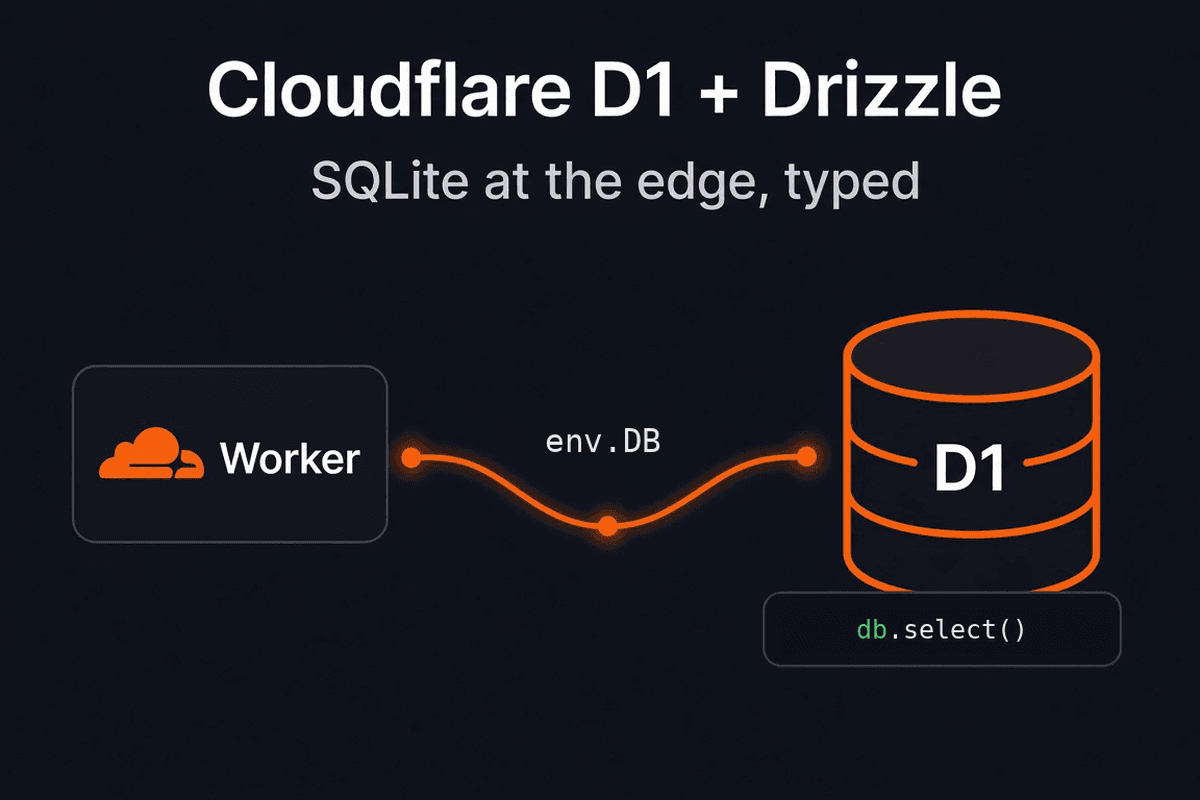
Cloudflare D1 is Cloudflare's managed SQLite database, reached from a Worker as a binding (env.DB), with SQLite SQL and no DATABASE_URL in application code. Drizzle ORM supports it through drizzle-orm/d1 and sqliteTable. Generate SQL with drizzle-kit generate, then apply with wrangler d1 migrations apply <DB> --local or --remote (or with drizzle-kit migrate over the D1 HTTP API, not both). D1 is a strong production database for read-heavy SaaS data that fits in 10 GB per database on Workers Paid. It is a weak fit when you need one larger primary, interactive transactions, or Postgres extensions. Workers Free includes D1 for prototyping, with daily row caps.
Quotable definition: Cloudflare D1 is a serverless SQLite database built into Workers. Each database is a binding in your Worker, backed by one Durable Object, with SQL queries, migrations, import and export, and Time Travel backups.
What is Cloudflare D1?
D1 stores relational data (users, sessions, subscriptions, orders) as SQLite tables. You query it with SQL from a Worker. Cloudflare describes it as the lightweight SQL option for user profiles, product listings, orders, and customer data, especially read-heavy workloads (storage options).
A few properties change how you design a SaaS on it:
- SQLite semantics. Types are SQLite types. Foreign keys are enforced by default, the same as
PRAGMA foreign_keys = onfor every query (foreign keys). You cannot import MySQL or Postgres dumps as-is. - Worker binding. In application code the database is
env.DB(typeD1Database). There is no host, port, or pool to size. Tooling can still reach a remote database over HTTP with an API token. Drizzle Kit'sd1-httpdriver does that with an account id, a database id, and a token. - One primary, single-threaded. Each database processes queries one at a time. Cloudflare's own guideline: a 1 ms average query can reach about 1,000 queries per second; a 100 ms query about 10. Extra concurrent requests queue, then return an overloaded error. Read replication adds more Durable Objects for reads. Writes still go to the primary (limits).
- A hard size cap. Workers Paid allows 10 GB per database, and Cloudflare states that cap cannot be increased. The intended scale-out is many smaller databases (per tenant, per user, or per entity).
Bind D1 on the Worker
Create the database, then declare it in Wrangler. wrangler d1 create returns the id you paste into config. --location is a hint for the primary region (weur, eeur, apac, oc, wnam, enam).
npx wrangler d1 create my-app-production --location=weur{
"name": "my-app",
"main": "src/index.ts",
"compatibility_flags": ["nodejs_compat"],
"d1_databases": [
{
"binding": "DB",
"database_name": "my-app-production",
"database_id": "<uuid>",
"migrations_dir": "drizzle",
"migrations_pattern": "drizzle/*/migration.sql",
},
],
}binding is the name on env. database_name is stable, so Cloudflare recommends it over the binding name when you run migration commands, in case the binding is renamed later (migrations).
migrations_pattern matters with current Drizzle Kit. drizzle-kit generate writes a folder per migration (drizzle/<name>/migration.sql plus snapshot.json), documented in Drizzle migrations. Wrangler only reads top-level .sql files unless you set a glob. The pattern must start with migrations_dir. Cloudflare's Drizzle example is migrations/*/migration.sql (migrations reference).
If the files on disk are flat 0000_name.sql files (older Kit, including some existing apps), drop migrations_pattern and point migrations_dir at that folder. Edge Kit ships "migrations_dir": "drizzle" and applies those files with Wrangler. Match the config to the SQL you generated. wrangler d1 migrations create only writes top-level files, so keep generating schema changes with Drizzle Kit when the pattern is nested.
Drizzle schema and the drizzle-orm/d1 client
Drizzle's Cloudflare D1 guide installs drizzle-orm and drizzle-kit (the page currently shows the @rc tags) and imports the driver from drizzle-orm/d1. Pin the versions your app already runs. A release-candidate driver and an older Kit will disagree about SQL.
Schema uses the SQLite column builders, not pgTable:
import { int, sqliteTable, text } from "drizzle-orm/sqlite-core";

export const users = sqliteTable("users", {
  id: int().primaryKey({ autoIncrement: true }),
  name: text().notNull(),
  email: text().notNull().unique(),
});
The Worker client is the binding. Queries use the SQLite-style .all() method the connect guide shows:
import { drizzle } from "drizzle-orm/d1";

import { users } from "./db/schema";

export interface Env {
  DB: D1Database;
}

export default {
  async fetch(_request: Request, env: Env) {
    const db = drizzle(env.DB);
    const rows = await db.select().from(users).all();
    return Response.json(rows);
  },
};
D1Database comes from Workers types (wrangler types, or the project's typegen). There is still no connection string in this file.
Kit config for generating SQL only needs the schema, the folder, and the SQLite dialect. Credentials show up when Kit itself applies SQL or opens Studio over HTTP (D1 HTTP with Drizzle Kit):
import { defineConfig } from "drizzle-kit";

export default defineConfig({
  schema: "./src/db/schema.ts",
  out: "./drizzle",
  dialect: "sqlite",
  driver: "d1-http",
  dbCredentials: {
    accountId: process.env.CLOUDFLARE_ACCOUNT_ID!,
    databaseId: process.env.CLOUDFLARE_DATABASE_ID!,
    token: process.env.CLOUDFLARE_D1_TOKEN!,
  },
});
The token needs D1 edit permission. accountId is on the Workers overview. databaseId is the D1 database id. If you apply migrations with Wrangler instead of drizzle-kit migrate, you can omit driver and dbCredentials for generate. Generate does not need a live database.
For ORM choice on TypeScript SaaS apps, see Drizzle vs Prisma. This guide stays on Drizzle because that is what we ship.
Cloudflare D1 migrations
Two appliers exist. Use one.
| Applier | Command | History table | When it fits |
|---|---|---|---|
| Wrangler | wrangler d1 migrations apply <DB> --local or --remote | d1_migrations (rename with migrations_table) | Workers deploys, Edge Kit, CI that already has Wrangler auth |
| Drizzle Kit | drizzle-kit migrate with driver: "d1-http" | Drizzle's migration table (__drizzle_migrations__) | You want Kit's migrate, push, and studio against remote D1 |
Running both on the same database applies the same SQL twice or leaves two histories that disagree. Pick Wrangler if deploy already runs wrangler d1 migrations apply. Pick Kit if you want one CLI for generate and apply and you will not also call Wrangler apply.
npx drizzle-kit generateRead the SQL in the pull request. Kit will ask you to confirm renames versus drop-and-add. A wrong answer drops data. General review rules (additive changes, never editing a file that already shipped) are in the Drizzle migrations guide.
npx wrangler d1 migrations apply my-app-production --local
npx wrangler d1 migrations list my-app-production --local
--local targets the Miniflare database used by wrangler dev. It does not touch production. Repeating apply runs only pending files.
npx wrangler d1 migrations apply my-app-production --remoteWrangler asks you to confirm, prints each file, and captures a backup after apply. In CI the prompt is skipped and the backup still runs. If a migration errors, Wrangler rolls that migration back and leaves the previous successful one applied (d1 migrations apply).
Apply before the new Worker starts serving, and keep the SQL compatible with the previous Worker. A drop in the same release as the code that still reads the old column will break the window where old code and the new schema overlap.
drizzle-kit push syncs schema without migration files. The D1 getting-started guide treats it as a fast local loop. Keep push off production. Same rule as Postgres.
Foreign keys can block a migration that rebuilds tables. D1 will not let you turn enforcement off for the whole connection. PRAGMA defer_foreign_keys = on defers checks until the end of the current transaction (foreign keys). Put that at the top of a migration that would otherwise fail mid-file, and fix violations before the transaction ends.
Large UPDATE or DELETE jobs need chunking. Cloudflare warns that one statement touching hundreds of thousands of rows, or hundreds of megabytes, can exceed the 30 second query limit. Their example chunk size is about 1,000 rows at a time (limits).
Local development
wrangler dev (v3 and later) runs locally by default, on Miniflare and workerd, with its own D1 data. Production rows are not copied in. A binding configured with "remote": true reads and writes the real database. Cloudflare warns that those changes cannot be undone (local development).
Local state persists across wrangler dev runs. --persist-to sets the directory. The Cloudflare Vite plugin uses the same runtime for vite dev, which is how TanStack Start apps on Workers see env.DB in development. Edge Kit stores that replica under .wrangler/state and documents the commands in database overview.
Useful checks:
npx wrangler d1 execute my-app-production --local \
  --command "SELECT name FROM sqlite_master WHERE type = 'table';"
Swap --local for --remote only when you mean production. --command and --file queries against remote D1 count as billable rows read or written, including dashboard queries (pricing FAQ).
Batching, and why db.transaction() fails
D1 auto-commits each statement. The supported way to run several statements atomically is batch(). Cloudflare's contract: statements run sequentially, and if one fails, the sequence aborts and rolls back (D1Database.batch). A batch also counts as one query against the per-invocation query limit, while each statement inside still has to respect statement length, parameter count, and duration (limits).
Drizzle exposes that as db.batch on the D1 driver (SQLite batch API):
import { eq } from "drizzle-orm";

const batchResponse = await db.batch([
  db
    .insert(users)
    .values({ id: 1, name: "Ada", email: "ada@example.com" })
    .returning({ id: users.id }),
  db.update(users).set({ name: "Ada Lovelace" }).where(eq(users.id, 1)),
]);
Every statement in the array is fixed before the call. You cannot await the first insert, read the new id, and then insert child rows inside the same batch. That is an interactive transaction, and D1 rejects BEGIN TRANSACTION / SAVEPOINT from the binding. db.transaction() on the D1 driver hits that error. Restructure the write so every statement is known up front (generate ids in the Worker, then batch the inserts), or move the critical section to a database that supports interactive transactions.
Postgres via Hyperdrive still has normal Drizzle transactions. SQLite inside a Durable Object has its own transactional storage API, which Cloudflare positions as the lower-level building block when you need strict serializability next to the data (storage options).
A Worker can open up to six D1 connections at once per invocation. That limit is about parallelism inside one request, not about pooling across requests.
Limits and pricing
Checked against the docs on 30 October 2026. Do not treat a blog as the billing source of truth.
What you pay
D1 bills rows read, rows written, storage above the included amount, and databases above the included count. It does not bill for idle compute hours, and it does not charge egress. Read replicas do not add a storage or compute fee. You pay the same rows_read and rows_written either way (pricing).
| Workers Free | Workers Paid | |
|---|---|---|
| Rows read | 5 million / day | First 25 billion / month included, then $0.001 / million rows |
| Rows written | 100,000 / day | First 50 million / month included, then $1.00 / million rows |
| Storage | 5 GB total | First 5 GB included, then $0.75 / GB-month |
| Databases | 10 | First 100,000 included, then $0.10 per extra database / month |
Rows read means rows scanned, not rows returned. SELECT * on 5,000 rows with no useful index is 5,000 reads even if you display ten. An index on the filtered column cuts that scan. Writing an indexed column also writes the index, so Cloudflare counts at least one extra row written. Row width does not change the count: 1 KB and 100 KB are both one row.
Free daily caps reset at 00:00 UTC. Past the cap, queries fail until reset. Past the free storage cap, you delete data before new inserts, new tables, or new indexes. Cloudflare's FAQ says the Workers Free plan will keep including D1 for prototyping. Workers Paid drops the daily caps and bills overages. Workers CPU time for running the query is billed as Workers usage, separate from D1.
An empty database is about 12 KB. Extra databases on Paid cost $0.10 per month even with no traffic. Cloudflare's example: 100,020 databases for a full month cost (100,020 - 100,000) × $0.10 = $2.00 plus whatever those databases read, write, and store.
Every query result includes meta.rows_read and meta.rows_written. Use that, the dashboard row metrics, or the GraphQL analytics API before you guess a bill.
Hard limits that change schema design
| Limit | Workers Free | Workers Paid |
|---|---|---|
| Databases per account | 10 | 1,000,000 (first 100,000 included) |
| Max database size | 500 MB | 10 GB (cannot be raised) |
| Max storage per account | 5 GB | 1 TB |
| Time Travel | 7 days | 30 days |
| Queries per Worker invocation | 50 | 1,000 (batch() counts as 1) |
Shared caps on both plans, from the same limits page:
- 100 columns per table. Rows per table are unlimited aside from storage.
- 2 MB max for a string, blob, or row.
- 100 KB max SQL statement. 100 bound parameters per query.
- 30 seconds max query duration.
- 50 MB max query result.
- 5 GB max file import via
d1 execute. - About 5,000 bindings per Worker script.
- 10 Time Travel restores per 10 minutes, per database.
The 10 GB ceiling is the decision point for a single shared database. Cloudflare's answer to "how much work can one D1 database do?" is horizontal: many 10 GB databases, not a larger one.
D1 versus Postgres, Supabase, Neon, Turso, KV, and Durable Objects
| Cloudflare D1 | Postgres (Neon, Supabase, or your own) | Turso | Workers KV | Durable Objects SQLite | |
|---|---|---|---|---|---|
| Engine | SQLite | PostgreSQL | Hosted libSQL (SQLite-compatible), via a connection URL | Key-value | SQLite beside the object |
| How Workers connect | Binding (env.DB) | Hyperdrive plus a driver | Client URL and token | KV binding | Object stub, code next to storage |
| Transactions | batch() only | Interactive transactions | libSQL transactions (confirm current client behavior in Turso's docs) | No SQL transactions | Transactional storage API, strict serializability |
| Size shape | 10 GB max per database on Paid | Single databases far past 10 GB | Check Turso's current plan limits before you bet on size | Value size limits, not tables | Per-object SQLite, same intended SQL pricing and limits as D1 |
| Best job | Relational SaaS data on Workers, read-heavy, fits the cap | Existing Postgres, extensions, heavy writes, one large primary | SQLite with a URL, including outside a Worker binding | Config, flags, hot reads that tolerate eventual consistency | Per-entity coordination, realtime, global ordering |
Supabase is Postgres plus auth, storage, and realtime. D1 is the database. Comparing "D1 vs Supabase" as if they were the same product category mixes a SQL engine with a backend platform. If the thing you want is Postgres (row level security, pgvector, a giant primary), use Supabase or Neon and connect the Worker with Hyperdrive. Edge Kit keeps its own accounts in D1 and documents that path for an existing Postgres database (Hyperdrive recipe). The two databases do not share a transaction.
Neon is serverless Postgres with a connection string and branching. Same Hyperdrive route from a Worker. Pick it when the schema already assumes Postgres, or when 10 GB and single-threaded writes are too small for one tenant's data.
Turso is the SQLite-compatible option when you want a database URL instead of a Worker binding. Confirm its current size, replica, and transaction docs before you migrate.
Workers KV is for configuration, routing metadata, and personalization (storage options). Reads of hot keys are the point. Writes to one key are rate-limited, and consistency is eventual. Session flags and a homepage announcement belong there. Orders, permissions, and account rows belong in D1.
R2 is for the bytes: uploads, images, exports. Store the object in R2 and the owner, name, and permissions in D1.
Durable Objects are the lower-level tool. Cloudflare is explicit: D1 is the managed database (HTTP API, schema management, import and export, query insights). SQLite in a Durable Object is colocated with your code, Workers-only, and gives you strict serializability. D1 and Queues are themselves built on Durable Objects. Each D1 database is one Durable Object. Use Durable Objects when you are building the coordination layer. Use D1 when you want the managed database.
Multi-tenant SaaS on D1
Two shapes, with a real tradeoff:
Shared database, tenant column. One schema, one migration history, one binding. Isolation lives in queries and constraints (tenant_id on every table, every WHERE). This is the usual SaaS shape and the one described in how to build multi-tenant SaaS. It fits until a tenant's data, or the whole customer base, pushes the 10 GB cap, or one tenant's writes stall everyone else because the primary is single-threaded.
Database per tenant. Cloudflare designs D1 for this: many databases up to 10 GB, 100,000 included on Workers Paid, then $0.10 each per month even when empty. Isolation is stronger. Operations are heavier. Every migration must fan out. A Worker script can hold about 5,000 bindings, so you cannot declare 100,000 tenant databases in wrangler.jsonc. Past that, query by database id through D1's HTTP API, which Cloudflare documents for access outside a Worker binding (storage options), and keep a directory of tenant ids in one small control database.
Do not split tenants across databases on day one because it sounds cleaner. Split when you can name the limit you are hitting: size, noisy writes, or a hard isolation requirement.
Read replication, Time Travel, and export
Read replication
Read replication is optional, per database, enabled in the dashboard (Settings, then Enable Read Replication) or with the REST API (read_replication.mode: "auto"). Replicas serve reads. Writes still go to the primary. Cloudflare currently places replicas in ENAM, WNAM, WEUR, EEUR, APAC, and OC, and says that list can change (read replication).
Replicas lag. Without a session, a read after a write can miss the write. withSession() is required or every query stays on the primary. "first-primary" sends the first query to the primary. "first-unconstrained" (the default) may hit any replica. A bookmark from session.getBookmark() lets the next request start at least that far forward. Sessions exist on the Worker binding. They are not on the REST API yet. There is no extra charge for replicas.
The documented Drizzle client takes env.DB. withSession() returns a D1DatabaseSession, and the current drizzle-orm/d1 driver is typed against D1Database (driver source). Do not assume drizzle(session) typechecks or preserves bookmarks until you check the version you have installed. Skipping the session means every query stays on the primary, so replicas you enabled do nothing.
Time Travel
Time Travel is the backup. It is always on for databases on the production storage backend (wrangler d1 info shows version: production). You do not schedule snapshots. History and restores have no extra D1 charge. You can restore to any minute in the last 30 days on Workers Paid, or 7 days on Free (Time Travel).
npx wrangler d1 time-travel info my-app-production --timestamp="2026-11-02T12:00:00Z"
npx wrangler d1 time-travel restore my-app-production --timestamp="2026-11-02T12:00:00Z"
Restore overwrites the database in place and cancels in-flight queries. It does not fork a copy. The command prints a bookmark you can restore again to undo. Alpha-era databases (version: alpha) still use the old snapshot API.
For retention past 30 days, export into R2. Cloudflare documents a Workflows path for that, and a plain export:
npx wrangler d1 export my-app-production --remote --output=./database.sql
npx wrangler d1 export my-app-production --remote --output=./schema.sql --no-data
Export blocks other queries on that database while it runs. It does not support virtual tables such as FTS5 (drop them, export, recreate). Very large integers can lose precision because values pass through JavaScript numbers. Import is SQL text, not a raw .sqlite3 file: dump with sqlite3 db.sqlite3 .dump, remove BEGIN TRANSACTION / COMMIT, then wrangler d1 execute <db> --remote --file=./db.sql. Files are capped at 5 GB, and a single INSERT must stay under the 100 KB statement limit (import and export).
Better Auth on Cloudflare D1
Better Auth's Drizzle adapter takes the same db you use for the rest of the app. For D1, the provider is SQLite (Drizzle adapter):
import { betterAuth } from "better-auth";
import { drizzleAdapter } from "@better-auth/drizzle-adapter";

export const auth = betterAuth({
  database: drizzleAdapter(db, {
    provider: "sqlite",
  }),
});
Generate the auth tables from your config, then generate SQL and apply it like any other D1 migration:
pnpm dlx auth@latest generate
npx drizzle-kit generate
npx wrangler d1 migrations apply my-app-production --local
On SQLite, the CLI stores dates as integers (integer({ mode: "timestamp_ms" })). String columns also work if you choose them. If your Drizzle table names differ from Better Auth's defaults, pass schema or set modelName and fields so the adapter maps them. The docs also describe advanced.database.joins (adapter 1.4.0 and later) once relations exist in the schema.
Auth rows are ordinary D1 rows: users, sessions, accounts, two-factor secrets. They count toward database size, rows read, and rows written. A session lookup on every request is a read. Index the columns you filter on (email, session token) so you do not scan the user table on each request.
What Edge Kit already ships
TurboStarter Edge is the TanStack Start starter kit on Cloudflare Workers. D1 and Drizzle are the application database out of the box: accounts, sessions, subscriptions, and the tables you add. The launch write-up is Introducing the Edge kit. The Edge docs match the model above.
| Task | Command | Target |
|---|---|---|
| Migrate and seed local dev users | pnpm db:setup | Local replica |
| Apply pending migrations | pnpm db:migrate --local | Local replica |
| Regenerate auth schema, then SQL | pnpm db:generate | Files only |
| Build, migrate remote D1, deploy the Worker | pnpm deploy | Remote, then Worker |
pnpm db:generate overwrites src/db/schema/auth.ts from Better Auth before Drizzle diffs. Keep your tables in other files under src/db/schema/ and export them from the barrel. For an application-only table, pnpm exec drizzle-kit generate skips the auth rewrite (schema).
pnpm deploy builds, runs pnpm db:migrate --remote, then wrangler deploy. The previous Worker keeps running against the new schema until the upload finishes, so prefer additive SQL. There is no down migration. Recovery is Time Travel plus a Worker rollback, and those are separate steps (Edge migrations, deployment).
The seed creates one local admin and one local user from SEED_EMAIL and SEED_PASSWORD. It does not run on deploy. Files go to R2 (UPLOADS), cache and settings to KV, and an existing Postgres database to Hyperdrive beside D1. Binding names live in wrangler.jsonc.
That is the ownership tradeoff versus wiring D1 by hand: the kit already chose SQLite, Drizzle, Wrangler migrations, and Better Auth's SQLite provider. You still own the schema, the SQL in review, and the Cloudflare account. If you are on Next.js instead of TanStack Start, the Workers path is different (TanStack Start vs Next.js, deploy TurboStarter to Cloudflare Workers). Which kit fits is covered in which TurboStarter kit to choose. Current kit pricing is on the pricing section.
FAQ
Workers Free includes D1: 10 databases, 500 MB each, 5 GB total storage, 5 million rows read per day, and 100,000 rows written per day. Cloudflare says that free prototyping will stay. Past the daily row cap, queries error until 00:00 UTC. Workers Paid includes the first 25 billion rows read and 50 million rows written each month, the first 5 GB stored, and the first 100,000 databases, then metered rates on the pricing page. There is no egress charge.
On Workers Paid, 10 GB per database (not increasable), 1 TB per account, 1,000 queries per Worker invocation, 30 seconds per query, 100 columns per table, 2 MB per row, 100 KB per statement, 100 bound parameters, and about 5,000 bindings per script. Free is tighter: 500 MB per database and 50 queries per invocation. Full table: D1 limits.
Yes, for workloads that fit SQLite and the published caps. Cloudflare bills it as a production database, with Time Travel on version: production databases and optional read replication. It is the wrong production primary when you need more than 10 GB in one database, interactive transactions, or Postgres extensions. Check wrangler d1 info for version: production before you rely on Time Travel.
Supabase is hosted Postgres plus auth, storage, and realtime. D1 is SQLite behind a Worker binding, max 10 GB per database on Paid, with batch() instead of interactive transactions. Use Supabase (or Neon) when you need Postgres. From a Worker, connect that Postgres with Hyperdrive and keep D1 only if you also want Cloudflare-native SQL for the app itself.
Yes. import { drizzle } from "drizzle-orm/d1" wraps the binding. Schema uses drizzle-orm/sqlite-core. Drizzle Kit generates SQLite migrations and can apply them with the d1-http driver. See connect Cloudflare D1. Use db.batch(), not db.transaction().
drizzle-kit generate, then wrangler d1 migrations apply <database_name> --local and, when the SQL is reviewed, the same command with --remote. Set migrations_pattern when Kit writes migration.sql inside a folder per migration. Alternatively, drizzle-kit migrate with driver: "d1-http". Do not run both appliers on one database.
KV is an eventually consistent key-value store for config and hot reads. D1 is SQL for relational product data. Use both: KV for a flag or cached announcement, D1 for accounts and orders, R2 for the files those rows point at.
Cloudflare D1 with Drizzle is a production-ready database for a SaaS that lives on Workers, stays inside 10 GB per database, and can express multi-statement writes as batches. Bind DB, generate SQLite migrations, apply them locally, then remotely, and keep Postgres for the workloads D1's limits exclude. The Edge starter kit is that stack already wired, if you want to ship on it instead of assembling the binding yourself.
Boilerplate vs vibe coding (Claude, ChatGPT Codex, Cursor)
Boilerplate vs vibe coding - when AI-from-scratch works, when a SaaS starter wins, and how to combine both for production.
Next.js Security Checklist 2026: Auth, Server Actions, CVEs
Next.js security for 16.x: patched versions for the 2025-2026 CVEs, why proxy.ts is not auth, Server Actions, CSRF, CSP nonces and Better Auth.