For the complete documentation index, see llms.txt. Prefer markdown by appending.mdto documentation URLs or sendingAccept: text/markdown.
Postgres with Hyperdrive
Connect an existing PostgreSQL database to your Edge app through Cloudflare Hyperdrive, alongside D1, with local development, caching, and previews.
Edge Kit keeps its own data in D1: accounts, sessions, subscriptions, and the records your features add. Some products also need data that already lives in PostgreSQL, such as a product database another service owns, records shared with a backend or a Core app, or a feature built on Postgres extensions like pgvector.
Cloudflare Hyperdrive connects your Worker to that database. In this recipe, you add a Hyperdrive binding, a Drizzle client for Postgres beside the existing D1 client, and a protected server function that reads customer data from it. D1 stays the application database, so authentication, billing, and the rest of the kit keep working unchanged.
The Postgres files below are new example files, not part of the kit. Finish local development setup first and have a Postgres connection string ready.
Why Hyperdrive?
Your Worker runs close to each visitor, while a Postgres database usually lives in one region. A direct connection needs several round trips for TCP, TLS, and authentication before the first query, and Workers cannot keep that connection open between requests. Hyperdrive completes the setup next to your Worker and keeps warm, pooled connections near your database, so each query crosses regions once. It can also cache popular reads. Your code still uses a standard Postgres driver and Drizzle.
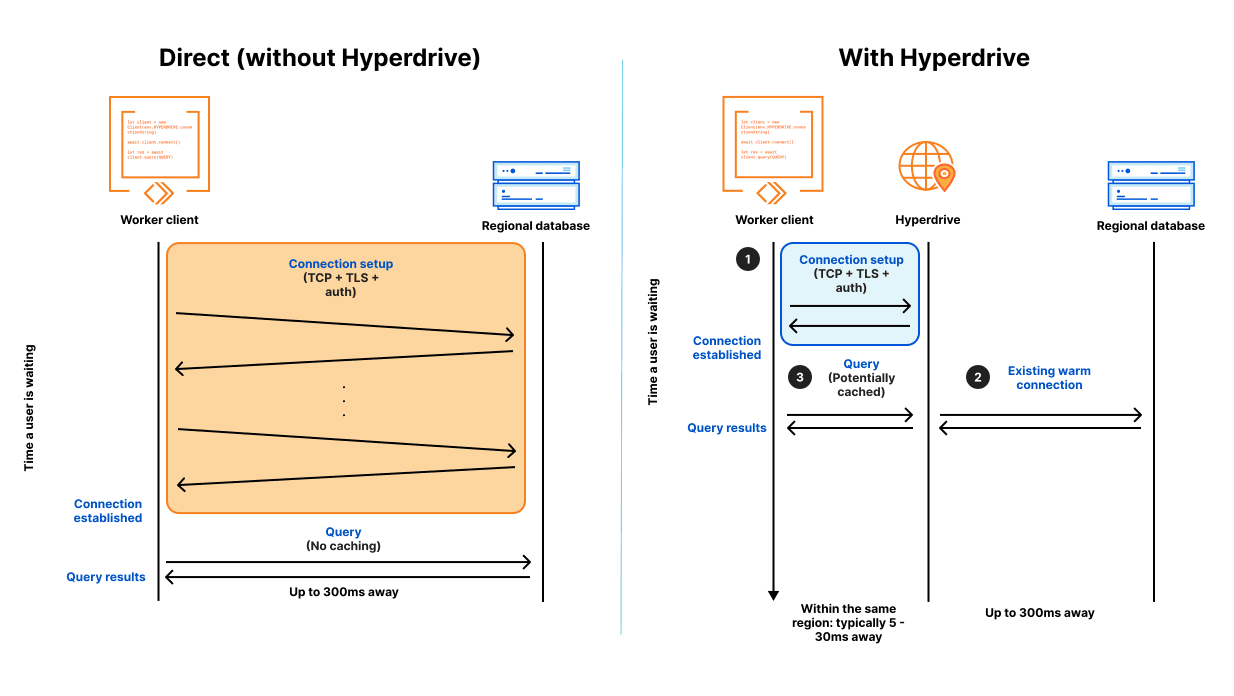
Data placement
Each database keeps the records it suits best:
| Data | Database |
|---|---|
| Accounts, sessions, subscriptions, and kit features | D1 |
| New records that only this app reads and writes | D1, through schema changes |
| An existing Postgres database, or one shared with other services | Postgres through Hyperdrive |
| Features that depend on Postgres capabilities or extensions | Postgres through Hyperdrive |
Link Postgres records to customers with the Edge user ID from the session. The two databases cannot join tables or share a transaction, so a workflow that writes to both should define what happens when its second write fails.
Create a Hyperdrive configuration
Hyperdrive needs a connection string for your database:
postgres://USER:PASSWORD@HOST:5432/DATABASEUse a dedicated database user with only the permissions this app needs, for example read access to the tables it queries. If your provider offers both pooled and direct connection strings, choose the direct one, because Hyperdrive pools connections itself. Cloudflare's Supabase guide shows this for one provider.
Create the configuration with Wrangler:
pnpm wrangler hyperdrive create my-app-postgres --connection-string="postgres://USER:PASSWORD@HOST:5432/DATABASE"Hyperdrive tests the credentials before saving the configuration, then Wrangler prints its id. You can also create it on the Hyperdrive page of the Cloudflare dashboard, which keeps the password out of your shell history.
For a database without a public address, connect through Cloudflare Tunnel. Hyperdrive supports MySQL as well, using a MySQL driver in place of the one below.
Bind it to the Worker
Declare the binding in wrangler.jsonc, next to the existing D1 database:
"hyperdrive": [
  {
    "binding": "HYPERDRIVE",
    "id": "<your-hyperdrive-id>"
  }
]
The ID identifies the configuration, while the database credentials stay in your Cloudflare account. The kit already enables the nodejs_compat flag that Postgres drivers need.
Regenerate the binding types so env.HYPERDRIVE is typed in server code:
pnpm cf-typegenConnect local development
pnpm dev runs your Worker on your machine, where it connects directly to a database you choose instead of going through Hyperdrive. Until you configure that database, the development server stops with:
When developing locally, you should use a local Postgres connection string to emulate Hyperdrive functionality.Add the connection string to .env.local. The variable name ends with your binding name:
CLOUDFLARE_HYPERDRIVE_LOCAL_CONNECTION_STRING_HYPERDRIVE="postgres://postgres:postgres@localhost:5432/my_app"The Cloudflare Vite plugin loads it for pnpm dev, and pnpm with-env loads it for the development seed, which reads the same Wrangler configuration. Point it at a Postgres instance on your machine, such as a Docker container, or at a development database from your provider. Remote databases usually need ?sslmode=require at the end of the URL.
Do not use your production database here. Local requests read and write it directly, without Hyperdrive in between.
Add a placeholder entry to .env.example so teammates know about the variable. The E2E workflow copies that file and starts the app, so give CI a reachable database too, for example a Postgres service container. pnpm build and the unit tests do not need it.
For a local default without real credentials, you can instead set localConnectionString on the binding in wrangler.jsonc. The environment variable takes precedence when both are set.
Install the driver
Install node-postgres and its types:
pnpm add pg
pnpm add -D @types/pg
Cloudflare recommends pg for Hyperdrive and requires version 8.16.3 or later. Use it with Drizzle's node-postgres adapter: Cloudflare does not currently support Drizzle with the Postgres.js driver over Hyperdrive.
Describe the tables
Postgres tables use Drizzle's pg-core builders, so they need their own schema file. Keep them out of src/db/schema/, because that barrel feeds the D1 client and SQLite migration generation.
This example reads a report table that another service fills with summaries for each customer. Create src/db/postgres/schema.ts and describe the columns your app uses:
import { pgTable, text, timestamp } from "drizzle-orm/pg-core";

export const report = pgTable("report", {
  id: text("id").primaryKey(),
  userId: text("user_id").notNull(),
  title: text("title").notNull(),
  createdAt: timestamp("created_at").notNull().defaultNow(),
});
When another service owns the database, its schema stays the source of truth. Describe only the tables and columns you need, and match their names and types. Schema and migrations covers introspecting an existing database and managing tables from this app.
Create a request-scoped client
Add a helper that opens a Postgres client through the binding:
import { env } from "cloudflare:workers";
import { drizzle } from "drizzle-orm/node-postgres";
import { Client } from "pg";

import * as schema from "./schema";

export async function connectPostgres() {
  const client = new Client({
    connectionString: env.HYPERDRIVE.connectionString,
  });
  await client.connect();

  return drizzle({ client, schema, casing: "snake_case" });
}
Call it inside each operation that uses Postgres: a server function, an HTTP handler, or a background job. Unlike the D1 db export, this client cannot live at module scope. Workers do not let one request use a connection opened by another, so a shared client fails on later requests. Hyperdrive keeps the pooled connections to your database, which makes a new client per request fast, and the Worker cleans it up when the request ends.
Reuse the returned client for every query in one operation. Keep transactions short, because each one holds a pooled connection until it finishes.
Query from a server function
Read the signed-in customer's reports in a server module:
import { desc, eq } from "drizzle-orm";

import { connectPostgres } from "@/db/postgres";
import { report } from "@/db/postgres/schema";

export async function listReports(userId: string) {
  const postgres = await connectPostgres();

  return postgres
    .select({ id: report.id, title: report.title, createdAt: report.createdAt })
    .from(report)
    .where(eq(report.userId, userId))
    .orderBy(desc(report.createdAt))
    .limit(25);
}
Expose it through a protected server function:
import { createServerFn } from "@tanstack/react-start";

import { enforceAuth } from "@/lib/auth/middleware";

import { listReports } from "./reports.server";

export const listReportsFn = createServerFn({ method: "GET" })
  .middleware([enforceAuth])
  .handler(({ context }) => listReports(context.user.id));
The middleware resolves the customer from the session, and the query filters by that ID. The function accepts no owner from the browser, so a caller cannot request another customer's reports. Load the result through a query as described in data fetching, and build the page with the route and translation steps from add a feature. For writes, apply the same validation and ownership rules as protected calls.
Verify the connection
Start pnpm dev. Wrangler logs that it found the local connection string for the HYPERDRIVE binding. Open the page, reload it a few times, then sign in as a second user to confirm that each customer sees only their own reports.
Run pnpm lint and pnpm build, then release through your deployment workflow. After a production request, this query on your database lists the connections Hyperdrive holds:
SELECT DISTINCT usename, application_name
FROM pg_stat_activity
WHERE application_name = 'Cloudflare Hyperdrive';
Connection failures appear in your Worker logs.
Query caching
Deployed Workers cache read queries by default. Writes always reach the database, but Hyperdrive does not clear cached results when data changes. A matching read can return the earlier result for up to a minute, plus a short stale-while-revalidate window. Local development connects directly, so you will not see this behavior until you deploy.
Match the configuration to how fresh each read must be:
| Read | Configuration |
|---|---|
| Public or slowly changing data, such as catalogs, reports, and dashboards | Cached, the default |
| Reads right after a write, permissions, and account or billing state | Cache disabled |
Queries that call functions such as NOW() or RANDOM() are never cached. When caching matters, compute the value in your code and pass it as a parameter. Cloudflare's query caching guide lists the rules and the adjustable cache lifetime.
For fresh reads, create a second configuration for the same database with caching turned off:
pnpm wrangler hyperdrive create my-app-postgres-fresh --connection-string="postgres://USER:PASSWORD@HOST:5432/DATABASE" --caching-disabledBind it beside the first one:
"hyperdrive": [
  { "binding": "HYPERDRIVE", "id": "<your-hyperdrive-id>" },
  { "binding": "HYPERDRIVE_FRESH", "id": "<your-fresh-hyperdrive-id>" }
]
Let the client helper accept a binding, keeping the cached one as its default:
export async function connectPostgres() {
export async function connectPostgres(hyperdrive = env.HYPERDRIVE) {
  const client = new Client({
    connectionString: env.HYPERDRIVE.connectionString,
    connectionString: hyperdrive.connectionString,
  });
Then call connectPostgres(env.HYPERDRIVE_FRESH) in operations that need the latest data. Run pnpm cf-typegen again, and add CLOUDFLARE_HYPERDRIVE_LOCAL_CONNECTION_STRING_HYPERDRIVE_FRESH to .env.local, since each binding needs its own local connection string. Both configurations open connections to the same database, so plan for their combined connection count.
Hyperdrive's cache works alongside the kit's other cache layers. KV caching stores values your code chooses, and client query freshness controls refetching in the browser.
Schema and migrations
Drizzle Kit needs a separate configuration for Postgres. The existing drizzle.config.ts generates SQLite migrations for D1, and Wrangler applies everything in the drizzle/ folder to D1.
Create drizzle.postgres.config.ts in the repository root:
import { defineConfig } from "drizzle-kit";

export default defineConfig({
  out: "./drizzle-postgres",
  schema: "./src/db/postgres/schema.ts",
  dialect: "postgresql",
  dbCredentials: {
    url: process.env.POSTGRES_URL ?? "",
  },
});
Drizzle Kit runs on your machine or in CI, not in the Worker, so POSTGRES_URL is a direct connection string rather than the Hyperdrive binding. Set your development value in .env.local.
When another service owns the schema, that service ships schema changes and your Edge file mirrors the tables it reads. To start from the existing database, introspect it with Drizzle Kit pull and copy the tables you need into src/db/postgres/schema.ts:
pnpm with-env drizzle-kit pull --config drizzle.postgres.config.tsRelease in a compatible order: add a column before the Edge release that reads it, and stop reading a column before the owner removes it.
When this app owns the tables, generate and apply migrations from your schema file:
pnpm with-env drizzle-kit generate --config drizzle.postgres.config.ts
pnpm with-env drizzle-kit migrate --config drizzle.postgres.config.ts
Review the generated SQL in drizzle-postgres/ before applying it.
Production migrations
pnpm deploy and the Cloudflare build commands migrate D1 only. Apply Postgres migrations to production with credentials from your CI secrets before deploying the Worker that depends on them. Prefer additive changes, as described in D1 schema deployment.
Previews and staging
Cloudflare's preview builds do not inherit production bindings. Add the binding to the same previews block as your other preview resources, pointed at a staging database through its own Hyperdrive configuration:
"previews": {
  "hyperdrive": [
    { "binding": "HYPERDRIVE", "id": "<your-staging-hyperdrive-id>" }
  ]
}
Previews that share a configuration share its database. When a branch needs isolated data, give it a separate configuration that points at a separate database or schema. Cloudflare's preview configuration explains which settings belong in the block.
Postgres as the main database
Edge Kit is designed around D1 as its application database. Moving authentication, billing, and the kit's own tables to Postgres is a migration project, not a configuration change. It affects:
- the Better Auth adapter, which uses the SQLite provider, and the auth schema it generates
- Drizzle Kit's dialect and the existing D1 migration history
pnpm db:migrateandpnpm deploy, which apply migrations with Wrangler's D1 commands- the development seed and Worker tests, which run against local D1
- the shared
dbexport, which would need a request-scoped client for auth, billing, and background jobs
If you want PostgreSQL as the primary database from the start, Core uses PostgreSQL with Drizzle for auth, billing, and application data, and its Cloudflare deployment connects through Hyperdrive.
Common issues
The dev server asks for a connection string
The variable name must end with the exact binding name, such as CLOUDFLARE_HYPERDRIVE_LOCAL_CONNECTION_STRING_HYPERDRIVE_FRESH for a second binding. Wrangler reads it from the environment, so keep it in .env.local or your shell even if your Worker secrets live in .dev.vars.
Queries fail after the first request
An error such as Cannot perform I/O on behalf of a different request means a client was created at module scope or shared between requests. Create it inside the operation with connectPostgres().
A saved change does not appear
The read probably came from Hyperdrive's cache. Use the cache-disabled binding for reads right after a write and for data that must be current.
Production cannot reach the database
Check the configuration's host, credentials, and TLS settings, and confirm that your database accepts connections from Hyperdrive. To store new credentials, for example after a password rotation, update the configuration:
pnpm wrangler hyperdrive update <your-hyperdrive-id> --connection-string="postgres://USER:PASSWORD@HOST:5432/DATABASE"Cloudflare's Hyperdrive troubleshooting explains specific connection errors, and limits lists connection counts for each Workers plan.
How is this guide?
Last updated on
Plan-based access control
Paid feature access using the included plan checks, with customer ownership, subscription status, and direct server verification.
Local development
Common development configuration issues, including environment values, Cloudflare account access, generated files, sign-in, and local email.