For the complete documentation index, see llms.txt. Prefer markdown by appending.mdto documentation URLs or sendingAccept: text/markdown.
Development
Run Edge Kit locally on the Workers runtime with a local D1 replica. Prerequisites, env files, migrations, and the everyday workflow.
Prerequisites
To get started with Edge Kit, ensure you have the following installed and set up:
- Node.js 24, using the project's
.nvmrcfor the runtime version - pnpm, using the
packageManagersetting inpackage.json - A free Cloudflare account (only needed for the remote bindings and deployment, see below)
Project development
Create the app with the Edge CLI or clone the repository before running these commands. Configure your editor if you want formatting and type-aware lint feedback while you work.
Install dependencies
Install the project dependencies by running the following command:
pnpm iUse dependency management when adding or updating packages and check their Worker runtime requirements before installation.
The postinstall script also compiles the Paraglide messages into src/lib/i18n and builds the content collections.
Setup environment variables
Create a .env.local file from .env.example and fill in the required environment variables:
cp .env.example .env.localThe example contains placeholder provider credentials and Turnstile test keys. They let you validate the local configuration, but do not verify OAuth, Stripe, email delivery, or remote binding access. Generate your own auth secret:
pnpm dlx auth secretSecrets and public VITE_* values are validated by envin in env.config.ts. Run pnpm env to browse and check them in the envin UI.
Follow environment configuration for each variable's scope, and app configuration for the product name and public origin.
One local secret file only
Wrangler prefers .dev.vars over .env and .env.local for the Worker env object. If both exist, values from .env.local never reach the Worker. Keep one of them.
Non-secret config (product name, URLs, sender address) also lives in the vars block of wrangler.jsonc. Update both when you change it.
Setup the local database
Apply the migrations to the local D1 replica and seed a development user:
pnpm db:setupIt runs wrangler d1 migrations apply DB --local followed by the seed script. You can sign in with SEED_EMAIL and SEED_PASSWORD from your env file (me@turbostarter.dev / Pa$$w0rd by default).
The database guide explains the local replica and how it differs from your production database.
Configure remote bindings
FLAGS (Flagship) and AI (Workers AI) are remote bindings - Wrangler can't simulate them locally. To use them in dev, expose an API token with access to your account:
CLOUDFLARE_API_TOKEN="<your-api-token>"Or run pnpm wrangler login once. Replace the demo Flagship app ID with your own app. With these bindings declared, a remote proxy authentication or resource error can prevent the development server from starting. Configure them before pnpm dev; for an offline variant, follow remote binding troubleshooting.
Start development server
To start the application development server, run:
pnpm devYour app should now be up and running at http://localhost:3000 🎉
Open Local Explorer and SQL Studio to inspect the local database and uploads while you develop.
The EMAIL binding is simulated locally, so messages aren't delivered to real inboxes. To preview and edit templates, run pnpm email and open http://localhost:3005.
Follow email templates for preview variables and localized copy.
Deploy to production
When you're ready to ship, follow the deployment guide to provision your resources, configure provider access, and run pnpm deploy.
Local Explorer
With pnpm dev running, open Cloudflare Local Explorer at http://localhost:3000/cdn-cgi/local/explorer. The shorter /cdn-cgi/explorer path also opens the explorer. Use your development server's port if you changed it.
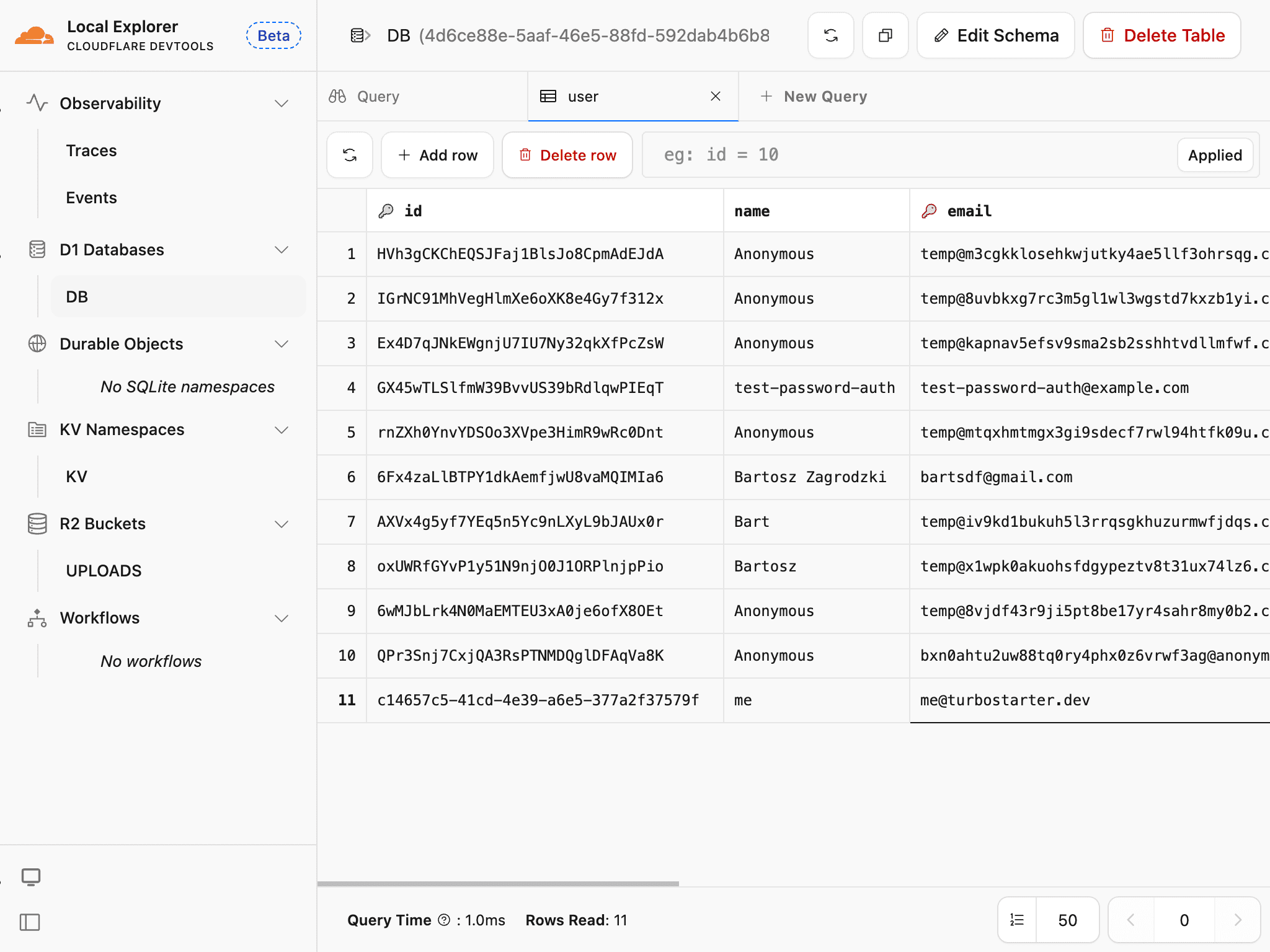
The built-in SQL Studio lets you browse D1 tables, edit rows, and run SQL queries. You can also inspect local R2 objects and KV values. These views work with your local binding state; production D1 and R2 remain separate.
Use the database guide to understand the local replica and database troubleshooting when tables or migrations are missing.
Common issues
Environment validation
Fill the missing keys in .env.local or temporarily set SKIP_ENV_VALIDATION=1 for a setup task that does not need real credentials. For Stripe test credentials and webhook setup, use subscriptions.
Binding types
After you change wrangler.jsonc, regenerate the types:
pnpm cf-typegenPort conflicts
Stop the other process, or start Vite on a different port (and update VITE_URL and BETTER_AUTH_URL to match):
pnpm dev --port 3001Route generation
Run pnpm generate-routes, or let Vite regenerate src/routeTree.gen.ts on the next dev start. Never edit that file by hand.
Local data
Inspect the target database and migration history first. pnpm db:setup does not reset existing data. Follow database troubleshooting to back up and recreate only disposable local D1 state while preserving R2 uploads.
Continue with local troubleshooting for secrets, generated files, origins, and remote services.
Once the app runs, review the project structure and coding conventions. Keep common commands nearby for linting, tests, and generated files.
How is this guide?
Last updated on