For the complete documentation index, see llms.txt. Prefer markdown by appending.mdto documentation URLs or sendingAccept: text/markdown.
Knowledge RAG
Knowledge RAG demo: upload documents and ask questions against your content. Retrieval, chunking, and chat over private data sources.
The Knowledge RAG demo application enables intelligent interaction with document content through a conversational AI interface. Upload a document from your device or provide a remote URL, then ask questions, request summaries, and extract information grounded in the document itself.
Features
Transform how you interact with document content through these powerful capabilities:
File upload
Upload documents directly from your device or import them from a remote URL.
Contextual conversation
Chat with an AI that answers using content retrieved from the uploaded document.
Information extraction
Quickly find specific information, key points, or summaries within the document through natural language queries.
Source highlighting
Visualize exactly which document sections informed the AI's responses with precise source highlighting.
Multi-document intelligence (coming soon)
Conduct sophisticated conversations spanning multiple uploaded documents, enabling cross-document analysis and comparison.
Setup
To implement the Knowledge RAG application in your project, configure these essential backend services:
Database
Set up PostgreSQL with the pgvector extension to efficiently store
conversation history, document metadata, and vector embeddings for semantic
search.
Storage
Configure S3-compatible cloud storage for secure management of uploaded documents documents.
You'll also need API keys for the language and embedding models used in the RAG flow.
AI models
This application leverages two complementary AI model types working together:
- Large Language Models (LLMs): Provide sophisticated natural language understanding to interpret your questions and generate contextually appropriate responses based on document content.
- Embedding Models: Convert document text segments into numerical vector representations that enable efficient semantic similarity search and Retrieval-Augmented Generation (RAG).
In the current codebase, the default RAG strategy uses OpenAI for both the chat model and the embedding model:
If you want to expand provider support, the right place to do that is packages/ai/rag/src/strategies.ts.
Data persistence
The application stores data related to chats, documents, and embeddings to provide a persistent experience.
Database
Learn more about database services in AI Kit.
Application data is organized within a dedicated PostgreSQL schema named rag:
chat: stores metadata for each RAG conversation.message: stores all user and assistant messages within a chat.document: stores uploaded document metadata includingnameand storagepath.embedding: stores extracted chunks and vector embeddings usingpgvector'svectortype, with an HNSW index for similarity search.
Storage
Learn more about cloud storage services in AI Kit.
The files uploaded by users are securely stored in your configured cloud storage bucket. The path field in the document table maintains the precise reference to each file's location.
Devtools
AI Kit provides an integrated devtools panel specifically designed to help you analyze, debug, and optimize every aspect of the RAG (Retrieval-Augmented Generation) workflow.
When you run the development server, the devtools panel becomes available at http://localhost:3001.
With devtools, you can trace how user queries are processed, examine the retrieval of relevant documents, and inspect each step in the response generation pipeline—including model calls, prompt construction, and semantic matching.
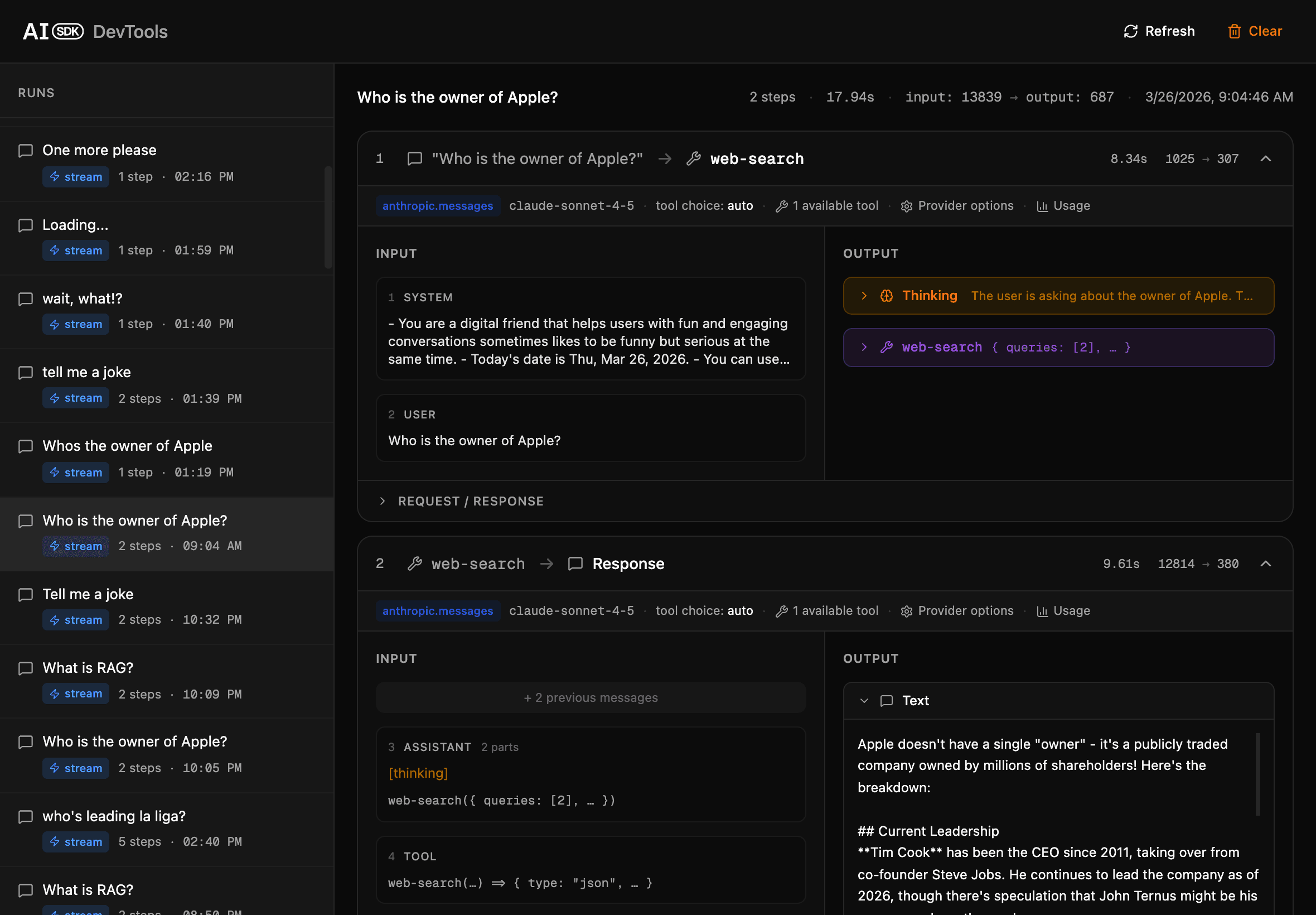
This tool allows you to observe retrieval and generation events as they happen, diagnose retrieval quality or edge cases, and fine-tune your RAG configuration for the best results. It is an essential resource for developing robust, transparent document-based AI features.
Structure
The Knowledge RAG feature is organized across the monorepo for shared AI logic, API routes, and platform-specific UI.
Core
The shared RAG logic lives in @workspace/ai-rag, implemented in packages/ai/rag/src:
- Validation schemas for messages and remote URLs
- Document loading, chunking, and embedding generation helpers
- Similarity search utilities for retrieving relevant content
- Streamed RAG chat logic with tool-assisted retrieval
API
The packages/api package wires the RAG app through packages/api/src/modules/ai/rag.ts.
This module validates uploads and chat messages, applies shared middleware like authentication, rate limiting, and credits, and then delegates to @workspace/ai-rag, where document creation, embedding generation, retrieval, and streamed responses are handled.
Web
The Next.js application (apps/web) delivers an intuitive user interface:
src/app/[locale]/(apps)/rag/**: route entry points for the RAG app and chat detail pagessrc/modules/rag/**: feature modules for upload, chat history, conversation UI, and the built-in document previewer
Mobile
The Expo/React Native application (apps/mobile) provides a native mobile experience:
src/app/(apps)/rag/**: route entry points for the mobile RAG appsrc/modules/rag/**: mobile-native modules for upload, history, and conversation UI- API integration: uses the same shared Hono client as the web app for consistent backend communication
This architecture ensures that core AI processing and data handling logic is shared across platforms, while enabling optimized UI implementations tailored to each environment.
How is this guide?
Last updated on